

Nancy_Liu
April 17, 2024
Question

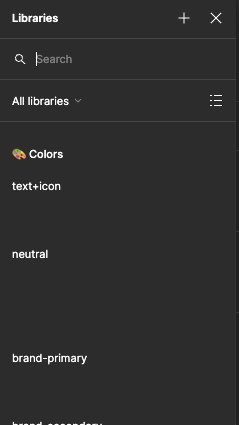
Variable color previews aren't showing up when selecting color
  • April 17, 2024
  • 34 replies
  • 1749 views

Screenshot 2024-04-17 at 4.07.46 PM

When I’m selecting a color variable the previews aren’t showing even though my library is enabled and I’ve already tried restarting Figma and my computer? I’m also not on Figma beta

This topic has been closed for replies.

34 replies

Erik Bue
New Member
May 16, 2025

Any other updates here? I’m having the same problem and tried clearing cache multiple times to no avail. And when I try to select some of the variables that don’t have a thumbnail, it shows as a blank white box vs still applying the intended color — Some of them still seem to apply the color, while others don’t.


Tom Reem
Figmate
Figmate
May 16, 2025

Hey ​@Erik Bue — thanks for flagging this, and sorry you’re running into trouble. To help us dig in, can you let me know if this is happening in the desktop app, browser, or both? If you can also share your browser and app versions (latest desktop version is 125.4.9), that would be super helpful. I’ll keep an eye out for your reply.

Maya4
New Participant
May 23, 2025

​@ksn No I have not used that plugin. I have since moved past this issue but I cannot remember how! I think I may have found a loose Variant Collection and deleted it. ​@Erik Bue can you please check your variants drop down menu?


Erik Bue
New Member
May 27, 2025

​@Tom Reem 

This is happening on the Desktop app, v125.4.9 as well as in the Chrome browser on a MacBook Air 15.4.1 (24E263)

Tom Reem
Figmate
Figmate
May 28, 2025

Hey ​@Erik Bue — thanks for confirming, and I appreciate you sticking with this. I’ve tried to reproduce the issue on a MacBook but haven’t had any luck so far.


To help us take a closer look, could you reach out to our Support team with the following?

  • a full-screen recording that walks through the steps leading up to the issue (if you’re able to capture one)
  • a link to the affected file
  • edit access granted to support-share@figma.com


That info should give the team what they need to investigate further. Let me know if anything else comes up in the meantime.

Ankur Gupta
New Member
September 16, 2025

Hi ​@Tom Reem - I’m having this same issue in my Figma Design desktop app as well as browser version for past few days. Inside the colour library dropdown, the colours added from Design System are not showing any thumbnail. I can see all the colour variable created in the Design System but none of the groups are showing thumbnail. Once I switch from grid view to list view, I can see the complete list of all the colours and they are working correctly. But I’m still not seeing the colour associated to the variables. I’m attaching a recordin of the issue - Variable color previews aren't showing up when selecting color

Tom Reem
Figmate
Figmate
September 17, 2025

Hey ​@Ankur Gupta — really appreciate you taking the time to share the details here (and for including the video, super helpful 🙏🏻).

I just tested this on my end: when I go to Fill → Library and toggle through design systems, I’m seeing thumbnails appear in both list and grid view. Since you mentioned this is happening in both browser and the Figma desktop app, could you restart and double check that you’re on the latest app version (125.7.5 or later), and let me know if that resolves it?

If the issue persists, the best next step is to have our Product Support team take a closer look at your specific file. You can kick that off by filling out this secure form and including:

  1. the link to this Forum post (so everyone can reference your video straightaway)
  2. a link to the file where the issue is happening
  3. ‘can edit’ access granted to support-share@figma.com for that file

Thanks again for flagging this — looking forward to hearing if updating resolves it.

Clare1
New Member
September 26, 2025

We just solved it!! My brilliant coworker saw that the difference between the working palettes and the non working palettes was that the working one had two configs for light and dark. 

He renamed the non-working column from “value” to “light” to match the other config that had “Light” and “dark” and BOOM. All swatch previews are working. 

​@Tom Reem ​@Ankur Gupta 


Tom Reem
Figmate
Figmate
October 1, 2025

Hey ​@Clare1 — welcome to Figma Forum! Huge thanks for taking the time to share what you discovered here. 🎯 Insights like this go a long way in helping the whole community, and I’ll also pass this along to the right team members so we can keep improving the experience.

​@Erik Bue and ​@Ankur Gupta — when you have a chance, please give Clare’s solution a try and let us know if it helps on your side as well. 🙏🏻

jakub.wiechec
New Participant
October 2, 2025

Hello. My team started to have the same issue yesterday. Nothing worked so far. Our shared library is not displaying thumbnails any more in files that use the library. and nothing was changing in the library for months.  The thumbnails work in the file the variables were created.