

Question

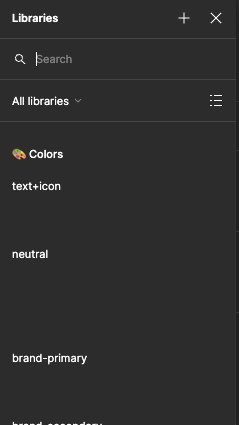
Variable color previews aren't showing up when selecting color
  • April 17, 2024
  • 34 replies
  • 1485 views

Show first post

34 replies

Ankur Gupta
  • New Member
  • September 16, 2025

Hi ​@Tom Reem - I’m having this same issue in my Figma Design desktop app as well as browser version for past few days. Inside the colour library dropdown, the colours added from Design System are not showing any thumbnail. I can see all the colour variable created in the Design System but none of the groups are showing thumbnail. Once I switch from grid view to list view, I can see the complete list of all the colours and they are working correctly. But I’m still not seeing the colour associated to the variables. I’m attaching a recordin of the issue - Variable color previews aren't showing up when selecting color


Tom Reem
Figmate
  • Figmate
  • September 17, 2025

Hey ​@Ankur Gupta — really appreciate you taking the time to share the details here (and for including the video, super helpful 🙏🏻).

I just tested this on my end: when I go to Fill → Library and toggle through design systems, I’m seeing thumbnails appear in both list and grid view. Since you mentioned this is happening in both browser and the Figma desktop app, could you restart and double check that you’re on the latest app version (125.7.5 or later), and let me know if that resolves it?

If the issue persists, the best next step is to have our Product Support team take a closer look at your specific file. You can kick that off by filling out this secure form and including:

  1. the link to this Forum post (so everyone can reference your video straightaway)
  2. a link to the file where the issue is happening
  3. ‘can edit’ access granted to support-share@figma.com for that file

Thanks again for flagging this — looking forward to hearing if updating resolves it.


Clare1
  • New Member
  • September 26, 2025

We just solved it!! My brilliant coworker saw that the difference between the working palettes and the non working palettes was that the working one had two configs for light and dark. 

He renamed the non-working column from “value” to “light” to match the other config that had “Light” and “dark” and BOOM. All swatch previews are working. 

@Tom Reem ​@Ankur Gupta 


Tom Reem
Figmate
  • Figmate
  • October 1, 2025

Hey ​@Clare1 — welcome to Figma Forum! Huge thanks for taking the time to share what you discovered here. 🎯 Insights like this go a long way in helping the whole community, and I’ll also pass this along to the right team members so we can keep improving the experience.

@Erik Bue and ​@Ankur Gupta — when you have a chance, please give Clare’s solution a try and let us know if it helps on your side as well. 🙏🏻


jakub.wiechec
  • New Participant
  • October 2, 2025

Hello. My team started to have the same issue yesterday. Nothing worked so far. Our shared library is not displaying thumbnails any more in files that use the library. and nothing was changing in the library for months.  The thumbnails work in the file the variables were created.


Tom Reem
Figmate
  • Figmate
  • October 5, 2025

Hey ​@jakub.wiechec — thanks for bringing this up. I’m catching up on open conversations, and it looks like there was a separate issue impacting thumbnail display in the Figma Desktop App that was resolved on Friday. Does that line up with what your team experienced?

When you have a moment, please refresh your tab or restart the Figma Desktop App, and let us know if everything displays correctly again.

If you’re still seeing the problem after that, please reach out to our Product Support team so we can take a closer look at the specific file where this is happening.

Hope this helps clarify!


jakub.wiechec
  • New Participant
  • October 6, 2025

Hello.

My team is using only the online Figma experience. We are still experiencing the issue. We are using Microsoft Edge and Chrome on different machines. The issue is persistent in all files, doesn’t matter what size (even new ones) so it does not seem to be performance related on first glance. I was trying republishing the colour library with new names of values etc,  nothing seems to work. I created a new library to test if it has the same issue. IT seems it affects all colour libraries we create. I will reach out to the support team. Thanks!


NS Sym
  • New Member
  • October 7, 2025

Having the same issue Ankur Gupta mentioned. Same issue as per the screen recording. 

I’ve tried clearing the cache, restart, tried on Web too. 

The thumbnails appear fine in the design system file but when using it else where, it doesn’t show. 

I have emailed Figma Support. Hoping to hear back soon. 

Thanks,

NS


Tom Reem
Figmate
  • Figmate
  • October 22, 2025

Hi everyone, checking in on this thread and wanted to thank you both, ​@jakub.wiechec and ​@NS Sym, for taking the time to share details and files with our teams. Please continue collaborating with the Technical Quality and Enterprise teams as they dig in — your input is key to helping us identify the cause and find a lasting fix.

We’ll be sure to update this thread as any broader information becomes available. Really appreciate your partnership on this.