

Sympathy
June 11, 2024
Solved

Upgraded to macOS 15, Figma not working properly

  • June 11, 2024
  • 29 replies
  • 3032 views

Hi everyone,

I recently upgraded my operating system to macOS 15 and have encountered some issues with Figma:

  1. After the upgrade, when I open a Figma design file, the page becomes unresponsive. I’ve tried using Chrome, Safari, and the Figma desktop app, but only Safari can open the file normally.

  2. The design files use the “PingFang SC” font. However, after the OS upgrade, it shows a font error and I’m unable to replace the font. This issue did not occur prior to the upgrade.
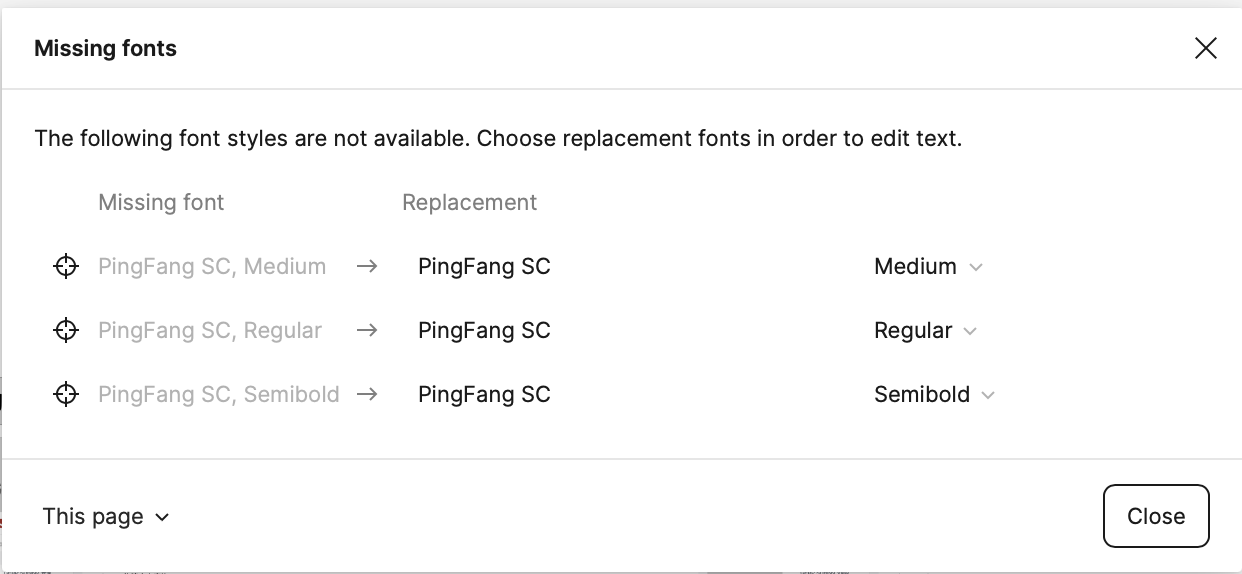
Has anyone else experienced similar problems after upgrading to macOS 15? Any insights or potential solutions would be greatly appreciated. I’m wondering if this is a compatibility issue between Figma and the latest macOS version.

Thanks in advance for any help or suggestions!

This topic has been closed for replies.
Best answer by Sympathy

Issue resolved - updating the Command Line Tools fixed the compatibility problems with Figma on macOS 15. Pages are responsive again and the font error is gone.

——————
Update - unfortunately, the issue resurfaced. Here’s what I did to resolve it:

  1. Clear Figma cache: In the Figma menu, go to “Help” - “Troubleshooting” - “Clear Cache and Restart”. This step clears Figma’s cached data.
  2. Restart the Mac system: I chose to shut down completely and then manually restart. I’m not sure if a normal restart would also work.

After restarting the system and opening Figma again, everything was back to normal.

29 replies

kairyo
New Participant
June 27, 2024

You might want to try updating Figma again. I hope it helps!
截屏2024-06-27 16.37.11

kairyo
New Participant
July 17, 2024

Unfortunately, after updating to the MacOS 15 Public Beta version, the issue has reappeared (it initially started with Beta 3). Could you please ask the Figma engineering team to look into this and provide a fix? Thank you very much for your assistance!

kairyo
New Participant
July 17, 2024

After clearing the cache and restarting the software, the issue has been resolved!

Nefi
New Participant
July 17, 2024

It works finally! And I’m still on beta 3

PeterPanda66
August 5, 2024

Still facing this issue even after clearing cache/restarting Figma/restarting Laptop. Anyone can advise? 😦

transey
August 6, 2024

same issue on my end

kairyo
New Participant
August 6, 2024

If there are still issues related to fonts after clearing the Figma cache, you can manually delete all contents under ~/Library/Application Support/Figma and restart. This should resolve the problem.
@transey @PeterPanda66

transey
August 7, 2024

it’s still there.
BTW, I just upadated macOS to 24A5309e, also updated xcode to beta 5.
and then tried your method. nothing changed. sigh

kairyo
New Participant
August 7, 2024

  1. clearing the Figma cache;
  2. quit Figma;
  3. delete all contents under ~/Library/Application Support/Figma;
  4. open Figma。