November 17, 2023
Solved

Undo function is not working on keyboard or using Edit menu

  • November 17, 2023
  • 38 replies
  • 19485 views

I thought it was just my bluetooth keyboard glitching out, but cmd + z is not undoing any action, nor is going to the Edit menu > Undo. Has anyone encountered this issue before? And if so, how did you resolve it?

Best answer by Celine_

Hi Russell, Vero,
Sorry to hear you are still having issues! Is it happening in browser, desktop app or both?
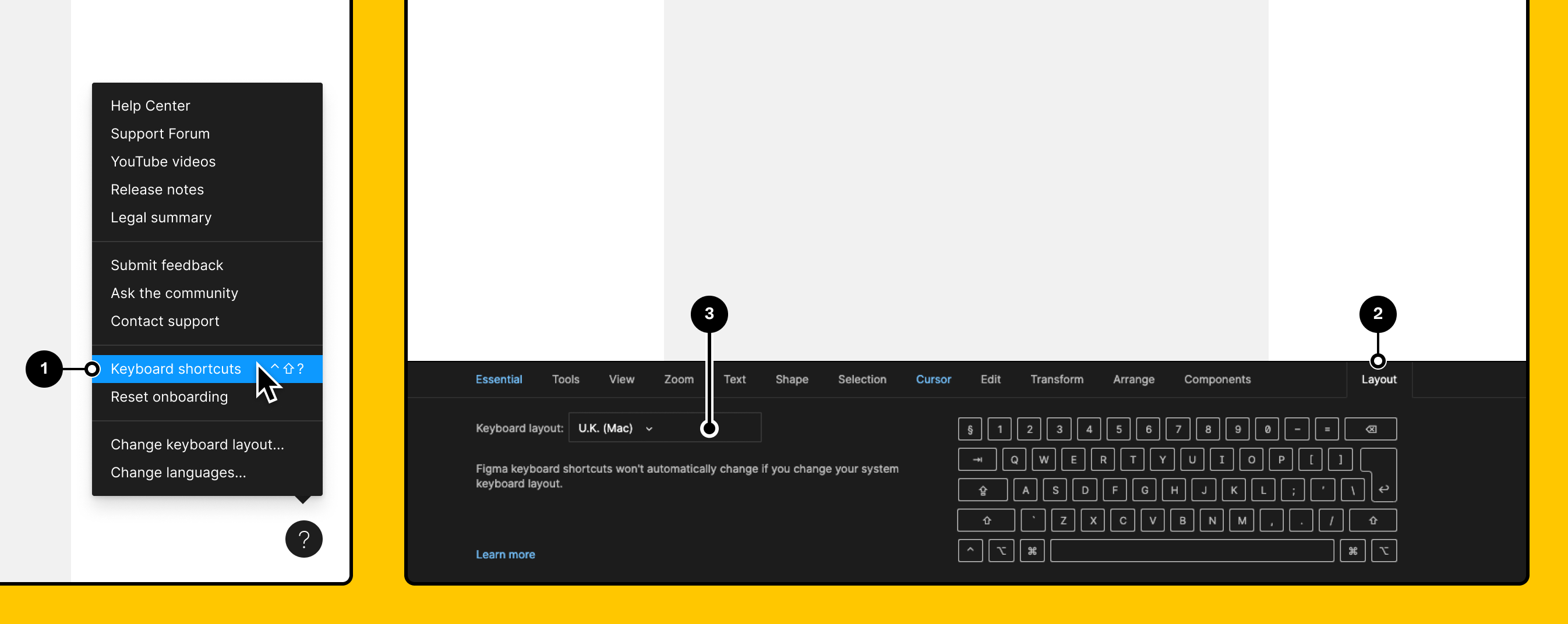
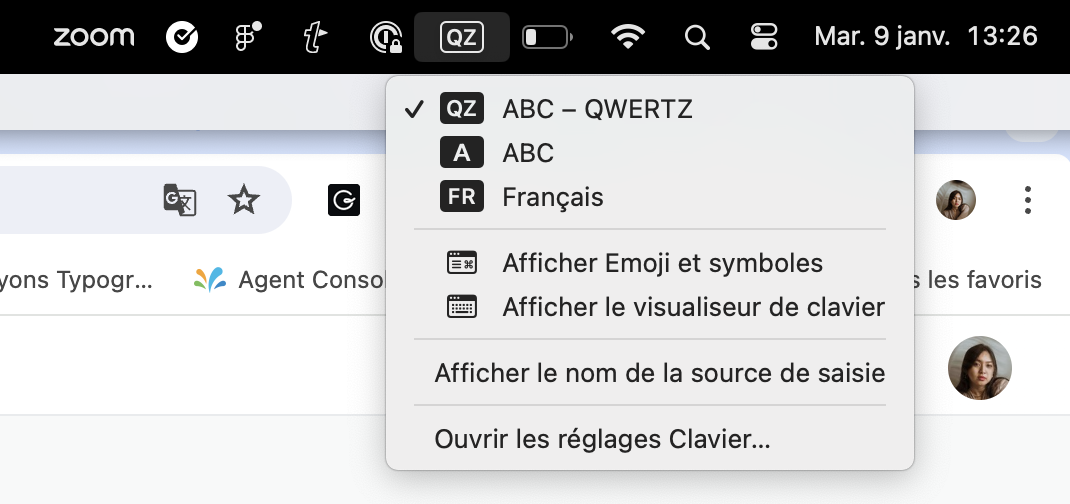
Can you also make sure you select the same keyboard layout on Figma and in your laptop?

On Figma:

On Mac:

Vero, I can’t see your ticket in our back end. Which email have you used? (I’ll remove it in this topic right after checking it in order to protect your privacy). If you haven’t yet, please reach out directly to the support team by filling this form so our team can have a deeper look into your issue: https://help.figma.com/hc/en-us/requests/new Thank you!


38 replies

Celine_
Figmate
Community Support
November 20, 2023

Hi Claire! Thanks for reaching out to the community.

Have you been experiencing this issue in the desktop app, in the browser or both?
Is the issue specific to the linked file or does it happen in multiple files?

As a troubleshooting measure, please try clearing your cache to see if that resolves the issue and let me know if it works:

You can clear the desktop app cache on a Mac in the Help menu under Troubleshooting. If you’d prefer to manually clear your cache you can:

  1. Quit the Figma desktop app
  2. Open Terminal.app and enter the following command: rm -rf "$HOME/Library/Application Support/Figma"
  3. Try opening the desktop app again

You can clear the desktop app cache on Windows under the toggle-arrow at the right of the top toolbar under Help > Troubleshooting. If you’d prefer to manually clear your cache you can:

  1. Close the Figma desktop app
  2. Open the Start menu, and paste in this, followed by enter: %APPDATA%\Figma
  3. In the window that opens, delete the Desktop and DesktopProfile folders if they exist
  4. Launch the desktop app again

Hope this helps!

November 23, 2023

Worked for me

Celine_
Figmate
Community Support
November 23, 2023

@Bram_Everaerd Glad it works on your end!

November 27, 2023

@Celine_Figma I have the same issue on Mac and it doesn’t worke for me.

Celine_
Figmate
Community Support
November 27, 2023

Hi @Clement1, sorry to hear you are also having this issue! Is it happening in the desktop app, browser or both?
Is the issue specific to the linked file or does it happen in multiple files?

If it is happening on desktop app, can you also try to uninstall and install again Figma: here

And, if this doesn’t help, I’d recommend you to reach ou directly the support team so they can investigate further by filling this form: here

Claire8Author
November 27, 2023

thanks, celine. clearing the cache helped! problem is solved

November 28, 2023

Thanks for your answer, but it doesn’t work on the browser or on another computer. I’ll contact support.

December 10, 2023

Hi, since today, same issue. I tried the Terminal command as I’m on Mac, it didnt worked. In the App and in browser version.
And if i go to undo in the edit menu, it doesnt undo too…
I uninstalled the Figma app, reinstalled it… not working still.
It’s my daily work tool so i’m very very embarassed…
Can you help ?

Celine_
Figmate
Community Support
December 11, 2023

Hi Pascal! Sorry to hear you’re still having issues. If these workarounds don’t work, I’d recommend you to reach out directly to the support team, they can investigate it further. Please fill out the form here: https://help.figma.com/hc/en-us/requests/new

December 13, 2023

I experienced the same thing today, in the desktop app. It was solved by clearing the cache and restart.