June 28, 2023
Solved

Unable to switch variable modes

  • June 28, 2023
  • 28 replies
  • 7853 views

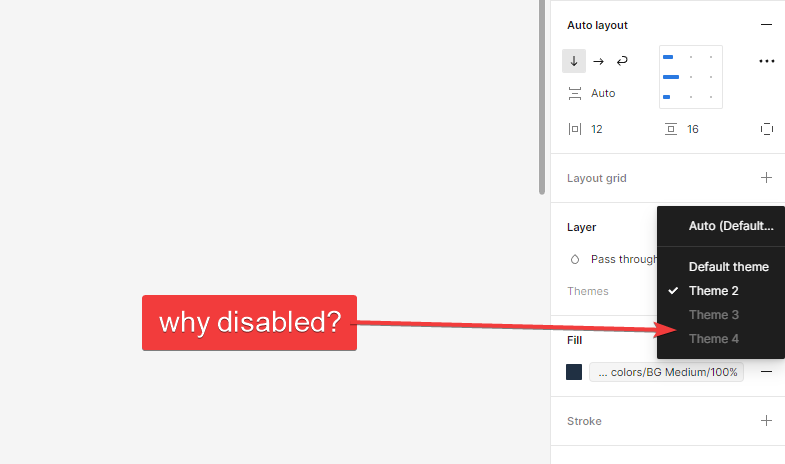
I set 4 color themes (variable modes) for my design in local variables but when I’m trying to switch them, 3 color themes are greyed out in the dropdown. Is it a bug or I’ve done something wrong?

This topic has been closed for replies.
Best answer by Josh

Hey all this could be due to the variables in your selection being on different versions with one version having access to fewer modes than the other one. If you update everything (variable collections, and make sure components using variables are published with the latest variable version), then all modes should become available for use.

Hope this helps. 🙂

28 replies

Rob_Winters
New Participant
October 11, 2023

Hi. Also having this issue as well as other issues with variables. Seems very buggy right now. I’ve even deleted all frames so nothing is being references and I’m still seeing the faded out modes, and also variables that have previously been deleted. Libraries appear to be up do date. Seems to start OK with a clean file but some breaks down when I start bringing in component. Even simple ones where I know only correct variables are being used.

October 13, 2023

Hi All, i am facing a same problem here, can’t access the variable which is inside a different mode, not able to toggle the boolean value between modes.

October 20, 2023

Hello, I’m also facing the same problem. In the library file that I’m working on I added a fourth mode and it is disabled. I can’t even use it in the file where I created it…

November 6, 2023

same issue, updated all the files but the instance won’t give me the other color variables (greyed out). Even after updating everything, even if I detach an instance, I haven’t tried detaching all the components but then I would lose all my updates if I detach.

Isabell_Herzog
November 16, 2023

Dear Figma Support,

I’m catching the same problems as many others do/did: I’m sometimes and quite randomly unable to switch between my color themes.

BUT in my case it makes completely no sense. Because it has nothing to do with my colors! My colors are connected to my “design system color variables”. In the following video, I’m showing you two nearly identical master screens.

Within the left one, it is possible to switch themes.
Within the right one, it is not possible to switch.

It took me 8h to find a reason. And you know what? – I didn’t find one 😪

Please let me know if you guys know more. 🔎 Because I don’t get it! For me, it is essential to be able to switch between color themes.

Thanks 👋

Isabell_Herzog
November 16, 2023

bug reported

Antonio_Lapa
December 4, 2023

Hey everyone, this is super helpful and it’s good to know that I’m alone in this. Is there already a way to troubleshoot this to anyone’s knowledge? I’m still encountering the same issue as all of you 😬

January 4, 2024

Hi Josh, any answer regarding to this bug? It has been more than 6 months since we published it.
If I am paying an enterprise license to have more variable modes I would like an answer…