October 25, 2023
Solved

Turn off notifications for specific project (Oct 2023)

  • October 25, 2023
  • 11 replies
  • 5734 views

I have searched for this answer in the forum, but haven’t been able to my situation represented yet - so here goes:

I am a design manager who needs access to all projects in my company, but do not want the notifications for all projects. Currently I am unable to find, either within the Mac desktop app or the we app, where within a specific project there is an ability to turn off notifications (currently getting both a pile of emails, as well as Slack notifications in our generic Slack integration- not channel specific).

Any help to turn off one project notifications would be greatly appreciated!

This topic has been closed for replies.
Best answer by David Norman

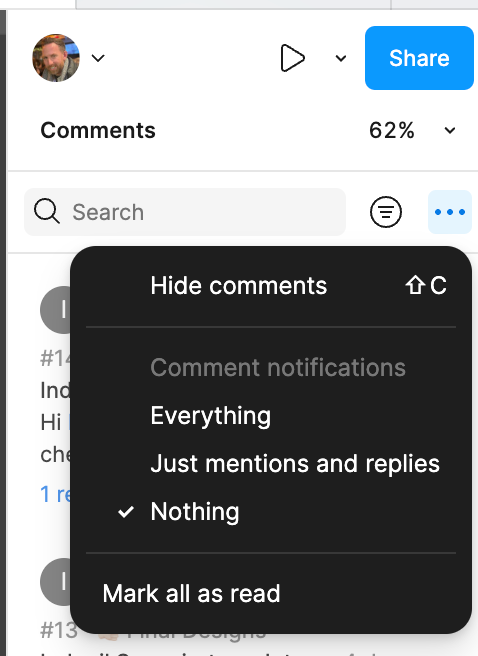
To turn off notifications for a specific file, just switch on the comments and then click the 3 dots at the top of the comments panel. Then select Nothing 


11 replies

Celine_
Figmate
Community Support
October 30, 2023

Hey Hank_Knaack, thanks for reaching out to the community.
If you would like to turn off notifications from your emails, please check this help center article: https://help.figma.com/hc/en-us/articles/360041547813-Adjust-comment-notification-settings?source=search

To disable desktop notifications, do one of the following:

  • On Mac: Navigate to Figma > Preferences and deselect Show Figma in the Menu Bar
  • On Windows: Navigate to the System Tray in the Task bar and deselect Show Figma in the System Tray

And, in order to completely remove the Figma integration on Slack, you will need to disconnect the app from your Slack workspace. Learn how to remove apps from your Slack workspace here
Hope this helps!

Gianna1
December 7, 2023

I’m looking for this same thing. My Mac had asked me if I wanted to turn notifications on for a specific project (but I didn’t realize that and just accepted) and now I am alerted everytime somebody comments in that project but I can’t figure out how to turn it off

Emma_Corby
October 11, 2024

The suggested solutions seem to turn off ALL Figma notifications which I don’t believe is desired, we just want to be able to turn off notifications on specific projects.

Angie_Fu
New Member
November 6, 2024

I am also experiencing this issue! I once commented on a file about 1.5 years ago, and now every time there is another comment in that file, I am notified via the notification icon in Figma, and in slack. It’s hugely distracting and I can’t for the life of me find out how to turn it off (for just this file!)

Oluwatobiloba_Samuel
New Member
November 19, 2024

Having this specific issue. I viewed a project now i get notifications whenever someone comments on it. Email, Slack and in app.
How do we turn this off Celine_Figma

Celine_
Figmate
Community Support
November 26, 2024

Hey everyone!

While unable to disable notifications for a specific Project, you would be able to have an Editor or an Admin on this Project specifically remove you from it–which will prevent these notifications from going to you moving forward. They would be able to do this by accessing the Share Modal in the Project, then by clicking your permissions and selecting Remove.

Alternatively, if you’d still like to be in this Project, you are able to disable notifications from comments on a file-by-file basis by following the instructions in our help documentation here!

I hope this clarifies!

jukie
New Member
December 10, 2024

Being removed didn’t stop me from getting notifications. I’ve tried the instructions in the link - TBD whether it worked

David Norman
David NormanSolution
New Member
February 25, 2025

To turn off notifications for a specific file, just switch on the comments and then click the 3 dots at the top of the comments panel. Then select Nothing 


Demi Smith
New Member
February 27, 2025

THANK YOU David!

Lindsay Prigmore
New Member
June 6, 2025

Thank you David! 2.5 second fix that’s been driving me crazy for months!