September 7, 2023
Solved

Truncating text glitch/problem

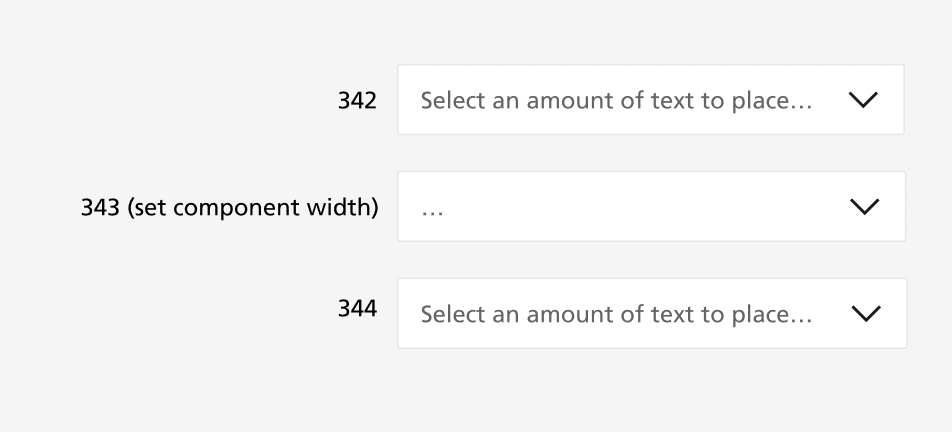
I have text in a component set to truncate, however when I create an instance of the component and add text through the properties panel I only get an eclipse at the start of the text box (no text).

However when I change the width of the instance the truncation works as expected. (see attached).

Additionally, if I input text directly into the instance (by clicking into the text box), the truncating is works properly.

Can anyone help and is this a glitch or am I doing something wrong?
This topic has been closed for replies.
Ryan_52
Ryan_52Solution
Technical Quality Specialist
September 12, 2023

Hi everyone, thank you for your patience. Our engineering team has successfully released a fix! Please refresh Figma to ensure that you are using the fixed version.

22 replies

September 14, 2023

I did that and it seems to work, thanks @Ryan_52

Jason_Lockwood
October 16, 2023

I’ve updated to the latest version this morning (Oct 16, 2023) and am still seeing truncating issues on my end. I’ve spent loads of time troubleshooting to see if there is a problem with how my component is setup but I cannot reconcile.

Once I toggle a boolean prop (to display icon) the text box (set to ‘Fill’) changes width however, the text truncation doesn’t follow the adjusted text field width as expected.

To fix this, I have to click into the text box and backspace to the point where the text is being truncated, then I have to reformat the text. Only then will the text w/ellipsis appropriately fill the text box.