September 7, 2023
Solved

Truncating text glitch/problem

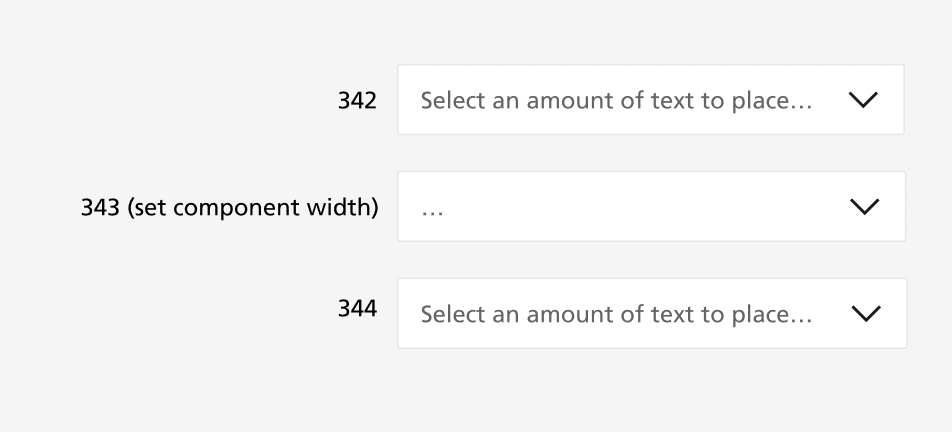
I have text in a component set to truncate, however when I create an instance of the component and add text through the properties panel I only get an eclipse at the start of the text box (no text).

However when I change the width of the instance the truncation works as expected. (see attached).

Additionally, if I input text directly into the instance (by clicking into the text box), the truncating is works properly.

Can anyone help and is this a glitch or am I doing something wrong?
This topic has been closed for replies.
Ryan_52
Ryan_52Solution
Technical Quality Specialist
September 12, 2023

Hi everyone, thank you for your patience. Our engineering team has successfully released a fix! Please refresh Figma to ensure that you are using the fixed version.

22 replies

Irfan_Dahir
September 8, 2023

I’m having this issue as well.

My existing component which was working fine stopped working and resulted to only the first 2-3 characters showing then a truncation “…”

I think this is after a latest auto-update?

Nataliya2
September 8, 2023

Have the same problem. Happened just today

Tiffany10
New Member
September 8, 2023

+1, also been experiencing this since yesterday.

September 9, 2023

+1
It started a day ago or so, first I thought something with my component was destroyed, but I cannot make it work any longer, the three dots sometimes is outside the component as well, sometimes the three dots are cut/truncated as well
image

September 9, 2023

I just reported it as a bug, maybe more people should do it?

September 11, 2023

Plus 1. Following for possible Solutions

Irfan_Dahir
September 11, 2023

A temporary solution that worked for me was to detach the component. It resolves this glitch.

Luongnd
Active Member
September 11, 2023

+1, I’m also having this problem.

Kelly_Ne
New Participant
September 11, 2023

I’m using text truncating in a container not wide enough to show everything (meaning, there’s extra text after the three dots), but text gets cut off before the end of the container. It gets cut off in the middle of it. It looks just fine while I’m editing the field. See the screenshots.


The cutoff point remains the same no matter how much I stretch the field, until there is enough space for the whole text to appear.

Has anyone had similar issues? Any idea why this happens?

Kelly_Ne
New Participant
September 11, 2023

So, I think I might have found out what the issue is.

The text container is in an instance. Container horizontal resizing is set to Fill. When I return it to Fixed, the container actually ends at the same place where the truncating starts in a Fill setup. When I detach instance, the truncating starts working as intended.

So this clearly has something to do with the fact that the text container is in a component. As to why it behaves like this, I have no idea. Probably some deeply buried system issue.

Hope Figma devs see this. Or anyone who encounters the same issue. Hope I’ve explained it well enough.