

Travis2
Active Member
March 24, 2023
Solved

"This document contains unsaved changes" - why?

  • March 24, 2023
  • 26 replies
  • 11263 views

Occasionally I’ll see this cloud icon at top right, warning me that my file isn’t saving. What’s interesting is that I always have several files open, and while sometimes more than one file will show this icon it’s never every file. It’s not the whole app, it’s just file to file. Some files are saving, some aren’t, and I can’t figure out what to do about it.

Obviously it’s disconcerting to work on something that I know isn’t saving - what can I do about it?
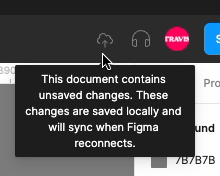
unsaved changes

-I’m marking this as solved because people need to see Mike’s post, but “solved” is very much in quotes because the fix is a hack - it’s a workaround for a problem Figma hasn’t fixed yet.

This topic has been closed for replies.
Best answer by Mike_Petropanagos

I had this happen to me as well - not sure when it started but noticed it today. Might be related to a bigger update I did in my design system or could be on the Figma side.

How I got my file to save

  • Saved the .fig to my desktop (just as a fallback)
  • Opened the same project in my browser
  • Closed the tab in my desktop app

When I opened the file in my desktop app, I saw a snackbar pop up saying “Your offline changes were synced”

26 replies

bezkhlibnyi.89
November 18, 2024

Changes you made to PP.Webflow PRO GSAP (Copy) while offline haven’t synced yet.


???

Gayani_S
Figmate
Community Support
November 21, 2024

Hi @bezkhlibnyi.89, thanks for reaching out. I understand how concerning it can be when your files has not synched yet.

When your connection to Figma is restored, any changes you made while offline should sync automatically. If you’ve closed the affected files, reopening them should trigger the sync for your offline changes.

However, there are some situations where changes might not be saved:

  • Using an unsupported browser or an outdated version.
  • Clearing your cache or browsing data before reconnecting to Figma.
  • Being in private browsing or incognito mode, or using a shared computer or guest account that clears browsing data automatically.
  • Running out of storage space in the browser, leaving no room for Figma to save changes.
  • A browser extension interfering with Figma’s ability to save data.

For more details, you can check this guide: What can I do offline in Figma?.

Please let me know if this happened in your case, happy to help out further!

Petch_Luancharoen
December 9, 2024

I’m having this problem a lot this month. I’ve tried many methods and it’s still like this. Please help me to fix it.

Gayani_S
Figmate
Community Support
December 13, 2024

Hey @Petch_Luancharoen, thank you for reaching out and I’m sorry to hear you’re running into this issue repeatedly.

Could you let me know if this happens in the browser, the desktop app, or both? Also, it would help if you could share the troubleshooting steps you’ve already tried so we can avoid repeating them.

In the meantime, can you check these scenarios that might cause the “This document contains unsaved changes” error:

  • You’re using an unsupported or outdated browser version.
  • Clearing your cache or browsing data before reconnecting to Figma.
  • Working in private browsing or incognito mode, or on a shared computer/guest account that automatically clears browsing data.
  • Running out of browser storage, leaving no room for Figma to save changes.
  • A browser extension interfering with Figma’s ability to save data.

If any of these might apply to your case, here’s a helpful guide on offline functionality: What can I do offline in Figma?.

Let me know more details when you can, and I can get you connected to our support team if we are not able to resolve your issue.

minhyuncho
Active Member
January 16, 2025

바보같은 피그마. 얘네는 돈받고 플랜 팔면 안된다.

Petra Bauer
New Member
January 16, 2025

Hello to all,
I am having this issue and cant open the file, having figma in browser open for few days already and still nothing. I have tried troubleshooting, can't open.  Please help