

Travis2
Active Member
March 24, 2023
Solved

"This document contains unsaved changes" - why?

  • March 24, 2023
  • 26 replies
  • 11263 views

Occasionally I’ll see this cloud icon at top right, warning me that my file isn’t saving. What’s interesting is that I always have several files open, and while sometimes more than one file will show this icon it’s never every file. It’s not the whole app, it’s just file to file. Some files are saving, some aren’t, and I can’t figure out what to do about it.

Obviously it’s disconcerting to work on something that I know isn’t saving - what can I do about it?
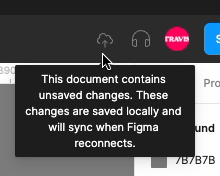
unsaved changes

-I’m marking this as solved because people need to see Mike’s post, but “solved” is very much in quotes because the fix is a hack - it’s a workaround for a problem Figma hasn’t fixed yet.

This topic has been closed for replies.
Best answer by Mike_Petropanagos

I had this happen to me as well - not sure when it started but noticed it today. Might be related to a bigger update I did in my design system or could be on the Figma side.

How I got my file to save

  • Saved the .fig to my desktop (just as a fallback)
  • Opened the same project in my browser
  • Closed the tab in my desktop app

When I opened the file in my desktop app, I saw a snackbar pop up saying “Your offline changes were synced”

26 replies

Gayani_S
Figmate
Community Support
February 14, 2024

Hey @Aaron_Mitchell, sorry for any disruption to your work!

We sometimes see users encounter this error message after some kind of network or service interruption. Even when you see this message Figma is generally saving your work in the background for later sync — you can read more on this in Can I work offline with Figma?

Can you try opening this File in an incognito window if you’re already using the browser, and sync any offline changes if asked to, as shown in that article? If you find the File is up to date there you can restart the Desktop App and this should clear that message.

If your work isn’t up to date when opened in the Browser, and you’re not alerted to sync offline changes, we’d suggest you use ‘Save as local copy’ from the File menu, to make a backup of your work, and then upload it in the Browser to check it is complete. If it’s incomplete we’d suggest copying and pasting over from the Desktop App to the Browser for any work you need to save.

Once your work is backed up, restarting the Desktop App, and your network and computer if necessary should clear this warning. If you find you continue to see this warning after restarting, just send me through a Console.log from the Developer Tools as shown in Use Chrome Developer Tools and I can create a support ticket on your behalf, so our Technical quality team can troubleshoot further with you.

Let me know if you have any follow up questions and I’ll be happy to help!

Stan5
New Participant
April 11, 2024

This happens when you pull a library update that affects many frames, and especially component instances, across the file. You must wait until all frames are updated.

Travis2
Travis2Author
Active Member
April 12, 2024

That can be one of the reasons it happens, but it also happens because [~insert mystery here~] and it takes way longer than the time any typical background process needs to finish. I’ve had it stay up for hours before.

May 12, 2024

issue
I have been having this issue “file has unsaved changes” Couldn’t open my design file.
Tried clearing cache, opening on web, deleting app and reinstalling. Nothing worked.

Gayani_S
Figmate
Community Support
May 13, 2024

Hey @Sugandhi_Chaudhary, thanks for trying out some of the troubleshooting steps!
I’ve just created a support ticket on your behalf. Your ticket number is #999220, for reference!

Please provide a direct link to the file to our support team, and invite support-share@figma.com with “can edit” permission so they can look into this further? Note that users with @figma.com emails on your team do not count towards your billing.

If you’re unsure on how to invite someone to a file, please follow these steps:

  1. Click the “Share” button at the top-right corner of the Editor
  2. In the next window, type support-share@figma.com into the text box
  3. Select the “can edit” permission option
  4. Click the “Send invite” button

Thanks in advance!

Jonathan_WONG1
New Member
August 8, 2024

This “unsaved changes” error happens too frequently for this to be a “solution”.

Figma should just add a button to “Sync changes” since we are all obviously (back) online.

Goyal_Neha_I
October 21, 2024

Facing this issue for quite a long time now. I have been having this issue “file has unsaved changes” Couldn’t open my design file. Tried clearing cache, opening on web, deleting app and reinstalling. Nothing worked.I tried opening it in browser and its NOT showing my most recent changes. I dont know whats going on but that error message is not helpful or accurate at all. Help us out Figma, being able to save your files is a pretty mission critical issue here.

Gayani_S
Figmate
Community Support
October 22, 2024

Hey @Goyal_Neha_I! Thanks for reaching out and for taking the time to try those troubleshooting steps.

I understand how frustrating it must be to encounter this issue, especially when you’re unable to access your most recent work.

I’ve created a support ticket for you, and your ticket number is #1156108 for reference. Could you please download Figma desktop app debug logs and share them with the team?

Our support team has already send a reply, please take a look when you have a moment.

Thanks,
Gayani

Benhbt
October 28, 2024

@Gayani_S I have been having this issue “file has unsaved changes” Couldn’t open my design file.
Tried clearing cache, opening on web, deleting app and reinstalling. Nothing worked.

Gayani_S
Figmate
Community Support
October 28, 2024

Hi @Benhbt, thank you so much for going through those troubleshooting steps already—I know it’s frustrating when nothing seems to resolve the issue. I’ve gone ahead and created a support ticket for you; your ticket number is #1161515.

To help us get to the bottom of this as quickly as possible, could you please download the Figma desktop app debug logs and share them with our support team? These logs will give us a closer look at what might be causing the issue.

Our team typically responds within 24 hours, though with the current high volume, there might be a slight delay. Thank you for your patience, and we’ll do our best to get back to you as quickly as possible!

Please feel free to reach out if you have any other questions or need further assistance in the meantime.