

Question

Text problem

  • June 2, 2026
  • 5 replies
  • 62 views

eburgaud

Hello,

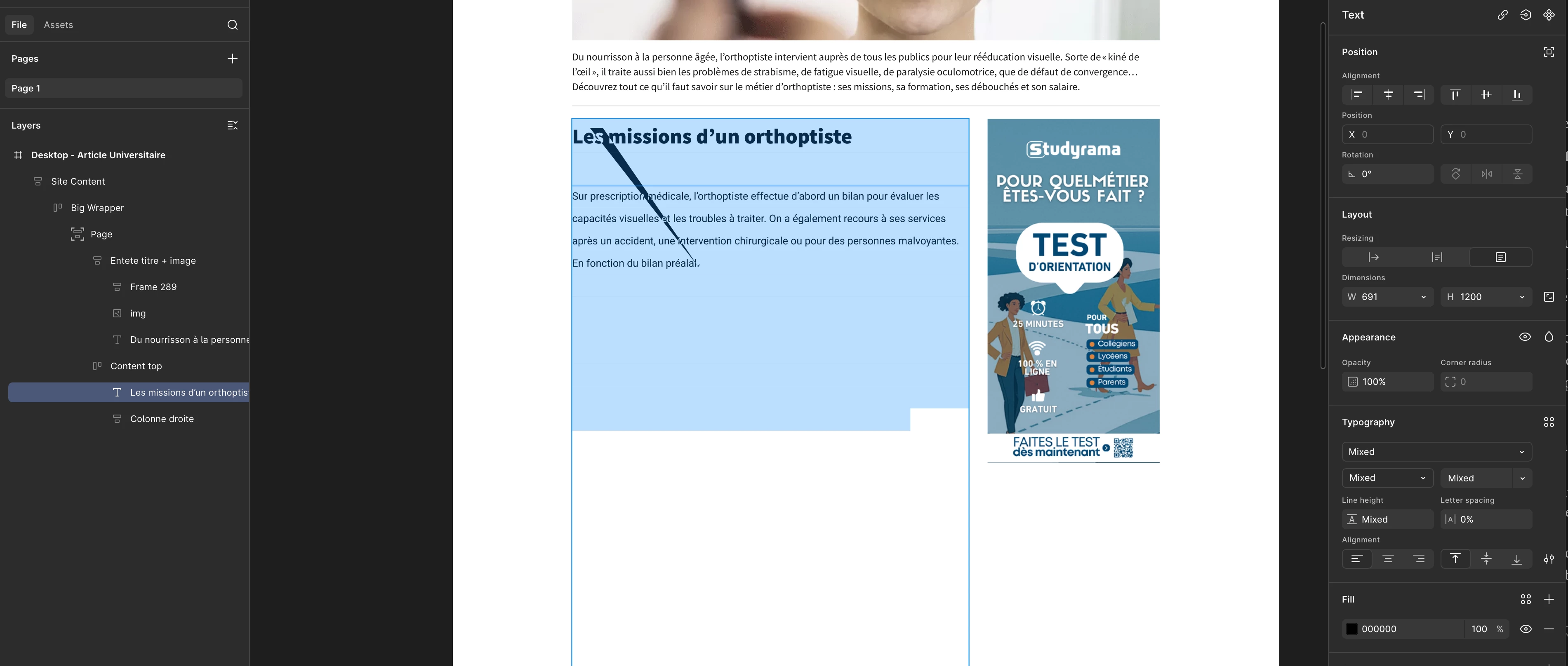
I'm having a problem with the text tool. There's a sort of line across the text block, and part of it is invisible. When I test with shorter text, there's no problem. I reopened some old drafts I made six months ago and discovered that this line is now present in the text blocks... I don't understand what's happening. Does anyone have any ideas?Here's a screenshot of my problem.


5 replies

Gayani_S
Figmate
  • Community Support
  • June 2, 2026

Hey ​@eburgaud, thanks for reaching out! 

Looking at your screenshot, a few things stand out that are worth investigating: Your right-hand panel is showing Mixed for font, font size, line height, and font weight. This usually means different text styles are applied to different parts of the same text layer. When a layer has inconsistent sizing or line height values, it can sometimes cause rendering issues, especially with longer content.

Here's what I'd try first:

  1. Select the text layer and open the Typography section in the right panel
  2. Select all the text inside the layer (Cmd/Ctrl + A while in text edit mode)
  3. Check whether a specific line height or font size value jumps out as anomalous — something very large or set to "Auto" inconsistently
  4. Try setting a consistent line height across the whole layer and see if the clipping resolves

A few other things I'm curious about:

  • Is this happening in one specific file, or across multiple files?
  • Does the issue appear at all zoom levels, or only at certain ones? (Sometimes this is a rendering/zoom glitch that refreshes on a zoom change)
  • Is your text layer set to a fixed height, or is it set to hug/auto? A fixed height with overflow hidden could explain the cut-off — though not the diagonal line
  • Does refreshing the file (close the tab and reopen) change anything?
  • Are you on the Figma desktop app or browser? And if browser, which one?


For some background on how text resizing and auto height work, Explore text properties in Figma Design is a good reference.


Let me know what you find, happy to help further! 


eburgaud
  • Author
  • New Member
  • June 3, 2026

Hello

Thank you for your answer and your help

I copied and pasted a shorter text in its place, and the problem disappeared. When I add lines to this text, the bug reappears. So it seems the problem is related to the text size.

I standardized the font (size, family, line spacing), but that didn't solve the problem.


The problem is present in all my drafts. These drafts didn't have the problem when I created them several months ago. I reopened them two weeks ago and noticed this line across the text blocks , and that parts of them were no longer visible.

Playing with the zoom doesn't change anything.

The text layer has a fixed height of 1200px, so there's plenty of room for the text.

Closing and refreshing the file doesn't change anything.

I'm using Figma in the Chrome browser.


Gayani_S
Figmate
  • Community Support
  • June 5, 2026

Hey ​@eburgaud, thanks for sharing the extra detail! 

Here's what I'd like you to try next:

  1. Set fill opacity to 100% on the text layer, I can see it's currently at 90% in your panel, which is an unusual value and could be contributing to the rendering behaviour.
  2. Duplicate the text layer and check if the duplicate shows the same issue.
  3. Delete the layer entirely, create a fresh text layer, and paste the same content in. This will tell us whether the bug is tied to the layer's history or the text content itself.
  4. Try the same long text in a completely new blank file, that'll help us confirm if it's isolated to these files or something broader.

One more thing I'm curious about, does the diagonal line always appear at the same point in the text, or does it shift depending on how much content is in the layer?

If none of those steps get you unblocked, I can submit a support ticket on your behalf and get our engineering team to look at this directly. They'll be able to access the file and dig into what's happening on your end. Just let me know how you get on and we'll take it from there.


eburgaud
  • Author
  • New Member
  • June 9, 2026


Hello ​@Gayani_S 

I reopened my drafts today and the problem disappeared as if by magic. I don't understand why at all. Perhaps you have an explanation? Could it be related to a patch or update?

Anyway, thank you for your help.

Have a good day :) 


Gayani_S
Figmate
  • Community Support
  • June 10, 2026

Hey @eburgaud! That's great news, really glad it sorted itself out!

It's hard to say with certainty what caused it, but issues like this can sometimes resolve following a Figma update that quietly fixes an underlying rendering behaviour. Since it affected older files consistently and then cleared up on its own without any changes on your end, that's a plausible explanation, though we can't confirm the exact cause without more investigation.

If it comes back, it'd be worth letting us know straight away. A support ticket would be the best route so our engineering team can dig into the specific file and get to the bottom of it properly.

Thanks again for working through all those steps with us!