

eburgaud
New Member
June 2, 2026
Question

Text problem

  • June 2, 2026
  • 12 replies
  • 266 views

Hello,

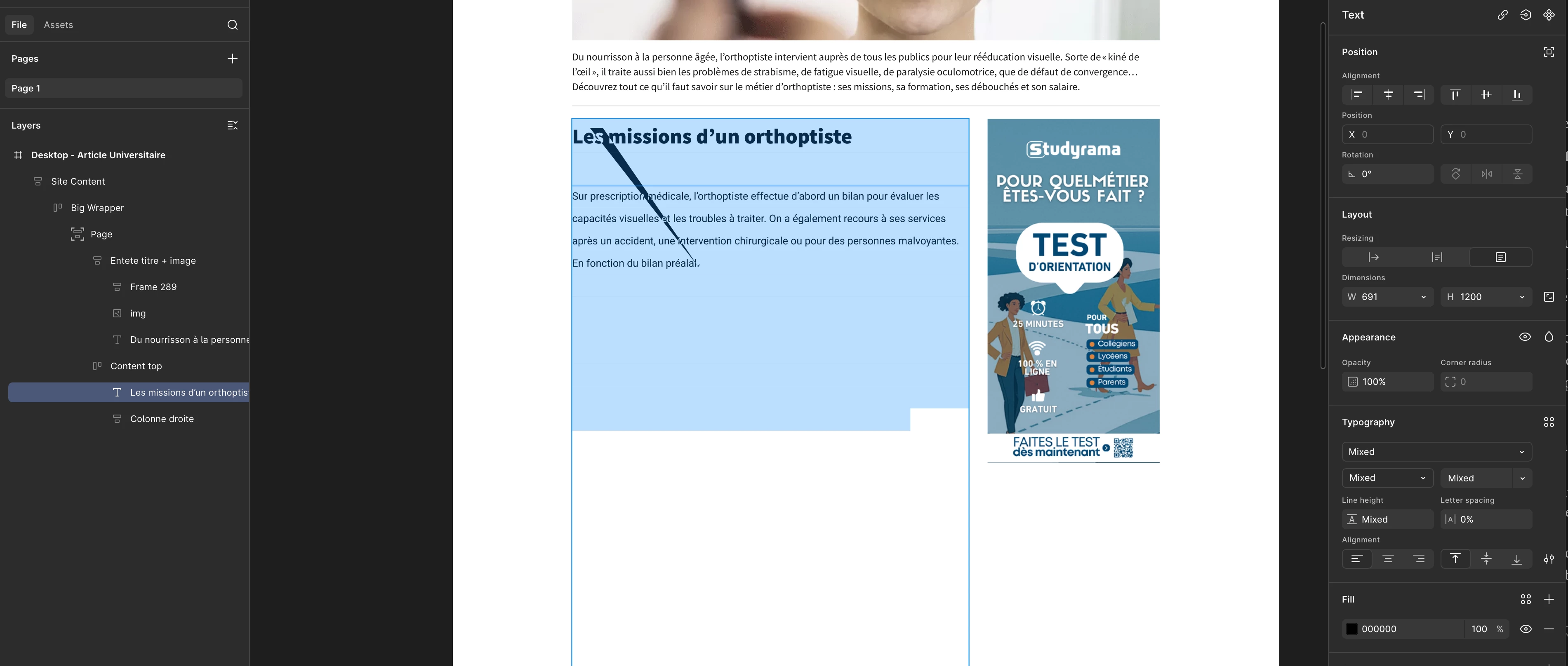
I'm having a problem with the text tool. There's a sort of line across the text block, and part of it is invisible. When I test with shorter text, there's no problem. I reopened some old drafts I made six months ago and discovered that this line is now present in the text blocks... I don't understand what's happening. Does anyone have any ideas?Here's a screenshot of my problem.


    12 replies

    New Participant
    August 18, 2026

    I can see why this would be frustrating. It looks like the issue may be related to how the text is being rendered or displayed rather than the content itself. I’d first compare the same text across different devices or browsers to narrow down whether it’s a platform-specific problem. Hopefully the screenshots and the troubleshooting steps above help pinpoint the exact cause.

    ksn
    Figmate
    Community Support
    August 19, 2026

    Thanks everyone - one thing I want to confirm: have you all tried clearing your cache and cookies to see if it still reoccurs? I know ​@Jess B. you mentioned you’re in Safari, so try that and see if that helps

    For everyone else, if you are using Chrome and clearing cache/cookies doesn’t help, can you try the following?

    1. Open Chrome and go to the Settings page chrome://settings/.
    2. In the Appearance section, ensure your Page zoom is set to 100%. This will ensure your files are displayed accurately at higher resolutions.
    3. In the System section, enable Use graphics acceleration when available
    4. If WebGL isn't enabled, open Chrome's Flags settings chrome://flags/.
    5. Update the Override software rendering list to enabled. This should be near the top of the list:Chrome settings panel showing the "Override software rendering list" option with "Disabled" selected.
    6. Alternatively, you can search for WebGL related flags and update this to Enabled.
    7. Verify WebGL is installed and enabled by visiting http://webglreport.com/


    I understand that these may be steps taken already, but I want to be sure we cover all bases again. Appreciate you working with me.