

Jenny_L
May 19, 2023
Solved

Spell check not working? (underlining correct spelling )

  • May 19, 2023
  • 15 replies
  • 2505 views

Hello there,

I’ve noticed that the Figma app on my Mac is highlighting correct spellings. I have already set the language to English in my profile. Could anyone please let me know if there are any solutions to this issue?

This topic has been closed for replies.
Best answer by djv

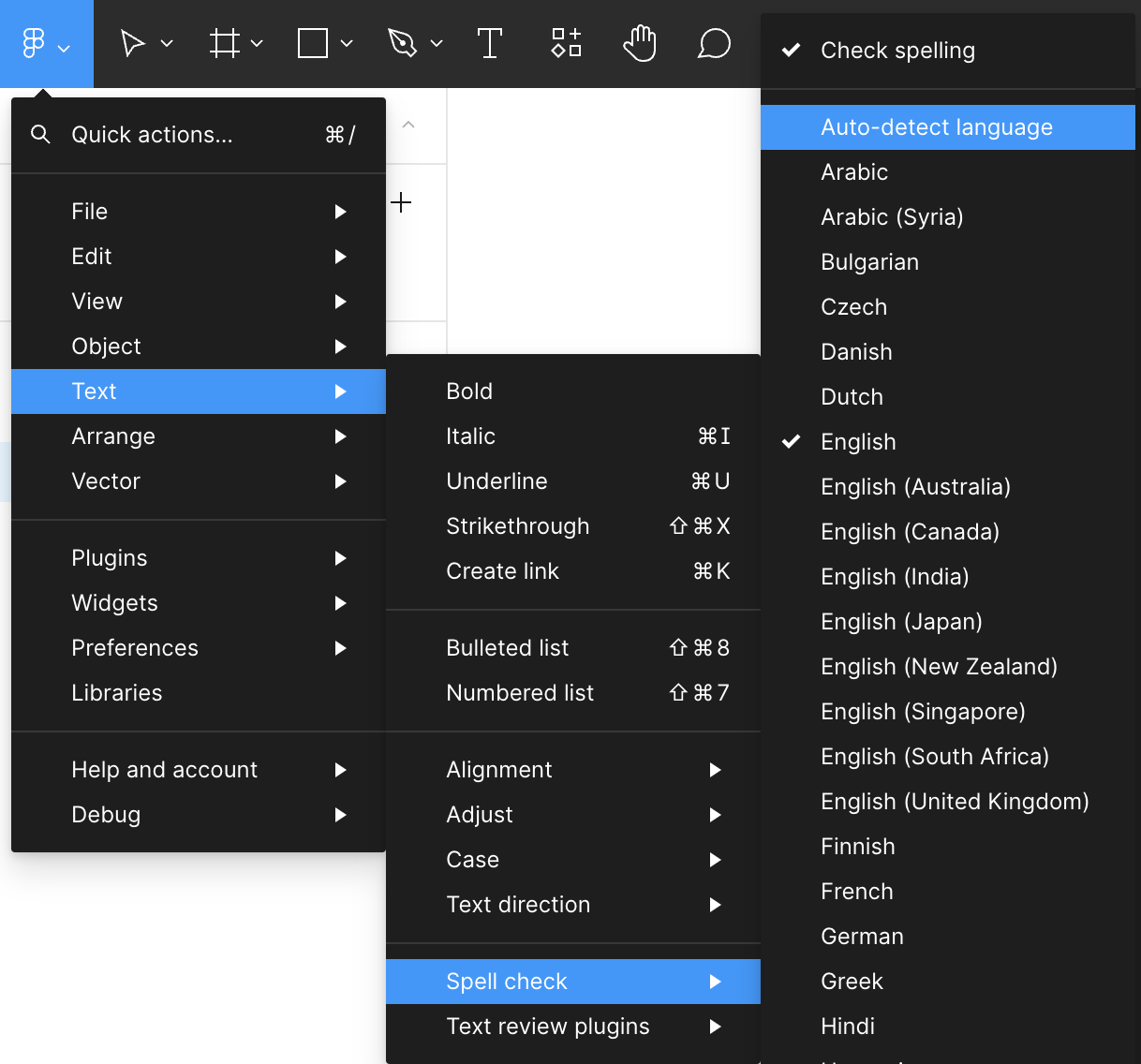
From the Main Menu via the Figma icon > Text > Spell check > Select langauge from available list

FYI - the spell check feature on the desktop app is dependent on the selected language in your Mac under System Settings > General > Language & Region

If your Mac has a preferred language other than English, it may be the cause of this issue. Glad to hear that it’s working as expected via the browser.

15 replies

Jenny_L
Jenny_LAuthor
May 19, 2023

Here is a screenshot of what I meant. thanks 😦

djv
Figmate
Community Support
May 19, 2023

Hey @Jenny_L, sorry to hear you’re having trouble with Spell check!

Can you try disabling Spell check then enable it again to see if that helps at all?

Jenny_L
Jenny_LAuthor
May 19, 2023

I’ve tried that and it didn’t seem to work out.

djv
Figmate
Community Support
May 19, 2023

Can you try selecting other English versions or if using Auto-detect language helps?

Jenny_L
Jenny_LAuthor
May 19, 2023

Thanks. Can you please guide me on how to do that? This is what I am currently seeing on the Figma settings.

The only other option is to switch to Japanese. I tried setting it to Japanese and then switching back to English. it wouldn’t work I. I uninstall and reinstalled Figma and that did not work either. The browser version works fine tho…

djv
Figmate
djvAnswer
Community Support
May 19, 2023

From the Main Menu via the Figma icon > Text > Spell check > Select langauge from available list

FYI - the spell check feature on the desktop app is dependent on the selected language in your Mac under System Settings > General > Language & Region

If your Mac has a preferred language other than English, it may be the cause of this issue. Glad to hear that it’s working as expected via the browser.

Jenny_L
Jenny_LAuthor
May 20, 2023

Manually switching to ‘English’ worked! Thank you!!

Kevin_SMITH2
September 24, 2024

Hi there !
I have a same type of issue. I can’t have any other language than english :

I’d like to pick French but my language list is limited to english. Before you ask, the language is installed on my windows system. Any clue ?

djv
Figmate
Community Support
September 25, 2024

Hey @Kevin_SMITH2, sorry for the trouble!

Are you using Figma via a web browser or the desktop app?

Please note that if you’re using Figma in the browser, spell check is only available in English (US, CA, UK) and Russian by default. To access spell check for any other language supported by your operating system, you can install the Figma font installer.

Kevin_SMITH2
September 25, 2024

Hi @dvaliao, I’m using the desktop app.