April 6, 2023
Solved

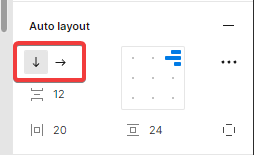
Shortcut for changing auto layout direction

  • April 6, 2023
  • 7 replies
  • 2250 views

Hi all, I’ve had a look but I’ve not been able to find a shortcut for swapping the direction of an autolayout frame between vertical and horizontal? Is there one?

April06-7L

This topic has been closed for replies.
Best answer by Celine_

Hi @KieronSykes ,
Thank you for providing this feedback! Not at this moment, but others in the community have requested something similar. Feel free to add your feedback for the team and up-vote this feature request here: Auto Layout shortcuts (so we can gauge the interest in the community.)

Thanks again for your thoughts and patience in the interim!

7 replies

Celine_
Figmate
Celine_Solution
Community Support
April 6, 2023

Hi @KieronSykes ,
Thank you for providing this feedback! Not at this moment, but others in the community have requested something similar. Feel free to add your feedback for the team and up-vote this feature request here: Auto Layout shortcuts (so we can gauge the interest in the community.)

Thanks again for your thoughts and patience in the interim!

Sasha_Sosin1
New Member
November 20, 2023

+1 would love this feature. I use Shift+A all the time.

Maybe Shift+K would be a good shortcut? It doesn’t currently do anything when an auto-layout layer is selected.

Shayne
March 7, 2024

Agree it feels like an Auto Layout direction change short cut is missing. Many times a day I wish this was available.

Desislava_Slavkova
Active Member
September 5, 2024

I have been looking for this forever myself… +1

Dikamsiyochi_Udochi
December 3, 2024

+1 Need this feature as soon as possible 🙏

BlairAAA
New Participant
April 11, 2025

yessss +1

ChukM
New Member
August 11, 2025

This would help when trying to move fast to show ideas in mtgs
