
Jerry_Beinhauer
May 22, 2022
Question

Project all of a sudden lost all color and is black and white...?

  • May 22, 2022
  • 22 replies
  • 34564 views

I am not a Figma expert by any means, but have been working hard to learn and have spent countless hours to create a prototype for a project I was working on.
All of a sudden, I must have hit some shortcut keys, my whole project lost all fidelity, and this is what it now looks like:
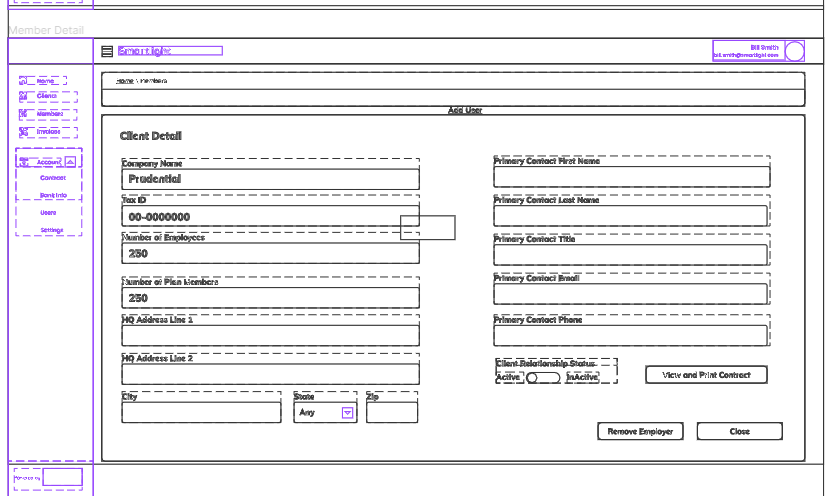

It was very high fidelity and colorful.
Does anybody know how to fix this?

This topic has been closed for replies.

22 replies

JanKragh
May 22, 2022

Hi @Jerry_Beinhauer ,

Don’t worry, your design is safe 👍🙂

Figma Help Center
Minou
June 12, 2022

Hi @Jerry_Beinhauer
This happened to me. I think you’re in outline mode. Click Command + Y to toggle between them.

Nithin_Gandhi_Simanand
July 21, 2022

Do you happen to know the shortcut for Windows? or where in the menus it may be

tank666
July 21, 2022
UX/UI designer. Figma expert. Creator and developer of plugins and widgets for Figma and FigJam. Check out my resources in Figma Community: figma.com/@tank
Nithin_Gandhi_Simanand
July 21, 2022

Thank you!

Samuel_Adigun
September 12, 2022

Thank you🥹

Roxanne_G
New Participant
December 21, 2022

Can I just say–Thank you sooooooooooo much for posting this here-- This Just happened to me and I nearly lost my mind!!!

Anusha_Naik
December 22, 2022

Thanks. You saved my life

Machu_Mzd
January 15, 2023

press cntrl+/ then type show outline…then uncheck the checkbox

February 6, 2023

Thank you.