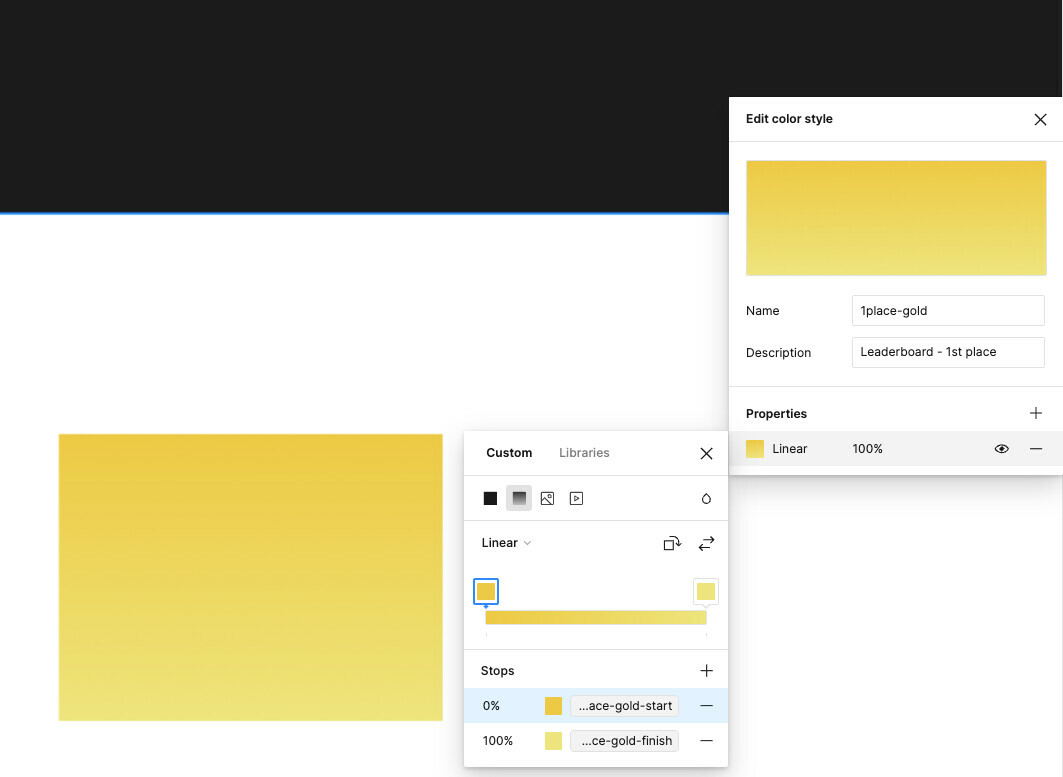
I’m not entirely sure if I understand correctly, but have you attempted clicking “Rotate gradient” and found that it didn’t rotate? If you haven’t already, could you please give it a try to see if it rotates the gradient?
I tested it on my side by assigning variables to the gradient color stops, and it looks like I can rotate it using either the “Rotate gradient” option or white handles on the element, just as it’s supposed to work.
Additionally, could you please attempt this quick fix to see if it’s resolve?
Close any Figma tabs you’re not using
Browser: Force-quit and open Figma in a new browser window
Desktop App: Force-quit the Figma Desktop app and restart it
(You can see the full guide here)
I hope this provides some clarification. If there is anything I missed, please inform us. And if any members of our community have any insights, please share them here.
I just want to mention that I did face the same issue today (not UI3). Tested on both Firefox and Chrome. Nothing worked. I tried multiple times, but clicking the rotate button didn’t rotate the linear effect.
I tried many things, but nothing worked.
One way to work around this, if you have one horizontal linear effect already:
Assign the custom color to something (like fill for a box)
Now create a new color in the same context
You’ll notice that Figma copies the previous color, including the rotated linear gradient 👏
Same here: I cannot rotate the gradient direction in the styles list (individual objects still works). Please fix this cuz I don’t want to manually edit every subjects.
Same issue. When I go to the list of styles, click +, choose “color”, and go to create a gradient, clicking the “rotate gradient” button has no effect. Come on folks… If the software is incapable of producing my required design that means I not only wasted a tremendous amount of time but I can no longer use the software. This issue has gone unresolved for a year? You have no intention of communicating with your users on this? This is a pretty basic ask.