Chibuike
November 1, 2023
Solved

My calibration is not showing?

  • November 1, 2023
  • 16 replies
  • 1090 views

Good day. how can i make my ruler bar to be active. i mean those calibration in the Figma app that helps align your design properly i can’t find mine. What do i d pls??

This topic has been closed for replies.
Best answer by Celine_

Hi Chibuike!
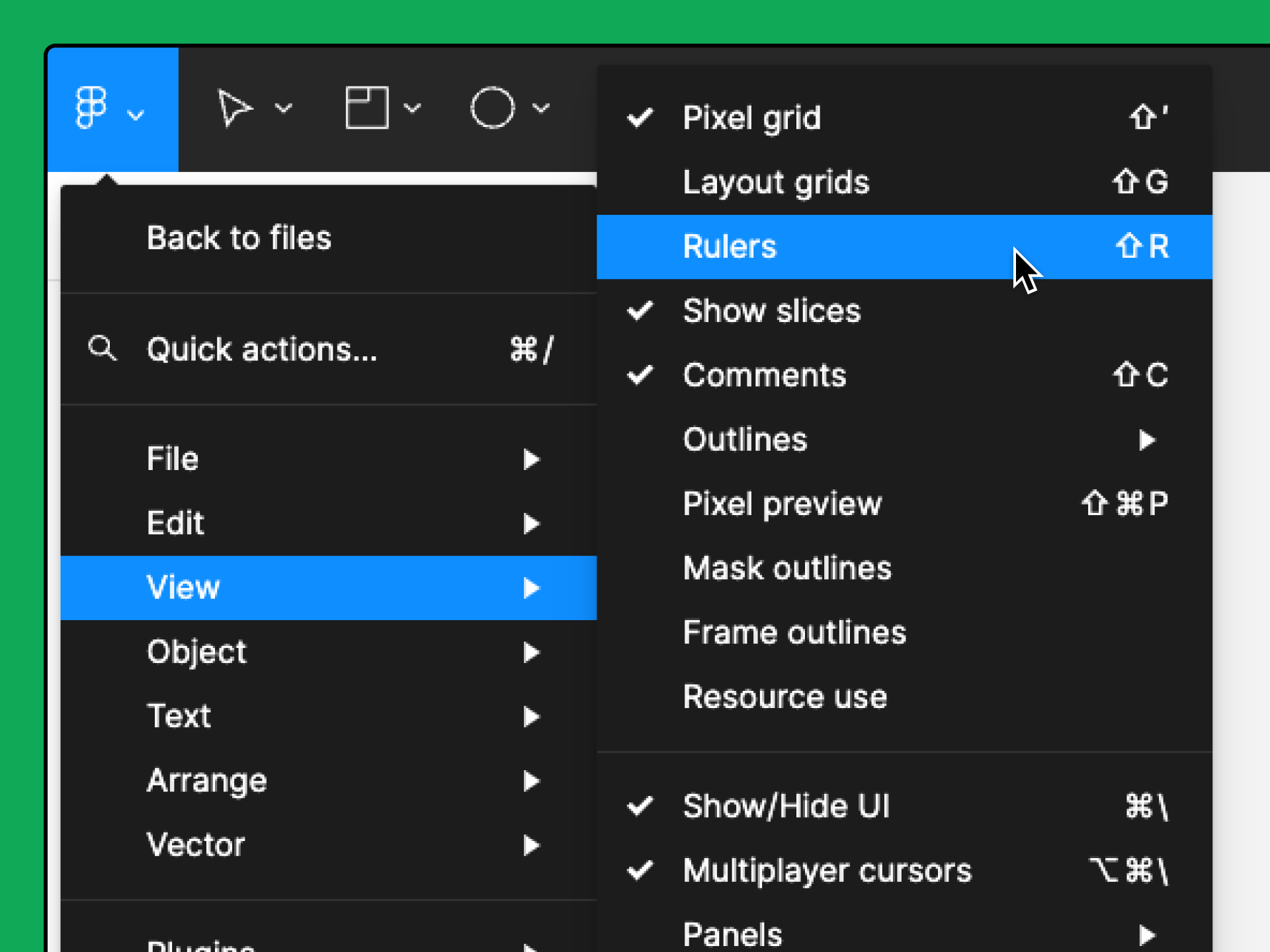
In order to enable the ruler, please click on Figma logo Capture d’écran 2023-11-01 à 14.48.47 to open the main menu.

  1. Go to View > Rulers.

You can also enable rulers by using the keyboard shortcut Shift + R.

More information about how to add guides here: https://help.figma.com/hc/en-us/articles/360040449713-Add-guides-to-the-canvas-or-frames Hope it helps!

16 replies

Celine_
Figmate
Celine_Answer
Community Support
November 1, 2023

Hi Chibuike!
In order to enable the ruler, please click on Figma logo Capture d’écran 2023-11-01 à 14.48.47 to open the main menu.

  1. Go to View > Rulers.

You can also enable rulers by using the keyboard shortcut Shift + R.

More information about how to add guides here: https://help.figma.com/hc/en-us/articles/360040449713-Add-guides-to-the-canvas-or-frames Hope it helps!

Chibuike
ChibuikeAuthor
November 1, 2023

Thanks. I have done it

Chibuike
ChibuikeAuthor
November 15, 2023

Good day. Please how do i go about using a mockup in my design?
Like i want to use a laptop and phone mockup, i have downloaded the mock up but i don’t know how to put my design in my laptop and phone mock up and then adiing it to my main desgin. please how do i go about it?

Celine_
Figmate
Community Support
November 15, 2023

You’re welcome Chibuike! Do you mean the Device Frames? This can help you to control how your prototype looks in presentation view. You can read this Help Center article: https://help.figma.com/hc/en-us/articles/360039823894-Set-prototype-device-and-starting-point?source=answerbot#Device

To select a specific device in your presentation view: when you select your Frame, go on your Prototype tab (in the right panel), click “Show prototype settings”, and select the device.

And, If you want to create a frame with a specific format device: You can click on the Frame icon (on the top left), and you will see in the right panel, in Prototype tab, a selection of device.

Chibuike
ChibuikeAuthor
November 29, 2023

When i select my font and i want to change it to semibold but my Figma app is only showing me “regular” and “bold”. Why is that?
And i can’t only use regular and bold. Please how can i solve this problem??

Celine_
Figmate
Community Support
November 29, 2023

Hi Chibuike,
This seems to be another issue not related to the topic. I’d recommend you to try to reinstall the font , restart Figma, and clear the cache to see if that helps, here the steps to clear the cache: https://help.figma.com/hc/en-us/articles/360040328553-Use-Figma-while-offline#clear-data

Here’s our guide to help you manage missing fonts and some workarounds: https://help.figma.com/hc/en-us/articles/360039956994-Manage-missing-fonts#fix-missing

As reminder, here are a few causes for missing fonts:

  • Missing installed fonts: collaborators are using a local font, which you don’t have installed.
  • Conflicting versions: collaborators are using a different (older or newer) version of the font.
  • Missing font styles: Either the style was missing from a download, or you are using a different version of the font which doesn’t include that weight or style.

If that doesn’t help, I’d suggest you to reach out directly the support team here: https://help.figma.com/hc/en-us/requests/new

Chibuike
ChibuikeAuthor
November 29, 2023

I don’t mean missing fonts. What i meant is that when i select a font like ‘monda’ and i don’t what it to be either “BOLD” or “REGULAR” maybe semi bold or light bold. but all i can see is Bold and Regular which is not suppose to be. i can’t be using only Bold and Regular. Do you understand?

Celine_
Figmate
Community Support
November 29, 2023

Thank you for giving more details about your issue. After checking for “Monda”, it’s exact that we have only bold and regular natively on Figma. If you want semi bold or light bold, I’d suggest you to install in your local fonts. Here the steps to do it in the browser and in the desktop app: https://help.figma.com/hc/en-us/articles/360039956894-Access-local-fonts-on-your-computer

Chibuike
ChibuikeAuthor
November 29, 2023

Also i can’t even find my boolean operation button i.e the subtract selection or intesect selection. How can i solve this problem???

Celine_
Figmate
Community Support
November 29, 2023

Hey again Chibuike,
Please refers to this help center article about Boolean operation: https://help.figma.com/hc/en-us/articles/360039957534-Boolean-operations Hope this helps!