Chibuike
November 1, 2023
Solved

My calibration is not showing?

  • November 1, 2023
  • 16 replies
  • 1112 views

Good day. how can i make my ruler bar to be active. i mean those calibration in the Figma app that helps align your design properly i can’t find mine. What do i d pls??

This topic has been closed for replies.
Best answer by Celine_

Hi Chibuike!
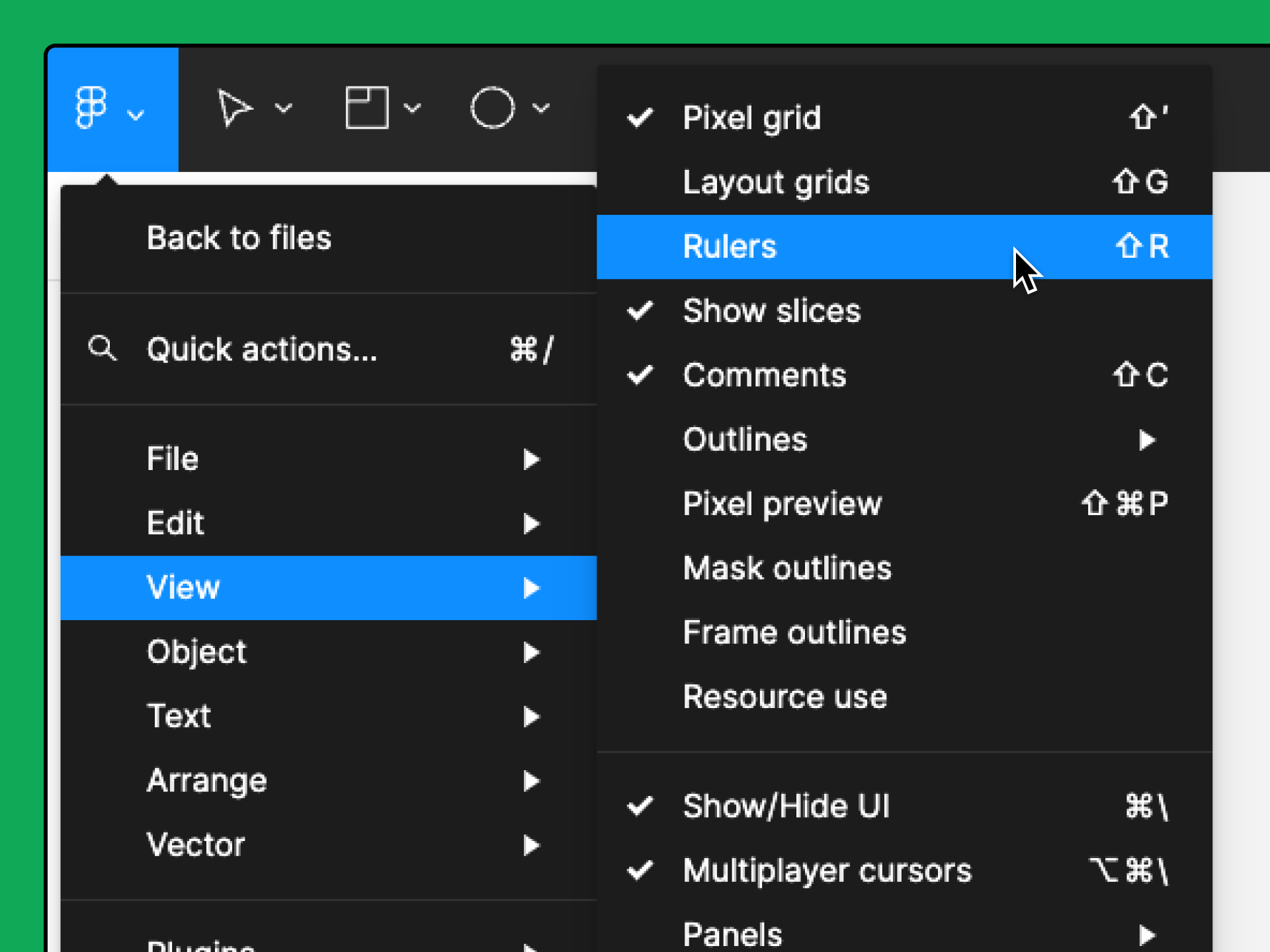
In order to enable the ruler, please click on Figma logo Capture d’écran 2023-11-01 à 14.48.47 to open the main menu.

  1. Go to View > Rulers.

You can also enable rulers by using the keyboard shortcut Shift + R.

More information about how to add guides here: https://help.figma.com/hc/en-us/articles/360040449713-Add-guides-to-the-canvas-or-frames Hope it helps!

16 replies

Chibuike
ChibuikeAuthor
November 30, 2023

This is not what i meant​:weary:😩. The problem is that when i create a rect. with a corner radius of 30, and i want to use the boolean operation it doesn’t show ontop of my Figma app. Even when i went to object to use one of the boolean operation it seems to be not active, when i click on one of the boolean operation it doesn’t respond. Do you get it now???

Celine_
Figmate
Community Support
November 30, 2023

Can you please share a quick video recording (or screenshot) of the different steps you’ve made so we can replicate on our end? It will help me to better visualise your issue. Please include the whole window, with the properties and layers panels in view and relevant layers expanded, and select any layers you’re having trouble with so we can check any relevant settings.

From what I understand, you’d need to create two shapes (for instance: two rectangles), select both of them so that the boolean operation can appear.

In the meantime, as recommendation, in order to cover some basics, please refer to this guide: https://help.figma.com/hc/en-us/articles/360039957534-Boolean-operations as explained. This article includes a video that gives details of how to use boolean operation: https://www.youtube.com/watch?v=8ZaX6qEcUCU&t=1s

As a reminder, if you have any other questions not related to the thread, please create another thread and precise your question in the title of your topic for the community. So others in the community can have a better look at your questions!

Chibuike
ChibuikeAuthor
November 30, 2023


As you can see when i created a two rectangles am suppose to see the boolean operations button on top of the Figma app

And in the second image when i went to the object and boolean groups, the operations are not active. Do you get it now???

Celine_
Figmate
Community Support
November 30, 2023

Thank you for the screenshot Chibuike. Please select the two shapes at the same time so the boolean operation can work.
Here the screenshot:

Chibuike
ChibuikeAuthor
December 3, 2023

ok.But if i don’t want to use the two rectangles i.e if i want to use only one rectangle does it mean that the boolean operations won’t work???


Like this???
Because i really need the boolean operations to be active in only one items

Celine_
Figmate
Community Support
December 4, 2023

Yes, you need to have two shapes.
As explained, please check this video that cover some basics to use boolean operations: https://www.youtube.com/watch?v=8ZaX6qEcUCU&t=3s