Claire Fredrick
New Member
May 30, 2025
Solved

Measurement Indicator Will Not Go Away

  • May 30, 2025
  • 28 replies
  • 4220 views

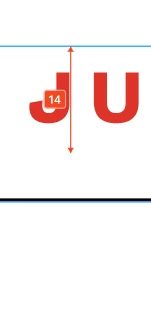
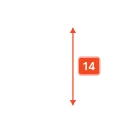
I can’t seem to find a way to turn off the red measurement tool. If I go to View > Hide UI it does remove it, but it also removes other side navigation components that I need available. 


This topic has been closed for replies.
Best answer by Junko3

Hi ​@Claire Fredrick,


I understand you're looking to hide those measurements from your canvas. That's definitely possible.

Please try following these steps:

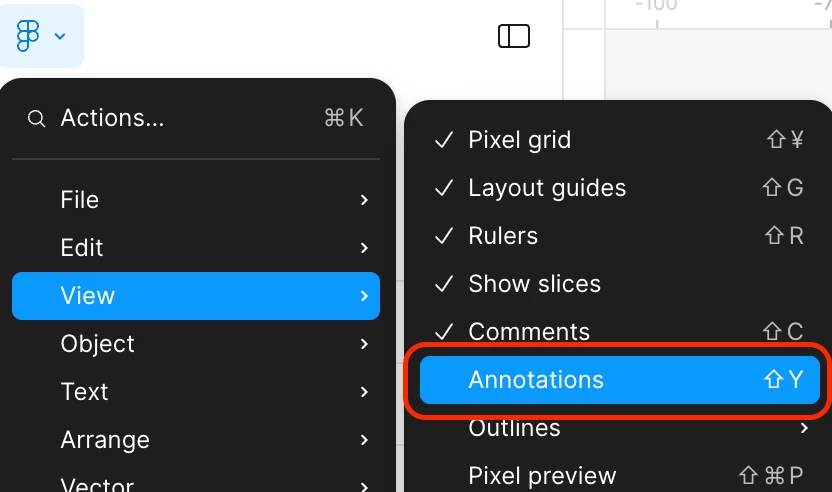
  1. Click  Figma icon on the top left to open the main menu.
  2. Hover over “View” in the dropdown.
  3. Deselect “Annotations”.

I tested this on my end, and it should hide both annotations and measurements for you. You can find more details in our article here: Add measurements and annotate designs
 

Thanks,

28 replies

Lara O.
New Member
June 17, 2025

Same - its really inconvenient. Please fix.

Figmate
June 18, 2025

Hi there,
 

I understand you are experiencing difficulty deleting measurements.

Typically, to delete a measurement, you can click it and press the Delete or Backspace key, as outlined in this article.


However, we are currently aware of a bug that may be affecting you:

Once you update an existing measurement, trying to delete it with the Backspace key just makes it revert to the original measurement, and it can't be removed.


Our engineering team is actively working on a resolution for this issue. Sorry for any inconvenience this may be causing.


Thanks,

Evie_Zhang
New Member
June 19, 2025

Hi there,
 

I understand you are experiencing difficulty deleting measurements.

Typically, to delete a measurement, you can click it and press the Delete or Backspace key, as outlined in this article.


However, we are currently aware of a bug that may be affecting you:

Once you update an existing measurement, trying to delete it with the Backspace key just makes it revert to the original measurement, and it can't be removed.


Our engineering team is actively working on a resolution for this issue. Sorry for any inconvenience this may be causing.


Thanks,

For added clarity: pressing the Delete key reverts the item to its original state rather than removing it.
This is a significant bug that creates uncertainty for users when interacting with the feature. Please prioritize fixing it.

djv
Figmate
Community Support
June 23, 2025

Hey All, thank you for your patience! 

Our annotations team pushed out a fix for this issue. Please refresh your tabs and let us know if you run into any further issues. 

Seth_Annis
New Member
June 24, 2025

It works! 🎉


Please thank the development team

djv
Figmate
Community Support
June 24, 2025

Glad to hear that, ​@Seth_Annis

I’ll pass along your kind words to the team. 😊

Tim Greller
New Member
December 13, 2025

This only works in Dev Mode tho. The measurements are visible in Design Mode as well, but cannot be deleted there. 

djv
Figmate
Community Support
December 15, 2025

Hi ​@Tim Greller, thanks for flagging this! 

I just tested this with a macOS in the browser and the desktop app, and I’m able to delete measurements as expected in both Dev mode and Design mode by simply selecting and pressing my delete key.

What OS are you using? Are you using Figma in the desktop app, browser, or both? And how are you attempting to delete the measurement?

With a few more details, our team can try to replicate and fix.