Claire Fredrick
New Member
May 30, 2025
Solved

Measurement Indicator Will Not Go Away

  • May 30, 2025
  • 28 replies
  • 4220 views

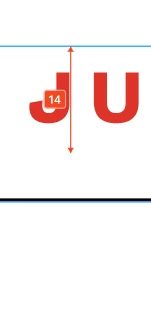
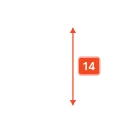
I can’t seem to find a way to turn off the red measurement tool. If I go to View > Hide UI it does remove it, but it also removes other side navigation components that I need available. 


This topic has been closed for replies.
Best answer by Junko3

Hi ​@Claire Fredrick,


I understand you're looking to hide those measurements from your canvas. That's definitely possible.

Please try following these steps:

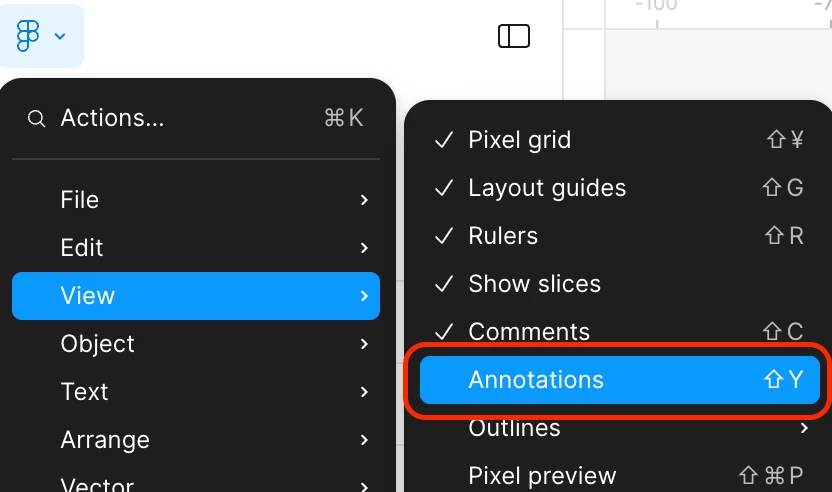
  1. Click  Figma icon on the top left to open the main menu.
  2. Hover over “View” in the dropdown.
  3. Deselect “Annotations”.

I tested this on my end, and it should hide both annotations and measurements for you. You can find more details in our article here: Add measurements and annotate designs
 

Thanks,

28 replies

Junko3Answer
Figmate
June 2, 2025

Hi ​@Claire Fredrick,


I understand you're looking to hide those measurements from your canvas. That's definitely possible.

Please try following these steps:

  1. Click  Figma icon on the top left to open the main menu.
  2. Hover over “View” in the dropdown.
  3. Deselect “Annotations”.

I tested this on my end, and it should hide both annotations and measurements for you. You can find more details in our article here: Add measurements and annotate designs
 

Thanks,

Claire Fredrick
New Member
June 2, 2025

That did the trick! Thank you so much

Ashley M
New Member
June 3, 2025

I can hide measurements but I can never seem to select and delete permanently.  I can move the measurement up and down, but never actually select it and be able to delete it. Right click also doesn’t do anything. This doesn’t seem right.

andrewc
New Member
June 3, 2025

+1 - I can add but can’t delete measurements, which seems like a bug.

Anthony11
New Member
June 4, 2025

I also can’t delete a measurement

Seth_Annis
New Member
June 4, 2025

Same problem here. When trying to delete the measurement it reset to origin but can’t be deleted.

Jon_Landis
New Member
June 4, 2025

Also eager to know how to delete measurement annotations!

Simon ROUSSEL
New Member
June 5, 2025

Same

Karen D.
New Member
June 6, 2025

Also interested in knowing how to delete measurement annotations.

JustJest
New Member
June 6, 2025

Same, this seemed to just appear on a component and I have no idea how to delete it.