Solved

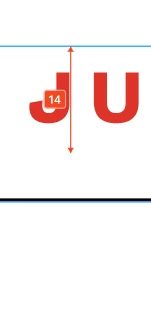
Measurement Indicator Will Not Go Away

  • May 30, 2025
  • 28 replies
  • 2844 views

Claire Fredrick

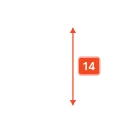
I can’t seem to find a way to turn off the red measurement tool. If I go to View > Hide UI it does remove it, but it also removes other side navigation components that I need available. 


Best answer by Junko3

Hi ​@Claire Fredrick,


I understand you're looking to hide those measurements from your canvas. That's definitely possible.

Please try following these steps:
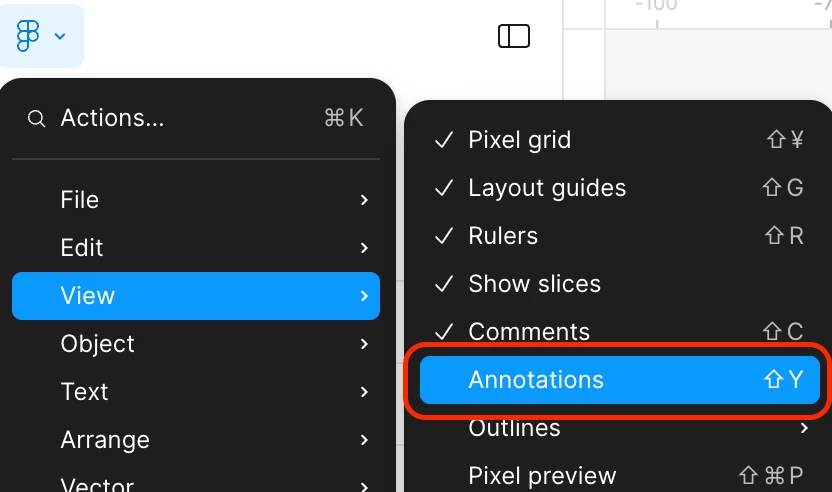
  1. Click  Figma icon on the top left to open the main menu.
  2. Hover over “View” in the dropdown.
  3. Deselect “Annotations”.

I tested this on my end, and it should hide both annotations and measurements for you. You can find more details in our article here: Add measurements and annotate designs
 

Thanks,

28 replies

  • Figmate
  • Answer
  • June 2, 2025

Hi ​@Claire Fredrick,


I understand you're looking to hide those measurements from your canvas. That's definitely possible.

Please try following these steps:

  1. Click  Figma icon on the top left to open the main menu.
  2. Hover over “View” in the dropdown.
  3. Deselect “Annotations”.

I tested this on my end, and it should hide both annotations and measurements for you. You can find more details in our article here: Add measurements and annotate designs
 

Thanks,


Claire Fredrick

That did the trick! Thank you so much


Ashley M
  • New Member
  • June 3, 2025

I can hide measurements but I can never seem to select and delete permanently.  I can move the measurement up and down, but never actually select it and be able to delete it. Right click also doesn’t do anything. This doesn’t seem right.


andrewc
  • New Member
  • June 3, 2025

+1 - I can add but can’t delete measurements, which seems like a bug.


Anthony11
  • New Member
  • June 4, 2025

I also can’t delete a measurement


Seth_Annis
  • New Member
  • June 4, 2025

Same problem here. When trying to delete the measurement it reset to origin but can’t be deleted.


Jon_Landis
  • New Member
  • June 4, 2025

Also eager to know how to delete measurement annotations!


Simon ROUSSEL

Same


Karen D.
  • New Member
  • June 6, 2025

Also interested in knowing how to delete measurement annotations.


JustJest
  • New Member
  • June 6, 2025

Same, this seemed to just appear on a component and I have no idea how to delete it.


Aranza
  • New Member
  • June 9, 2025

Same, I ended up cutting and pasting everything in the same frame, and that finally removed the measurement tags, hope Figma fixes this soon.


Slava_Bronevitskiy

This is incorrectly market as “SOLVED”. It is not solved. There is a bug where indicators cannot be removed. It’s not about hiding all. It’s about deleting a single measurement indicator while keeping the rest.


Mmediong Esu
  • New Member
  • June 11, 2025

Still happening 


Payton_Biddington

Yep, still happening. You can hide them, but can’t delete…


Mike D
  • New Member
  • June 12, 2025

Still happening for me too. I did find a workaround that seems to be a permanent fix, though a clunky one: If I click on the annotation (like a measurement) and hit delete, nothing happens at first. But if I do that, then close and reopen the app, the annotation is gone. Not exactly efficient — but better than a sharp stick in the eye.


Matteus da Costa

It's buggy!!!!

When I try to delete is does not go away...
When I try to move it, does not move and retrieves back to the original position…

The workaround: To apply the changes I made, I have to reload the tab I every.single.time 🙄


Matteus da Costa

hey ​@Junko3, please review the new comments.


Jeremie_Passebon

There is a bug! We cannot permanently remove the measures


cartino
  • New Member
  • June 16, 2025

@Junko3 Also calling for this to be re-opened. Measurements can be hidden, but still don’t appear to be individually removable. 


krcheon
  • New Member
  • June 17, 2025

I can't delete it. It's so inconvenient.


Lara O.
  • New Member
  • June 17, 2025

Same - its really inconvenient. Please fix.


  • Figmate
  • June 18, 2025

Hi there,
 

I understand you are experiencing difficulty deleting measurements.

Typically, to delete a measurement, you can click it and press the Delete or Backspace key, as outlined in this article.


However, we are currently aware of a bug that may be affecting you:

Once you update an existing measurement, trying to delete it with the Backspace key just makes it revert to the original measurement, and it can't be removed.


Our engineering team is actively working on a resolution for this issue. Sorry for any inconvenience this may be causing.


Thanks,


Evie_Zhang
  • New Member
  • June 19, 2025

Hi there,
 

I understand you are experiencing difficulty deleting measurements.

Typically, to delete a measurement, you can click it and press the Delete or Backspace key, as outlined in this article.


However, we are currently aware of a bug that may be affecting you:

Once you update an existing measurement, trying to delete it with the Backspace key just makes it revert to the original measurement, and it can't be removed.


Our engineering team is actively working on a resolution for this issue. Sorry for any inconvenience this may be causing.


Thanks,

For added clarity: pressing the Delete key reverts the item to its original state rather than removing it.
This is a significant bug that creates uncertainty for users when interacting with the feature. Please prioritize fixing it.


djv
Figmate
  • Community Support
  • June 23, 2025

Hey All, thank you for your patience! 

Our annotations team pushed out a fix for this issue. Please refresh your tabs and let us know if you run into any further issues. 


Seth_Annis
  • New Member
  • June 24, 2025

It works! 🎉


Please thank the development team