

PartyParrotGreg
February 28, 2022
Question

Long loading times for Swap Instance panel

Hey, I noticed that the Swap Instance panel in the Design tab takes a lot of time to load. No matter the internet connection (slow or fast) this take ages. Sometimes I need to restart Figma in order to make it work.

Some of the libraries, like this one: Phosphor Icons added to the Community, has more than 4,000 components
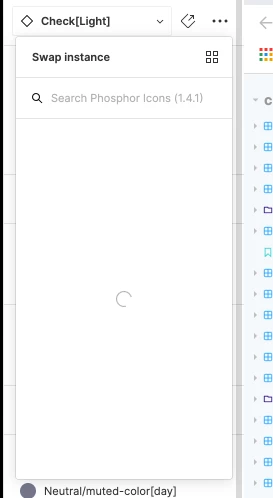
image

Not sure what is the technical strategy for serving components from the libraries but this is really slowing down my workflow (alongside the new, and messed up, way of not look-up for components among all the libraries).

This topic has been closed for replies.

23 replies

Rob3
New Member
June 16, 2022

Thank you this also worked for me, can we flag this as a fix?

RonMan
New Participant
May 22, 2024

It is definitely a regression bug. For me it started to occur when file size of number of components wasn’t increased.

And suggested “solution” is not feasible if you have 10s of components. And I don’t understand what is suggested there.

Celine_
Figmate
Community Support
May 23, 2024

Hey @RonMan ,
Thanks for flagging this, and sorry to hear you are having issue for loading your swap instance panel!
If it only happens on desktop app, please follow the steps in this Help Center article: here

As this thread was from 2022, and it looks like the workaround here was to force-quit and start Figma again. If you are still having issues with the performance, I’d also recommend you to reach out directly to the support team with a copy of your file so the team can try to replicate: here

Be sure to use your Figma email account, share the link of your file and please ddd support-share@figma.com as an Editor to a file where you’re seeing this slow loading (this won’t affect your billing at all) so the team can make a test edit on to see if we can reproduce this on our side and take a closer look.

(If there are specific actions we should check, I’d appreciate if you can also make a video showing these so we can be sure we check the right actions (please add it in the support form). In the video it’s helpful for us to see the whole window, with the Properties and Layers Panel in view and relevant layers expanded, and for you to select any Frames you’re having trouble with, so we can check any relevant settings.) Thank you!