

Justin_Trout
New Member
February 24, 2024
Solved

Library assets may need to be republished for modename mode to show

  • February 24, 2024
  • 28 replies
  • 3562 views

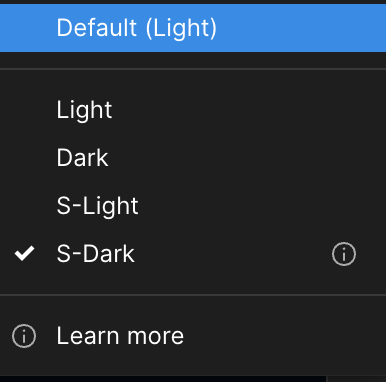
I am getting a message that says “Library assets may need to be republished for modename mode to show.” There is also a little icon next to the mode name in all of my files when selecting a palette mode. We use a single design system file that has all of our variables and the other palettes don’t seem to have the same problem. The error message is not very helpful and I have cleaned up all of the files and resolved everything I can find but this message never goes away. Can anyone help me understand what is going on?

I have included a couple of images as an example of what I am seeing.
Screenshot 2024-02-23 at 17.11.59

Best answer by Justin_Trout

This was resolved through support. What needed to happen was to set all pages in the library file to the default mode at the page-level and republish. I am still waiting to hear back about what the issue was and why this process resolved it.

28 replies

StasDoDesign
New Member
April 3, 2025

yoyoyo i have the same issue/ what the F*ck Figma? I pay you to play not to stop working!

zu.nguyen
Active Member
April 26, 2025

same issue after creating a third mode. I feel frustrated while in rush and now I can’t change the brand color for my file.

zu.nguyen
Active Member
April 27, 2025

same issue after creating a third mode. I feel frustrated while in rush and now I can’t change the brand color for my file.

Just check the components. For some reason, the link to master components is broken.

Guido Galetto
New Member
May 12, 2025

I’m having the same issue and nothing solve it 😪

zu.nguyen
Active Member
May 13, 2025

Does anyone have a solution yet? Do you, in your library components has hidden components like _components or .components? These hidden components seem will not update if you publish your library it seems

Mathias_Temmen
New Participant
September 17, 2025

I ran into this issue today. Is there any update on this? :-(


Mathias_Temmen
New Participant
September 17, 2025

This was resolved through support. What needed to happen was to set all pages in the library file to the default mode at the page-level and republish. I am still waiting to hear back about what the issue was and why this process resolved it.

Hmmm, that’s not really an option for me, so Figma should consider this a bug tbh…


Patrick Schrödter
New Member
October 7, 2025

i also ran into this problem through a huge setup - after adding new modes we cannot use them in the target file seeing the same exclamation mark icon right besides the mode-name.

How do I “set all pages in the library file to the default mode at the page-level and republish”?

Tom E.
New Participant
November 18, 2025

In our setup I was able to track this issue to a rogue variable in one of our most basic components that had at some point become disconnected from the library variable collection. Reassigning this connection fixed it.

Offending variable - you can see it does not light up in the library collection on the left when selected:


After fixing - it lights up correctly when selected:


Tom E.
New Participant
November 18, 2025

Here’s a bit of code I used to find any offending elements that had the issue I outlined above. If you select your offending component/element and run this in Figma’s console, it will:
1. Fetch the color vars from your libraries
2. Check all nodes within the current selection that have color variables assigned to any value
3. Reference all color aliases found in the selection against the library vars.
4. Select all elements that have a stale variable reference (ie. anything not found in libraries added to the file - note that this also flags references to variables defined in the file itself).
 

// From the current selection, find COLOR variables used on fills/strokes
// that are NOT present in any enabled library variable collection.
// Logs them and selects the nodes that use them.

(async () => {
const selection = figma.currentPage.selection;
if (!selection.length) {
console.log("No nodes selected.");
return;
}

// 1. Get all variable keys from enabled library collections (COLOR only)
const libraryCollections = await figma.teamLibrary.getAvailableLibraryVariableCollectionsAsync();

const libraryColorVariableKeys = new Set();

for (const coll of libraryCollections) {
const varsInColl = await figma.teamLibrary.getVariablesInLibraryCollectionAsync(coll.key);

for (const libVar of varsInColl) {
if (libVar.resolvedType === "COLOR") {
console.log(`Adding ${libVar.key}`);
libraryColorVariableKeys.add(libVar.key);
}
}
}

// 2. Walk selection subtree and collect bound COLOR variables on fills/strokes
const allNodes = [];
const walk = (node) => {
allNodes.push(node);
if ("children" in node) {
for (const child of node.children) walk(child);
}
};
for (const node of selection) walk(node);

const seenVarIds = new Set();
const nonLibraryVars = new Map(); // varId -> { variable, nodes: Set<SceneNode> }
const nodesWithNonLibraryVars = new Set();

for (const node of allNodes) {
if (!("boundVariables" in node) || !node.boundVariables) continue;
const bv = node.boundVariables;

console.log("Processing node", node.id);

const aliases = [];
if (Array.isArray(bv.fills)) {
for (const a of bv.fills) if (a) aliases.push(a);
}
if (Array.isArray(bv.strokes)) {
for (const a of bv.strokes) if (a) aliases.push(a);
}

for (const alias of aliases) {
if (!alias || alias.type !== "VARIABLE_ALIAS") continue;

const varId = alias.id;
// Fetch variable once per id
let record = nonLibraryVars.get(varId);
let variable = record?.variable;

if (!seenVarIds.has(varId) && !variable) {
seenVarIds.add(varId);
variable = await figma.variables.getVariableByIdAsync(varId);
if (!variable || variable.resolvedType !== "COLOR") continue;

const isInLibrary = libraryColorVariableKeys.has(variable.key);
if (!isInLibrary) {
record = { variable, nodes: new Set() };
nonLibraryVars.set(varId, record);
}
}

if (record) {
record.nodes.add(node);
nodesWithNonLibraryVars.add(node);
}
}
}

console.log("Enabled library variable collections:");
libraryCollections.forEach((c) => {
console.log(`- ${c.libraryName} / ${c.name}`);
});

if (!nonLibraryVars.size) {
console.log("No COLOR variables found in the selection that are missing from all enabled library collections.");
} else {
console.log("COLOR variables used in the selection that are NOT in any enabled library variable collection:");
for (const { variable, nodes } of nonLibraryVars.values()) {
console.log(
`- ${variable.name} (id: ${variable.id}, key: ${variable.key}, collectionId: ${variable.variableCollectionId})` +
` — used on ${nodes.size} node(s)`
);
}
}

// 3. Select nodes that use non-library color variables
const nodesArray = Array.from(nodesWithNonLibraryVars);
if (nodesArray.length) {
figma.currentPage.selection = nodesArray;
figma.viewport.scrollAndZoomIntoView(nodesArray);
}
})();
