

Kerstin_Stepper
July 25, 2023
Question

Is there auto layout wrap "vertical first"?

  • July 25, 2023
  • 13 replies
  • 3812 views

The awesome new auto layout! Thanks Figma <3
My topic: The wrap feature does always fill the available width, before adding a second row.
I’m looking for the setting how to fill the possible height first, before adding a new column.

In the screenshot you can see the fifth item will always align top right instead of below-right.
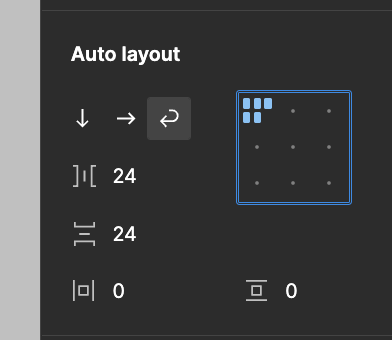
Bildschirmfoto 2023-07-25 um 12.17.16
Is there a setting to choose “vertical first” instead of “horizontal first”?

Best, Kerstin

This topic has been closed for replies.

13 replies

Greg_Huntoon1
November 1, 2023

@Kerstin_Stepper Have you put this in as a request?

Figmate
June 3, 2024

3 posts were split to a new topic: Auto layout wrap vertical option

ange1sha
New Member
August 13, 2024

Hello Haroll. I am implementing your solution for a component in my design system. But the width and height values are now interchanged. And this is misleading for designers, devs and PMs using or inspecting my component.
I also still want to use the spacing:Auto feature so that the nested elements can arrange themselves to fill spacing horizontally within the container as it changes width.
Achieving these is challenging. Have you come across a similar scenario?