

sekeidesign
April 7, 2021
Question

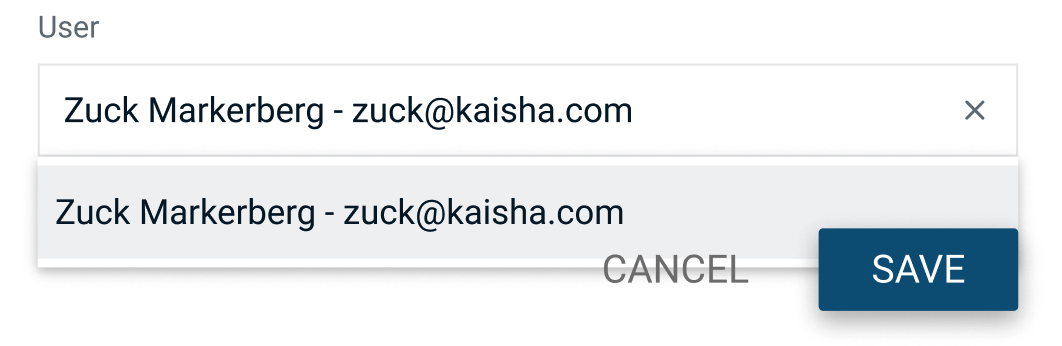
Is there any way to change the "z-index" of an auto-layout child?

  • April 7, 2021
  • 35 replies
  • 58653 views

I’m using auto-layout for this modal, just like I do for pretty much everything else, and I’m creating a modal, with a text field, and a dropdown.
The dropdown should float above the buttons, and I’d prefer to do this with auto-layout. (I know I could use an overlay, it would be nice to control the z-index somehow though)
This topic has been closed for replies.

35 replies

Slava_Bronevitskiy
Active Member
August 20, 2022

And now add a dropdown component where options open downwards, with tooltip flying upwards, and you are back to the frustration land.

This stacking order does not fill the need for z-index

impactby.design?ref=nI
Simon_Steer
August 31, 2022

Not sure if I understand your specific case correctly, but do you mean something like this?

I was able to achieve this without modifying any auto-layout child’s z-index. The Figma file is public so if you want to see how everything is set up you can do so here:

Figma – 31 Aug 22
Slava_Bronevitskiy
Active Member
September 1, 2022

This is the case

impactby.design?ref=nI
Simon_Steer
September 1, 2022

I see. You can still achieve this effect with auto layout and reversing the stacking order of items, but you will have to reorganize how your UI is built somewhat.

Instead of having a single vertical auto layout and several rows, you will want to have a vertical auto layout for each column’s rows (ID/Risk/Status). You can then set the stacking order for the Risk column to “First on top”, and the stacking order for the Status row to “Last on top”.

I updated the file I shared earlier with this prototype, so feel free to take a look at it to see how I’ve set it up. Maybe not the cleanest solution, but it will do what you need.

Slava_Bronevitskiy
Active Member
September 2, 2022

Hi Simon. I appreciate you going new lengths to workaround the lack of adjustable z-index mechanism and recreating the scenario.

You solved the problem locally. There are many other creative ways to solve this locally. Like rendering tooltips as overlays for example.

You changed the layer structure from row-based to column-based. This allowed you to have up and down flyouts to display correctly, but broke row hover possibility, cell stretching when one of the cells has multi-row content and will still have the same z-index issue for everything extending left and right. So you basically rotated the problem from vertical plane to the horizontal, creating additional non-z-index related errors.

image

Without z-index properly implemented by Figma, workarounds will always be solved in one place, but always break in another.

We have a modular (cell content, cell, row, grid) data grid component in our design system, used across an enterprise application landscape. And data grid is just one of many components affected by the lack of z-index. Others are lists, selectors, search forms and more.

Patching all instances locally is a seriously bad decision because of the scale. It will require design maintenance effort that is larger than the benefits it returns. We are better off calling front-end developers when they are about to develop the UI to explain things verbally, or creating a throw-away screenshots.

Although your help effort is appreciated, this is not an issue a community member can help resolve. This is a request to Figma dev team for an irreplaceable functionality. Unfortunately Figma is not hurrying.

impactby.design?ref=nI
Lucien
New Member
October 12, 2022

The “canvas stacking” option solved the issue for me! Thanks Simon.

Sudarshan_Mane
December 23, 2022

You Are Real Hero!

Tiffany_Loue
June 15, 2023

You are my hero for today ! 👏🏼

Paul_Lyons
New Participant
October 5, 2023

Agree 100% @Slava_Bronevitskiy.

Any news Figma Support?

Is this in the pipeline as a future feature?

Ivan_Bravo
October 21, 2023

Just use absolute position instead auto-layout on the faulty component.