

Uria_Fassina
May 12, 2022
Question

Icon color changes on master component don't propagate to its instances that have icons swapped

  • May 12, 2022
  • 14 replies
  • 3185 views

Ok, sorry for the long title but let’s try to be straight to the point:
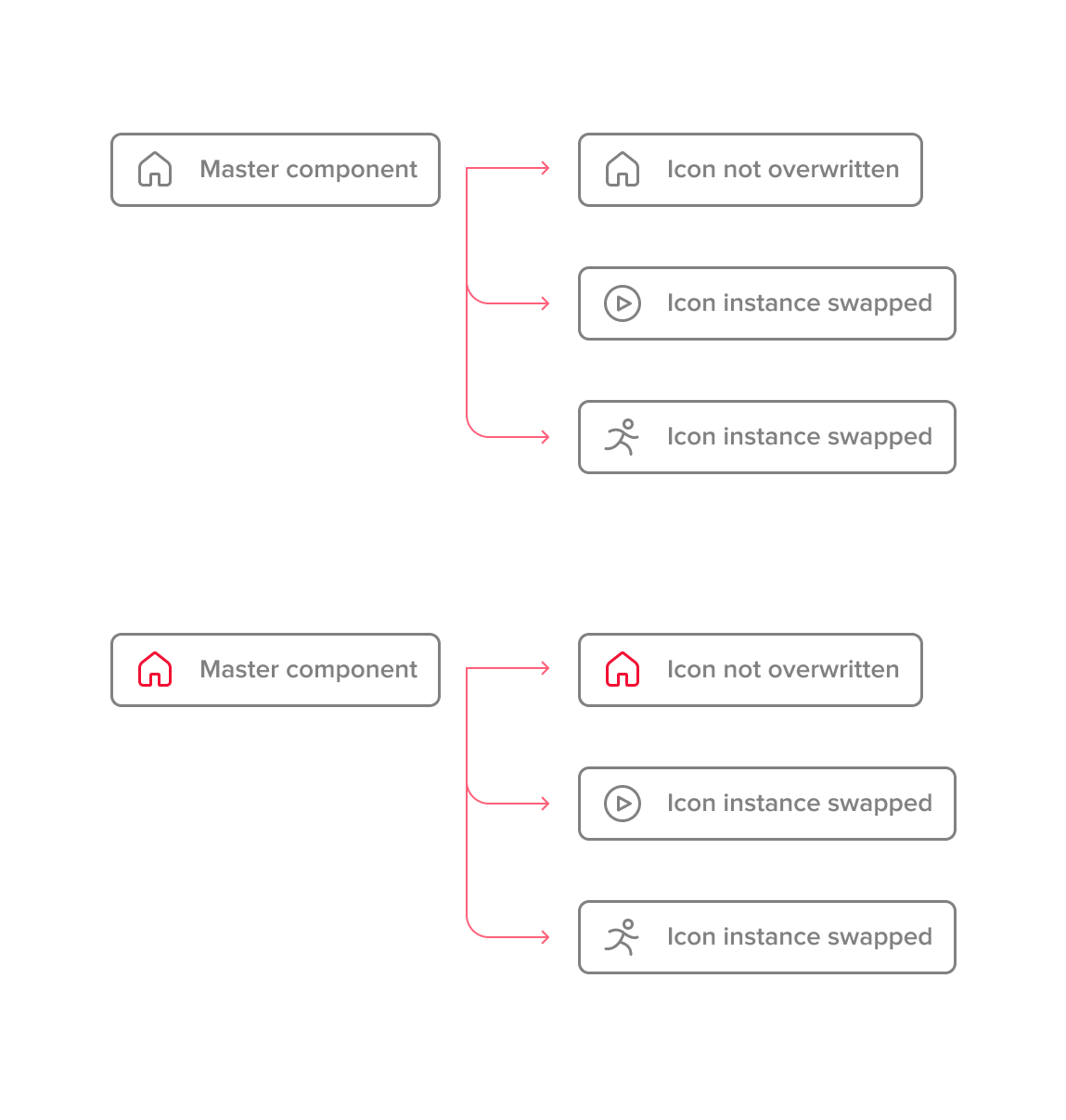
At the right-hand side you guys see instances that had its icons swapped. All the icons are also components.

Is there a way to change the icon color on the master in a way that propagates to all the instances including the ones that had its icons swapped?

Note that this is not the same issue addressed by Rogie here. It is kind of the other way around.

Thanks guys!

This topic has been closed for replies.

14 replies

carlhauser
May 13, 2022

Hey Uria_Fassina,

I think what you want to do works pretty well with Rogie’s trick. You just need to set up the master component icon instance as an intersected element.

Hope that helps!

Uria_Fassina
May 13, 2022

Now you made me more confused than before. I always use the “union hack” to set my icons and never could accomplish what you just showed.

What am I doing wrong?

Would you mind sharing this file?
Super thanks!

carlhauser
May 14, 2022

Haha, I hope that File makes you less confused and that it solves your issue

Have a great day

StLa1
August 3, 2022

Hi Carl, your file works because you added the 3 icons as variants.
But if you separate them into 3 components, even with the same sublayer names (Vector), it won’t work, which is the issue @Uria_Fassina is running into (I assume).

This means icon sets must be built with one single “Icon” component, which is limiting.

Preslava
September 5, 2022

Guys, I have the same problem and it’s driving me crazy. I have all of my icons set as separate components then I have a frame with no fill with the icon in it made as a new component with variants changing color and swap incense used. As a result the icons change but some of them won’t change their color (all the icons are simple path and I didn’t find any difference in them). Did you find a solution?

VladKo
New Member
October 5, 2022

Same problem.
Problem appears when I use “Add swap property” for an icon in a Master button - after that icon will always lost/reset color.

If I use the old approach and don’t “Add properties” to the icon in the Master button - the colors are preserved and everything works perfectly.

Radiyya
October 10, 2022

Hi…I am having the same issue…I am using an icon as part of a component. the icon is a different colour to the Icon set…when i instance swop the icon it reverts back to the original colour

Gerlof
New Member
November 4, 2022

Same issue here.

Fabio_Giolito
March 15, 2023

this bug still seems to happen.

Swapping the icon instance in a button causes icon to revert back to the original color instead of keeping the color set in the button component.

Tried some hacks people mentioned in a closed thread with no success, such as:

  • Create a union operation of the icons then move them out of the union
  • Force the icons to another color then back to the desired color
  • Make sure icons are flat and vector layer is named the same across all icons
DeAnna
New Participant
March 16, 2023

Hi, I also have icons as separate components but instead of a frame, used a square vector to determine padding. Would adding a frame make a difference?

The icon will change colors with swap instance but not always. Sometimes it’s only parts of the icon that change and/or the vector for padding changes to a solid. Is anyone else having a similar issue with the padding vector or frame becoming solid?