

Slava_Bronevitskiy
Active Member
May 5, 2021
Question

How to persist color overrides between instance swaps?

  • May 5, 2021
  • 18 replies
  • 10308 views

User case:

Simple button that uses an icon of color, which I’d like to keep after swapping it with another icon. It’s very common use case and I have no idea how to achieve. Currently I’m messing up my designs by re-applying color in each and every instance in each and every design after each and every swap.
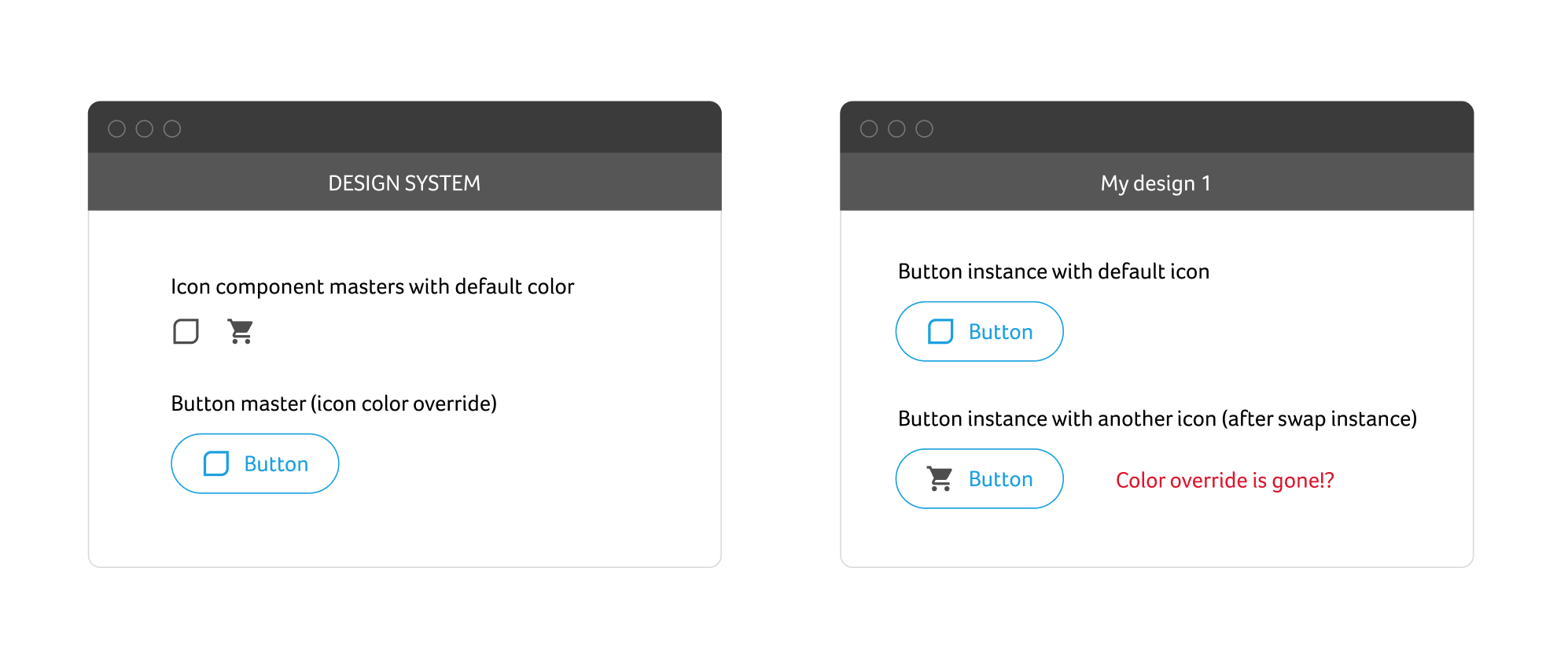
Design System loses it’s value if designs are not set up to follow it. So I really would like to know this.

This topic has been closed for replies.

18 replies

October 3, 2023

Hi Nathi, if you don’t mind sending me link to the file, I can take a look and see if we can fix it somehow.

Andrew_Jasper
December 11, 2023

god bless your tender heart

Oliver_Schwaiger
New Participant
January 10, 2024

Hey @Pratyush_Tewari you are using shapes here right? Probably made out of different unified shapes with stroke and fill properties. While they can include both, once you unify them, they actually receive the color information via the fill prop if you want to change it, and as this is the same everywhere that works fine.

However if I want to use instances inside a wrapper component and inside this one change the color override of the nested one (that can then change from stroke prop to fill prop) this override will not be passed on.

I guess this is just something I have to live with and always go with a unified shape approach. Let’s see

January 10, 2024

Hi @Oliver_Schwaiger - The icons ((union / and flattened - like you mentioned, I created a massive library of about 3000 icons form the new google variable font symbols).

In my previous screenshot, these icons are being used inside the button component as an instance swap property. The buttons have colored states (like hover and disabled) and I have changed the color of the shape in each button variant.

the color override works through the instance swap for me because the following two conditions:

  1. all of the 3000 shapes have same name (“vector” in my case) and
  2. I have directly overridden the colors of the shapes (which have the same name, height and width) and not on the frame of the icon (which has unique names).

So when even I swap for a new icon in a button … the color override for states and variants work across all the 3000 icons inside for that icon.

I’ll make a video about it and share to explain as it seems like an important feature for massive design systems.

April 10, 2024

Thanks for the simple example. I was struggling with this problem for a long time.

Matt_Lawes1
May 16, 2024

Please can you link me to this video tutorial if it exists?

Pedro_Camacho_Huaman
July 24, 2024

Muchas gracias por la información. Al día de hoy (024/07/2024) funciona este método, tenía mal nombrado las capas de los íconos y al momento de cambiar de color en los componentes los íconos no respetaban el color que asignaba, cuando cambié el nombre de los iconos por la palabra “icon” a todos por igual, funcionó por magia. Muchas gracias por la solución, me he demorado días resolviendo este problema.

Sayalee_Rakh
October 1, 2024

Solution: Apply colour styles to the assigned variables on your main component.