David_Herreman
New Participant
July 11, 2023
Solved

How to detach a variable on layer level without deleting it from the local variables list?

  • July 11, 2023
  • 21 replies
  • 5659 views

How exactly do you detach a variable from a layer without deleting it from your local variables list? Right now you have to make the entire thing from scratch or am I missing something?
This topic has been closed for replies.
Best answer by David_Herreman

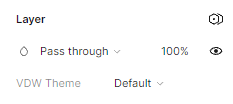
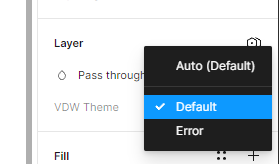
I’m talking about a variable applied on layer level. As you can see no way of detaching:
image
image
image

21 replies

KennLucas
June 27, 2024

I can’t follow any of the solutions on this page. But I DID find today that if you select the nested layer and then change the variable collection to AUTO, it removes it and follows the parent.

That solved my problem.

Not sure if that is the same solution you posted. But doing that worked for me today.