David_Herreman
New Participant
July 11, 2023
Solved

How to detach a variable on layer level without deleting it from the local variables list?

  • July 11, 2023
  • 21 replies
  • 5659 views

How exactly do you detach a variable from a layer without deleting it from your local variables list? Right now you have to make the entire thing from scratch or am I missing something?
This topic has been closed for replies.
Best answer by David_Herreman

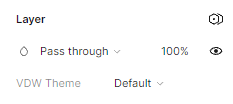
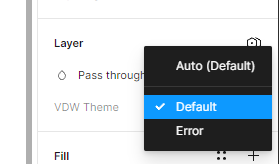
I’m talking about a variable applied on layer level. As you can see no way of detaching:
image
image
image

21 replies

Kino.W
New Member
September 18, 2023

I think it’s a bug.
In my case:

  1. I deleted a collection containing 2 modes that were applied to a component’s frame.
  2. In the layer variable mode dropdown of the component instance, I can still see the deleted collection & mode name (which is not available since they have been deleted).
  3. I detached the instance and the ghost variable option was still here.

Now I have to ungroup & recreate the component’s frame to “remove the ghost variable”.

The structure of the variable should be very stable before applying it to the ui element 🫥

October 9, 2023

Came across this problem multiple times…It looks like a bug or a bad design.

Laura_Silvani2
New Member
February 2, 2024

I have the same issue 😦 I have copied some components from one file, and these components have variables. I want to get rid of them but it is impossible. I am looking into some plugins at this point…

February 28, 2024

Having the same problem. this is pretty annoying. happy I found out about this bug, before I have done a lot of designing with the variables.

This should be fixed ASAP.

Just make Variables be detachable on Layers.

Figmate
February 29, 2024

Hello there, Thank you so much for bringing this to our attention. I completely understand how frustrating this situation can be.

When a variable is applied to an element or a nested layer, its collection is also applied to the layer and the parent layer. If the variable has multiple modes, you can switch between them by clicking on “Change variable mode” icon in the “Layer” section of the right sidebar.

I tested this on my end and found that detached variables applied to all nested elements or changing the variable applied to nested elements without multiple modes caused the “Change variable mode” icon to disappear from those “Layer” sections, as @21222090_Wataru_yamanouchi mentioned.

You can find more details on variable modes here:

Figma Learn - Help Center

I hope this information is helpful! Please don’t hesitate to let us know if I missed anything. Additionally, we welcome any further insights from community. Feel free to join the discussion!

Thank you,

February 29, 2024

Well, Thank you for sharing that Video.

Though, it is pretty annoying to be pressed to remove the corresponding variables from ALL “child frames”, before it disappears from the “parent frame”.

Why not just make it so that you can detach it from the parent frame itself. Without any child frame being changed?

That really irritates me!

Badly implemented?

Would be cool if a Figma employee could share the reasoning behind this “bug”. Or is it a feature?

Nice day to you all.

Stephan_Loewe
New Participant
March 19, 2024

Yes, it’s very bad implemented. Even worse, if you copying from other files you inherit these variables and they confuse the shit if they have familiar names.

March 19, 2024

I try to avoid modes now where ever I can - too bad, its a good concept.

Jan_Kopriva_BSSHOP_s.r.o
New Participant
April 24, 2024

Same problem… It is Bug AF! Dont tell me, you have to delete all variables inside, to delete the variable mode… Please fix it Figma Team!!!

KennLucas
June 27, 2024

Figma fail.