

joshmillgate
May 31, 2022
Question

How to delete a variant property

  • May 31, 2022
  • 14 replies
  • 20995 views

I simply want to delete the property “Label Size” on all my variants. I could do this by renaming the layers and removing “Label Size=Sm” but I have hundreds of variants and that would take forever… I can’t right click on the property anywhere.
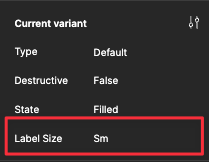
CleanShot 2022-05-31 at 16.47.11

This topic has been closed for replies.

14 replies

tank666
October 4, 2022

I can only suggest that you write a script (or find a plugin in the Figma Community with such functionality) that will take the description from the Component Set and apply it to the Variants within it.

UX/UI designer. Figma expert. Creator and developer of plugins and widgets for Figma and FigJam. Check out my resources in Figma Community: figma.com/@tank
Rob28
October 4, 2022

I’ll keep digging. Thanks again!

CJ_Josephs
October 13, 2022

Exactly how I found this thread. I have removed all variants and have “rounded” left and would like to remove “rounded” and leave the icon asset the way it is.

MiloW
Active Member
October 15, 2024

Well, I have no variants, just one element in the component and I click - and nothing happens, it just resets my property to Default… OMFG