

Julija4
New Participant
April 24, 2025
Question

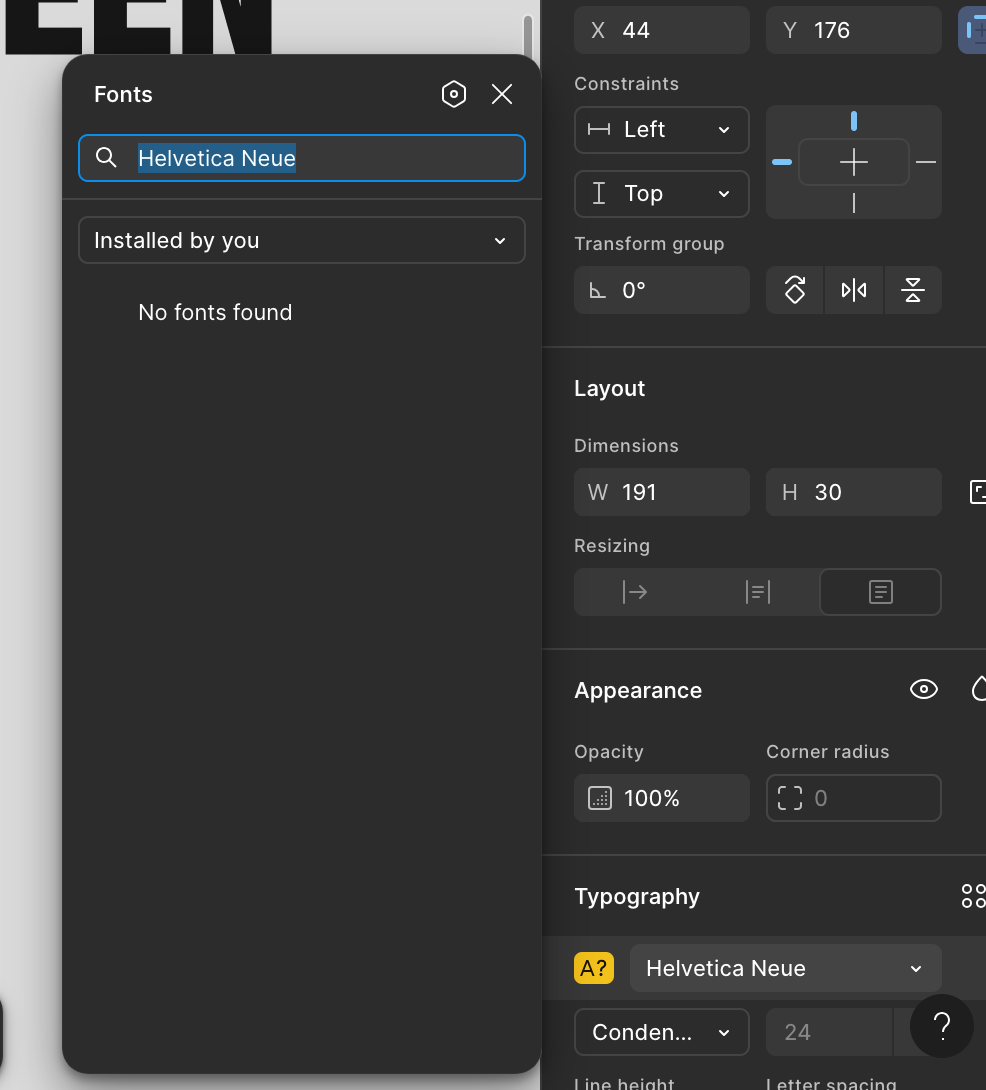
Font Installer/ Figma Agent Issue

  • April 24, 2025
  • 37 replies
  • 7357 views

Hi everyone,

I use Figma on the web, my macOS version is Sequoia 15.4.1. I have installed the Figma Agent and it said I can use local fonts on the web, but this is not working. I tried everything from clearing cache, restarting computer, refreshing page but Figma still doesn’t show the fonts under “Installed by You”. I also have the latest google chrome version. I can’t see the fonts in an existing Figma project and also not if I create a new file. Other programs on my mac like Adobe Illustrator show all fonts without an issue.

Any solutions? Thank You!


This topic has been closed for replies.

37 replies

Farah8911
New Member
April 24, 2025

I’m having the same issue and can’t troubleshoot, no matter how many times I reinstall the font and the Font Helper. Following along to see if anyone has a workaround here.

djv
Figmate
Community Support
April 24, 2025

Hey All, sorry for the trouble!

@Julija4 - When was this last working as expected for you? Did you recently update your macOS? 

@Farah8911 - What OS are you using? And when was this last working as expected? 

Julija4
Julija4Author
New Participant
April 25, 2025

@dvaliao  Yes, I had to reset my Mac 2 days ago and therefore to redownload the fonts and the Figma Agent. The last time this was working was before the reset and if I am not mistaken the Figma Agent I previously had installed was called “Figma Font Helper”.

julijacreates.com
djv
Figmate
Community Support
April 25, 2025

Thanks for the context, ​@Julija4

Did you add the fonts before or after re-installing the Figma Font Helper?

After installing it, it best to then reinstall your fonts then make sure to restart your computer or at the very least reload any open files or tabs in your browser — this refresh should trigger Figma to detect the new fonts.

Julija4
Julija4Author
New Participant
April 26, 2025

@dvaliao Previously, I did it in the same order as written here: https://help.figma.com/hc/en-us/articles/360039956894-Add-a-font-to-Figma-Design


Now I reinstalled the fonts and restarted and reloaded everything–as you recommended, but it is still not working. Maybe the Figma Agent File is broken? There is no indication of an installation process, just an immediate success message. I also can’t find the Figma Agent in my Applications folder after installing. Could you provide a link to the installation file? Maybe mine is outdated...

julijacreates.com
JoannaMN
New Member
April 26, 2025

I’m on a Mac using Safari, and I am having the same issue. I’ve gone through the steps multiple times for the Font Agent Mac installer. Although I get a success message, there is no Font Agent app in my applications folder. 

No matter what I do, I can’t get the custom fonts to show up on the Web version of Figma.

Julija4
Julija4Author
New Participant
April 30, 2025

Hello? ​

@dvaliao 

julijacreates.com
tank666
April 30, 2025

​Could you provide a link to the installation file?

https://desktop.figma.com/agent/mac/FigmaAgent-125.3.6.zip

UX/UI designer. Figma expert. Creator and developer of plugins and widgets for Figma and FigJam. Check out my resources in Figma Community: figma.com/@tank
Julija4
Julija4Author
New Participant
April 30, 2025

​Could you provide a link to the installation file?

https://desktop.figma.com/agent/mac/FigmaAgent-125.3.6.zip

Thank You! But didn’t work either😩

julijacreates.com
tank666
April 30, 2025

[…] but Figma still doesn’t show the fonts under “Installed by You”.

Are installed fonts listed under "All fonts" in the Figma font picker?

UX/UI designer. Figma expert. Creator and developer of plugins and widgets for Figma and FigJam. Check out my resources in Figma Community: figma.com/@tank