

ahmad_tabby
New Member
March 29, 2022
Solved

Figma Mirror app doesn't render the design correctly

  • March 29, 2022
  • 69 replies
  • 7290 views

When using mirroring on my phone, the design doesn’t show properly. Sometimes there are missing elements, or elements that are not fully visible.

This happens even when I open Figma Mirror on my phone’s browser.

Here’s how my design shows up:
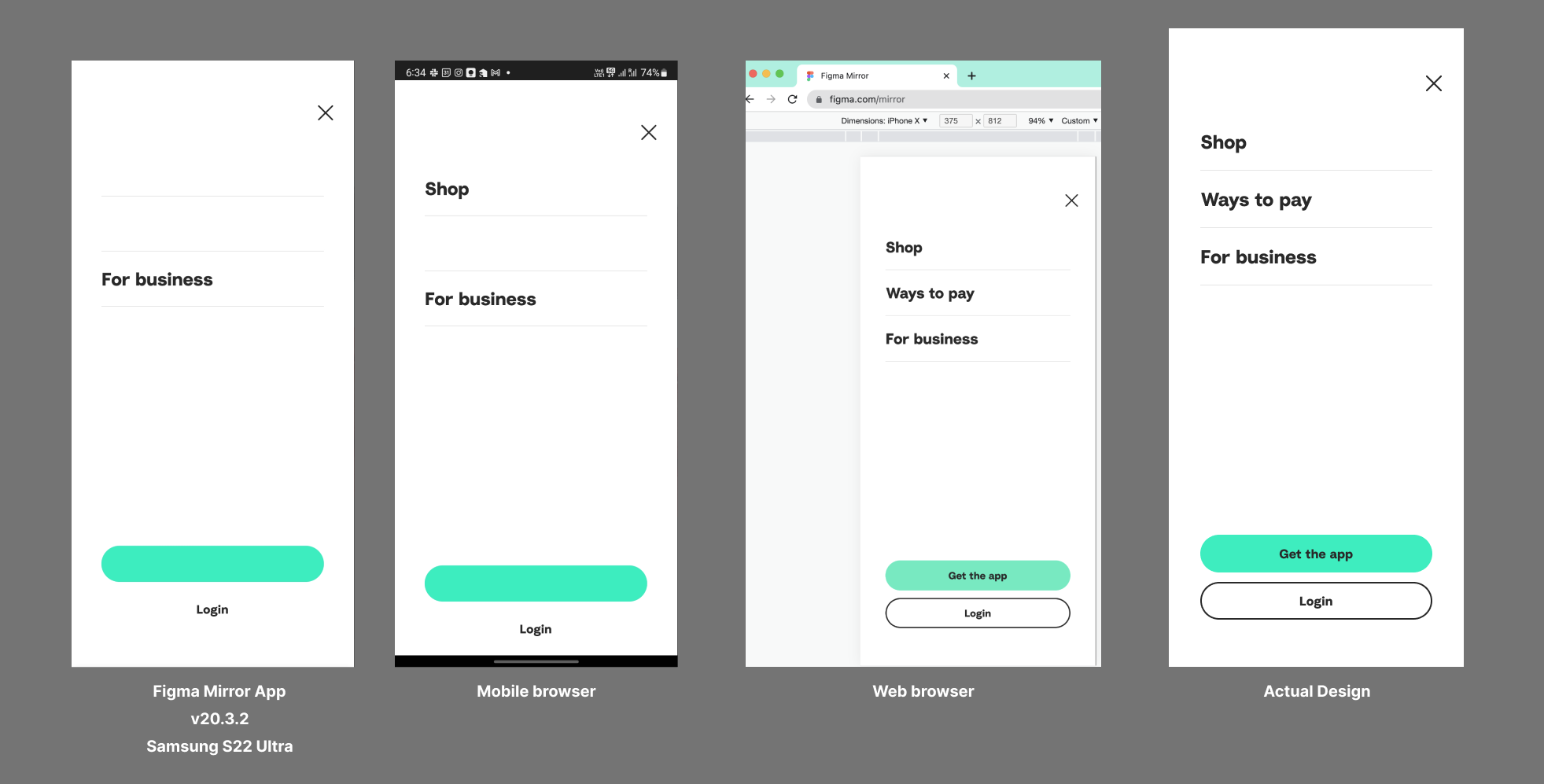
I’m using the Samsung Galaxy S22 Ultra. Already tried re-installing the app and clearing the cache.

This topic has been closed for replies.
Best answer by John_L

Hi all,

We’ve pushed a fix that we think may help with the S23 issues you’ve reported. Can you let us know if things seem to be better or if you are still having trouble?

Thanks,
John

69 replies

ahmad_tabby
New Member
March 29, 2022

Here’s another example with more elements in the frame:

omer_tzur
April 3, 2022

I’m also having this exact issue, this started happening right after I switched to the Galaxy s22 plus.

ahmad_tabby
New Member
April 3, 2022

Yea same for me. Worked fine on my Galaxy S21.

omer_tzur
April 5, 2022

I contacted Figma support about this, hope they can help us out.

Do you know if the problem has to do with android 12 or the new SOC?

lijie
April 6, 2022

Worked fine on my Pixel 6 with android 12.
I guess it just happen on Galaxy s22 s22+ and s22u.

lilinyang
April 7, 2022

I have the same problem with three mobile phones, s22+ ,xiaomi12 ,oppo find x5 pro

omer_tzur
April 8, 2022

So the problem has to do with the Snapdragon 8 gen 1.
In that case there are a total of 10 phones right now that are experiencing this problem.
Let’s hope it will be fixed sooner rather than later

Altamash_Shaban
April 19, 2022

Yeah!
Having the same issue on my S22 Ultra as well!
I hope it will be fixed soon.

eCraft
May 8, 2022

This bug still exists, any comments from figma side?

Rocio_Espinoza
May 10, 2022

I having the same issue with s22.
I hope it will be fixed soon