
Solved

Figma Make: React Warning: “React does not recognize the %s prop on a DOM element”

  • March 11, 2026
  • 35 replies
  • 430 views

m1n3g


Both of my projects started showing this warning today while using Figma Make. The warning appears in the console and points to a React issue. Is anyone else experiencing the same issue?
 

Any insights or solutions would be appreciated.


Best answer by Celyn_L

Hi everyone,

Our Engineering team has pushed a fix and confirmed that the issue has been resolved. Please refresh your files and let us know if you’re still experiencing any issues.

Thanks again for reporting this and for your patience!


35 replies

Eugene87
  • New Participant
  • March 11, 2026

I experince similar issues. No solutions so far.


Eugene87
  • New Participant
  • March 11, 2026

I’ m experiencing persistent React warnings in the console when working with a prototype built in Figma Make.

From what I understand, these props are injected by the Figma preview environment, but React treats them as invalid DOM attributes and throws warnings.

Additionally, the preview sometimes shows visual artifacts and triggers automatic page reloads repeatedly, which makes working with the prototype nearly impossible.

Has anyone experienced this before?

[Moderator note: This post was merged from “Figma Preview Injecting _fgT/_fgS/_fgB Props → React Warnings + Auto Page Reload Loop FIGMA MAKE” into "Figma Make: React Warning: “React does not recognize the %s prop on a DOM element”
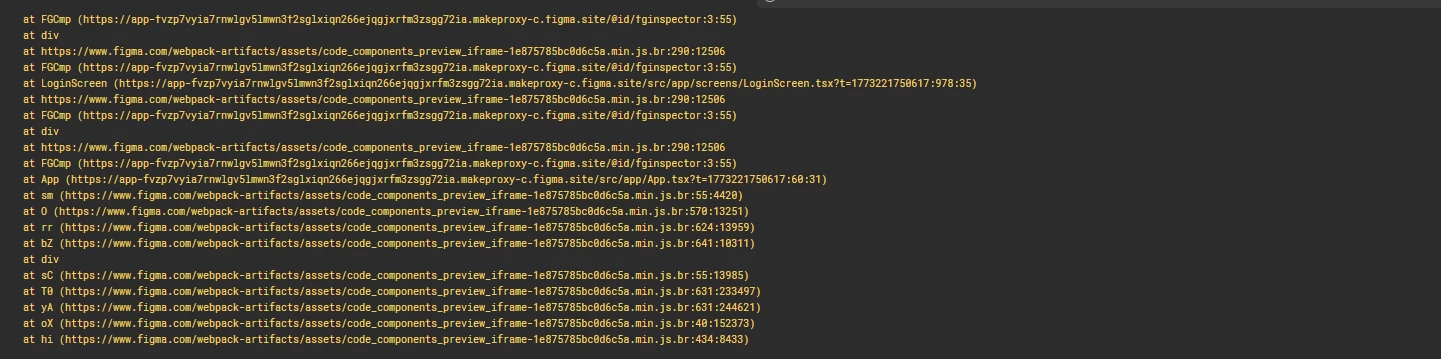

I started encountering this yesterday.

My Figma Make freezes on certain elements. I found that it starts to freeze on Dropdown Items, which makes it impossible to work on the interface.

The styles have also changed (some elements have changed color, outlines have been added or removed, which I did not do).


There were also errors like this:

But the funny thing is that when you deploy a project to Publish or Static Files, everything is fine. But when you work through the Figma Make builder, errors occur.

I assume this is a bug on Figma's side.


[Moderator note: This post was merged from “Figma Preview Injecting _fgT/_fgS/_fgB Props → React Warnings + Auto Page Reload Loop FIGMA MAKE” into "Figma Make: React Warning: “React does not recognize the %s prop on a DOM element”


Same. ​@Andrew_Chan ​@seni ​@Gayani_S ​@Tom Reem 


My Figma Make freezes on certain elements. I found that it starts to freeze on Dropdown Items, which makes it impossible to work on the interface.

The styles have also changed (some elements have changed color, outlines have been added or removed, which I did not do).


There were also errors like this:

But the funny thing is that when you deploy a project to Publish or Static Files, everything is fine. But when you work through the Figma Make builder, errors occur.

I assume this is a bug on Figma's side.


@Andrew_Chan ​@seni ​@Gayani_S ​@Tom Reem 

Please can you help us 


m1n3g
  • Author
  • New Participant
  • March 12, 2026

Same. ​@Andrew_Chan ​@seni ​@Gayani_S ​@Tom Reem 


My Figma Make freezes on certain elements. I found that it starts to freeze on Dropdown Items, which makes it impossible to work on the interface.

The styles have also changed (some elements have changed color, outlines have been added or removed, which I did not do).


There were also errors like this:

But the funny thing is that when you deploy a project to Publish or Static Files, everything is fine. But when you work through the Figma Make builder, errors occur.

I assume this is a bug on Figma's side.


I also suspect this is a bug on the Figma Make side.


YuriiV
  • New Member
  • March 12, 2026

I am experiencing the same issue just today. Seems like it’s something to do with the update. Although, everything works perfectly fine for other Figma Make projects – the issue occurs only with the one.

Team Figma, please fix :)


Celyn_L
Figmate
  • Figmate
  • March 12, 2026

Hey everyone — thanks so much for flagging this and for sharing your experiences.

I’m sorry you’re running into the React warning: “React does not recognize the %s prop on a DOM element” while using Make.

I’ve shared these reports with our Engineering team, and they’re actively investigating. I’ve also created support tickets on your behalf so the team can take a closer look and follow up with you directly.

@Eugene87 — I’ve located your support ticket (#1789796) and have given it a bump for visibility.
@m1n3g — your case number is #1790827.
@Boris Octalysis — your case number is #1790831.
@YuriiV — your case number is #1790863.

When you get a chance, please share the impacted file with support-share@figma.com and grant “Can View” access — this won’t affect your billing and will help us reproduce the issue more efficiently with Engineering.

Thanks again for flagging this, our team will be in touch shortly with next steps.


Davide Albanese

Hi,
we're having the same problem with a Figma Make project. When I click on a dropdown item, the entire interface freezes. This happens in both preview and full-screen view. Is there support available? Or do we just have to wait?

Thanks a lot

Hey everyone — thanks so much for flagging this and for sharing your experiences.

I’m sorry you’re running into the React warning: “React does not recognize the %s prop on a DOM element” while using Make.

I’ve shared these reports with our Engineering team, and they’re actively investigating. I’ve also created support tickets on your behalf so the team can take a closer look and follow up with you directly.

@Eugene87 — I’ve located your support ticket (#1789796) and have given it a bump for visibility.
@m1n3g — your case number is #1790827.
@Boris Octalysis — your case number is #1790831.
@YuriiV — your case number is #1790863.

When you get a chance, please share the impacted file with support-share@figma.com and grant “Can View” access — this won’t affect your billing and will help us reproduce the issue more efficiently with Engineering.

Thanks again for flagging this, our team will be in touch shortly with next steps.


Eugene87
  • New Participant
  • March 12, 2026

To this problem I can add another one. Now I can’t publish/update my prototype as well. Have some emergency. Hope it will be fixed very soon.


m1n3g
  • Author
  • New Participant
  • March 12, 2026

To this problem I can add another one. Now I can’t publish/update my prototype as well. Have some emergency. Hope it will be fixed very soon.


I didn’t have this issue on my site, but when I tap the dropdown, the whole screen freezes, including the pointer function.


Eugene87
  • New Participant
  • March 12, 2026

To this problem I can add another one. Now I can’t publish/update my prototype as well. Have some emergency. Hope it will be fixed very soon.


I didn’t have this issue on my site, but when I tap the dropdown, the whole screen freezes, including the pointer function.


Yes, this problem still exists.

Short review meeting to assess progress in receiving quality and forward progression.


.


Product Claro

I'm having the exact same problem on the site, not just with one, but with all the Figma Make files I had open. Less than an hour ago, the only copy that hadn't crashed yet stopped working. The same console errors, the same failure when activating any dropdown menu, and some icon buttons have changed size and color. 


ksn
Figmate
  • Community Support
  • March 12, 2026

Hi everyone - I’m stepping in for ​@Celyn_L to let you know that we have a bug ticket filed for this, and our engineers are now working on addressing the issue.

We will update you as we learn more - thank you for your patience!


Sanjana Danait


> My Figma Make freezes on certain elements. I found that it starts to freeze on Dropdown Items, which makes it impossible to work on the interface.The styles have also changed (some elements have changed color, outlines have been added or removed, which I did not do).

I’m facing these exact same issues since last night. Trying debugging multiple times and nothing really fixes it so I suspect this is a FigmaMake bug. Just created a support ticket for this as well.


ksn
Figmate
  • Community Support
  • March 12, 2026

Hey everyone! Can you all try refreshing and see if things are working as expected again? There was a fix we pushed, and want to verify everything is well.


Hey everyone! Can you all try refreshing and see if things are working as expected again? There was a fix we pushed, and want to verify everything is well.

 
Just reloaded.  And everything froze again after click to Dropdown.


ksn
Figmate
  • Community Support
  • March 12, 2026

@Boris Octalysis I just sent you a follow-up PM to touch base - thanks!


YuriiV
  • New Member
  • March 12, 2026

Hey everyone! Can you all try refreshing and see if things are working as expected again? There was a fix we pushed, and want to verify everything is well.

Tried to reload the page. Still the same issue – freezing after pressing dropdown.


Exago Team
  • New Member
  • March 12, 2026
Hello, here in Brazil we are also facing the same problem, still without a solution. We observed this afternoon that the warnings even freeze the interface, making it impossible to use.

⚠️ Warning: React does not recognize the `%s` prop on a DOM element. If you intentionally want it to appear in the DOM as a custom attribute, spell it as lowercase `%s` instead. If you accidentally passed it from a parent component, remove it from the DOM element.%s _fgB _fgb


Sanjana Danait

Hey everyone! Can you all try refreshing and see if things are working as expected again? There was a fix we pushed, and want to verify everything is well.

Seems to be working for me now! No more errors/warnings in the console and icons/buttons/dropdown styles are back to what they were earlier. Thank you!  


m1n3g
  • Author
  • New Participant
  • March 13, 2026

Hey everyone! Can you all try refreshing and see if things are working as expected again? There was a fix we pushed, and want to verify everything is well.


The freezing issue still occurs when I click any dropdown on the screen. 


The freezing issue still occurs when I click any dropdown on the screen. 


Hey everyone! Can you all try refreshing and see if things are working as expected again? There was a fix we pushed, and want to verify everything is well.

Seems to be working for me now! No more errors/warnings in the console and icons/buttons/dropdown styles are back to what they were earlier. Thank you!  


Hi. Try making any prompt for your Figma Make, and then try clicking on the dropdown. Tell us what happens.


Eugene87
  • New Participant
  • March 13, 2026

Same problem exists. System becomes iressponsive. Artifacts in the dropdowns still exist.