Hey everyone! Thanks again for raising these questions about AI credit limits. Good news: we have a few updates for you!
Starting December 9 (and rolling out over the next week), we’re adding more transparency around how AI credits are used across Figma products. You’ll now be able to track your AI credit usage directly in Figma. We’re also expanding the ways you can add more credits next year.
Here’s a summary:
Starting this week, you’ll be able to track your AI credit usage in Figma.
Next year, we’re introducing new ways to buy AI credits:
Starting March 11, 2026, you'll be able to add more credits through an ongoing subscription.
By Q2 2026, you’ll have an option to pay-as-you-go for more credits.
Starting on March 18, 2026, we will enforce all seat credit limits.
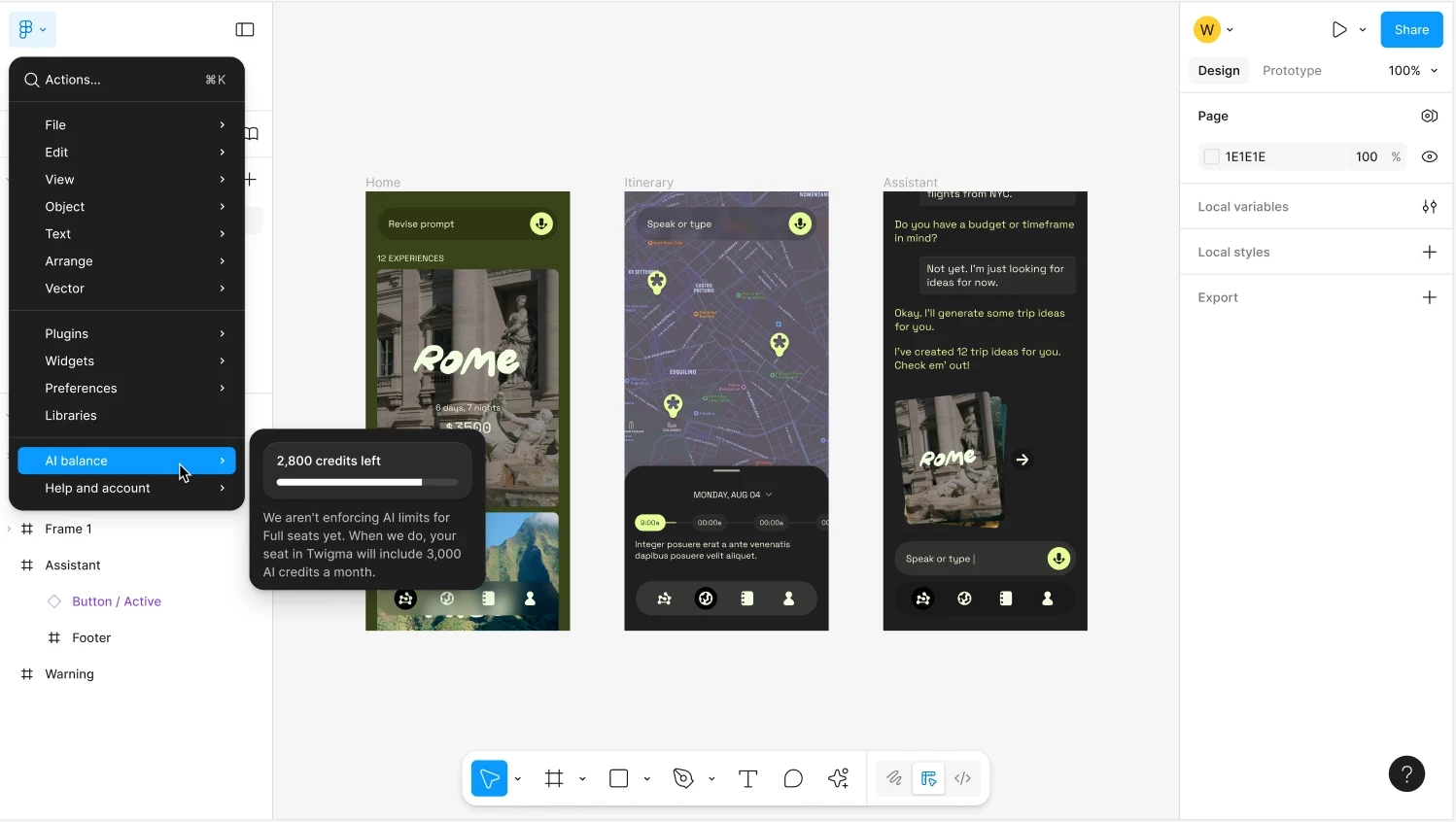
For example, toview your seat credits. You can now view how many credits you’ve used, how many credits you have remaining, and when they’ll reset directly in your file menu:
We’ve also introduced a new AI credits page for admins on paid plans to track AI usage across their plan. Read more about managing AI credits as an admin in ourHelp Center.
Hey @Konstancja , thanks for flagging it! I’m not sure if your case is connected, but there was an issue that occurred yesterday. If you’re on Full seats, you should not be seeing the message: “You’ve reached your current limit. Your credits will reset on xxx.” Our engineers were aware of the problem and have already released a fix. Please refresh Figma and try again to ensure you’re on the updated version. If you’re still seeing the message and would like our team to take a closer look at your account, please submit a report.
On your question about buying more prompts: later this year we plan to introduce the option to purchase additional AI credits for more flexibility. In the meantime, you can find more details in our Help Center article: How AI credits work
We’re sorry for any inconvenience this caused, and thank you for your patience!
Question about the Figma Make Credits and Prompt limit. Looking at the data in the link you provided, it looks like users on the Enterprise Plan are allowed 4,250 credits per month. Is that per user or per Enterprise? For example, if our company has an Enterprise account, does each user with a full license get 4,250 credits per month or does the whole company only get 4,250 credits per month?
Full seat AI credits:
Professional plan
Organization plan
Enterprise plan
3,000 credits per month
About 50-70 Make prompts based on current estimates
3,500 credits per month
About 60-80 Make prompts based on current estimates
4,250 credits per month
About 80-100 Make prompts based on current estimates
Hey @Bryan Long , thanks for asking this question! Each user with a Full seat gets 4,250 credits per month on Enterprise account, hope this clarifies!
Hey Bryan, happy to clarify! At the moment, there isn’t a way to view your remaining AI credits directly in your account. You’ll receive an in-product notification once you reach your daily or monthly limit, as well as when your credits reset. Just a heads-up, unused AI credits expire at the end of each day or month and don’t roll over. Hope this helps!
I am an instructor currently teaching the Figma Make course, and it seems that my credit points have run out. Since my classes are actively running these days, I am unable to continue teaching without full access to the platform.
It doesn’t seem reasonable to limit a teacher during an active course, so I kindly request that my credit points be renewed urgently by tomorrow, so I can continue teaching my students without interruption.
I would appreciate your quick approval and assistance. Thank you in advance.
Hey @rinat_chen thanks for reaching out and sharing this. I understand how disruptive it can feel to hit the credit limit while you’re teaching an active course.
On the Education plan, AI credit limits are enforced, and once you’ve reached your usage limit for the current period, credits can’t be renewed manually. If you’ve used your monthly allocation, you’ll need to wait for the next monthly reset, or you can consider upgrading your plan if you need more credits sooner (read more).
You should also see an in-product notification once you've met your usage limit for a given period, along with information on when your credits will reset.
In the meantime, you may find our best practices for Figma Make helpful. They can help you get stronger results with fewer prompts once your credits reset.
Thanks again for your understanding, and I hope this helps keep your course running smoothly!
Im on higher education plan. sometimes i get credit expired for a few days and sometimes for more than a month! whats the reason for that? i cant even tell how many prompts i have left so that i can use them carefully. Please answer. i heavily rely on figma make for my UX UI design internship.
[This post was moved from “Figma make prompt limit” to “Figma Make Prompt Limit” by a moderator on 02-Dec-2025.]
Hey @mrunmayee dandekar — welcome to Figma Forum, and thank you for sharing more about how the credit limits are affecting your work. I’ve merged your post into this existing thread where we’re collecting similar feedback from other designers as we work on improvements.
When you have a moment, take a look at the response above from @Celine_ — it outlines the current behavior and what we’re actively reviewing. We’ll continue to share updates as soon as we have them.
If anything new comes up, feel free to share it here. It helps us keep the feedback loop open with the product team as they continue iterating this experience.
Hey everyone! Thanks again for raising these questions about AI credit limits. Good news: we have a few updates for you!
Starting December 9 (and rolling out over the next week), we’re adding more transparency around how AI credits are used across Figma products. You’ll now be able to track your AI credit usage directly in Figma. We’re also expanding the ways you can add more credits next year.
Here’s a summary:
Starting this week, you’ll be able to track your AI credit usage in Figma.
Next year, we’re introducing new ways to buy AI credits:
Starting March 11, 2026, you'll be able to add more credits through an ongoing subscription.
By Q2 2026, you’ll have an option to pay-as-you-go for more credits.
Starting on March 18, 2026, we will enforce all seat credit limits.
For example, toview your seat credits. You can now view how many credits you’ve used, how many credits you have remaining, and when they’ll reset directly in your file menu:
We’ve also introduced a new AI credits page for admins on paid plans to track AI usage across their plan. Read more about managing AI credits as an admin in ourHelp Center.