sezer
New Member
July 31, 2025
Solved

Figma copy-paste no longer brings in vectors—only images. What changed?

  • July 31, 2025
  • 32 replies
  • 4198 views


I’m hoping someone can clarify this for me. I used to copy objects from Adobe Illustrator with Cmd +C and paste them into Figma with Cmd +V, and they would arrive as editable vectors. I’m absolutely certain this worked before.


Lately, though, every paste comes in as a flattened image instead of vectors. Nothing in my workflow has changed, so I’m starting to wonder if I’m losing my mind!


Has Figma (or Illustrator) changed something recently? Is there a setting or workaround I’m missing? Any insight would be greatly appreciated.


Thanks in advance!

Best answer by djv

Hey All, thank you for your patience while our team worked towards a solution with Adobe! 

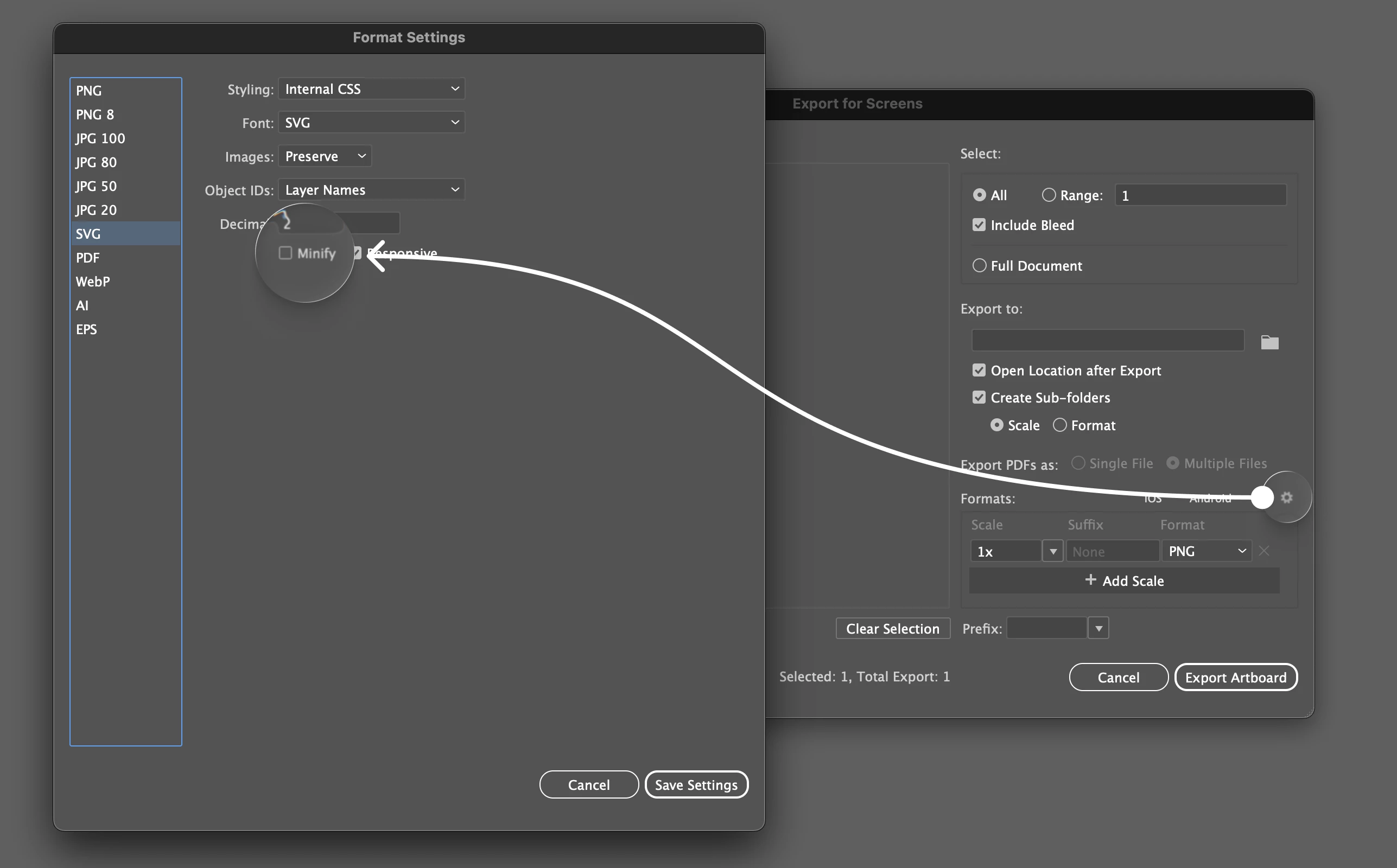
Adobe identified the root cause and now have a fix in place. The issue stems from a code change introduced in version 29.8.x and is not related to the recent SVG settings change. They also confirmed the exact repro: the issue occurs when the SVG “Minify” option is enabled.

They will be disabling the feature flag associated with this code change and will let us know once it’s complete. After the flag is turned off, you will need to restart the application and Copy/Paste with the Include SVG setting enabled to ensure it will work as expected.

You can find the setting under File > Export for Screens, and hit the little settings icon in that Dialog...go down to SVG and uncheck minify (until the fix has been fully rolled out by Adobe).


32 replies

Ioana_Ionescu
New Participant
December 10, 2025

I solved with  Preferences > Clipboard Handling> check Include SVG Code

Thank you so much! You’re a life saver.

tamasta
New Member
May 20, 2026

Any updates related to this issue? Just realize that copy → pasting workflows from Illustrator to figma are no longer working anymore (even with the solutions suggested above). It’s lil’ bit annoying for lazy person like me to do repeating a tasks (export as) individual objects/asset 😫.

Any update on this would be appreciated 🫰🏼