

Kenny_Grant
April 28, 2022
Solved

Figma colours don't match web/export

  • April 28, 2022
  • 15 replies
  • 9031 views

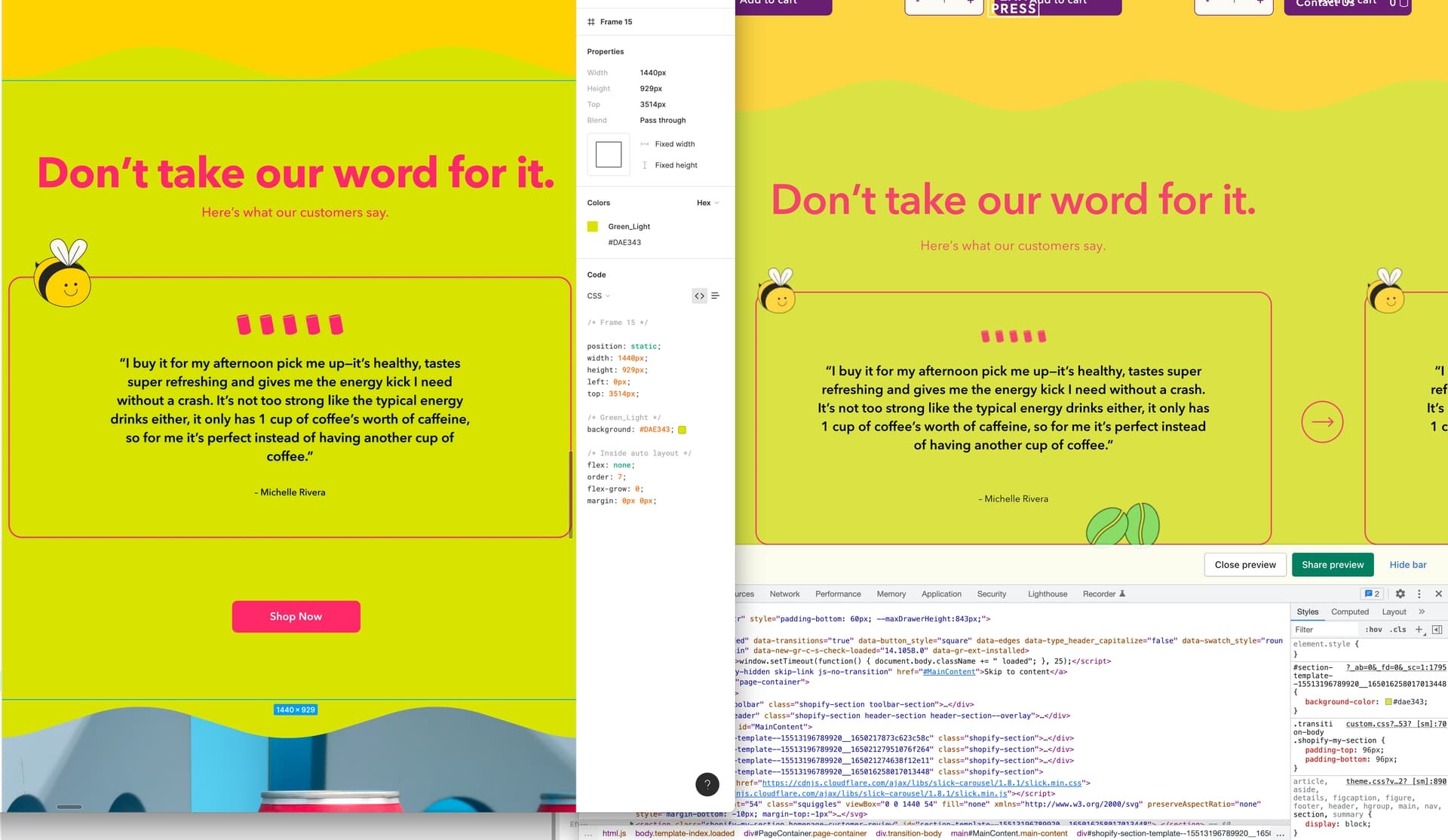
The designs within Figma are bright and pop, but after converting to HTML and using the same hex codes they look faded and washed out.

Is there a workaround? Is this related to color profiles?

Left shows Figma, right shows HTML. Note the background colours and fonts don’t look as bright

Help!! Just looking for the web to pop like the figma designs =)
This topic has been closed for replies.
Best answer by djv

Hey All, sorry for the lack of acknowledgement here!

This is a known issue our team is addressing, but we don’t have an exact ETA for a fix at the moment.

I’ve gone ahead and added this topic to our ongoing bug report for more visibility, while the team works on a fix…

The workaround here would be as @Brian_Saunders suggested. Change the color profile to sRGB. This should help make the on-screen appearance and the export match.

15 replies

Sam Stanford
New Member
April 10, 2025

This is a particularly annoying issue. I’m finding myself having to move away from Figma for various projects for this sole reason. Very frustrating!

Tim Sekiguchi
New Member
May 30, 2025

** bump **


2 years later…. How is this still an issue? Figma is design software, and a primary part of that is being able to see the right colors. Please ​@djv, make this a higher priority!

Magic Saga
New Member
May 31, 2025

I’ve run into this exact same problem before! The colors in Figma always look super vibrant, but once you move them into the browser, they lose that “pop.” It’s definitely related to color profiles — Figma uses sRGB, but depending on your monitor or browser settings, HTML/CSS colors can render differently. Also, Figma can sometimes simulate colors with blending and effects that don't translate 1:1 in code.

One trick that helped me was double-checking the contrast and saturation directly in the browser, and using richer colors or subtle shadows to bring back some of the vibrancy. Also worth checking your monitor calibration and making sure your browser isn’t doing any weird color management.

Would love to hear if anyone else found a solid fix for this!

Ethan Welner
New Participant
October 15, 2025

Same problem here. The same hex code inside figma renders a very visibly different color inside chrome, even on SRGB. Being able to match the color profile between apps or the operating system is table stakes for design software and I can’t believe Figma is dropping the ball here.

voqmvla
New Member
October 24, 2025

There’s an option to use Firefox instead of a desktop app or Chrome. When exporting, it preserves color accuracy and properly represents the DCI-P3 color gamut. I’m not entirely sure about the details, but it seems that Firefox can apply the OS ICC profile to the browser. That’s why I use Firefox whenever I need to work with Figma.
