

Kenny_Grant
April 28, 2022
Solved

Figma colours don't match web/export

  • April 28, 2022
  • 15 replies
  • 9031 views

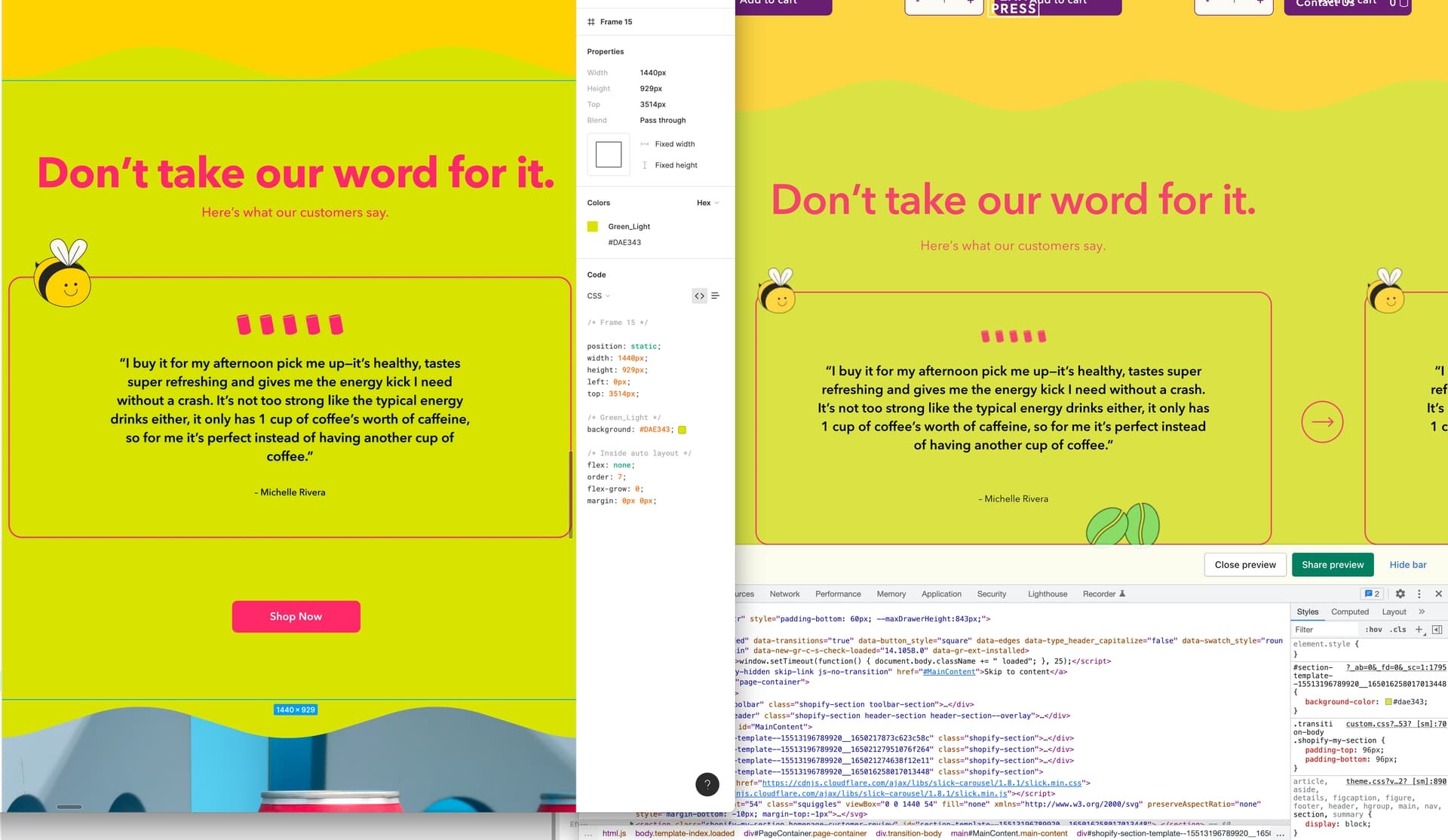
The designs within Figma are bright and pop, but after converting to HTML and using the same hex codes they look faded and washed out.

Is there a workaround? Is this related to color profiles?

Left shows Figma, right shows HTML. Note the background colours and fonts don’t look as bright

Help!! Just looking for the web to pop like the figma designs =)
This topic has been closed for replies.
Best answer by djv

Hey All, sorry for the lack of acknowledgement here!

This is a known issue our team is addressing, but we don’t have an exact ETA for a fix at the moment.

I’ve gone ahead and added this topic to our ongoing bug report for more visibility, while the team works on a fix…

The workaround here would be as @Brian_Saunders suggested. Change the color profile to sRGB. This should help make the on-screen appearance and the export match.

15 replies

Kenny_Grant
April 28, 2022

Dave18
August 14, 2022

Were you ever able to solve this? I am seeing the same issue.

Brian_Saunders
New Participant
August 14, 2022

Dave you may want to try switching to sRGB if you’re using the desktop app. Other than that, I think differences in color appearances are normal between browsers but I’m not very knowledgeable about such things.

Figma Help Center
David_Prati
November 10, 2022

Same issue here (whatever we’re in sRGB or Unmanaged in Figma)
Did anyone fix the issue?

We’re thinking about different hexa between figma and web, using tokens as common language

May 5, 2023

Anyone still wondering, I had this problem and I did screen grabs of how it appeared on Chrome and how it appeared in Figma, imported the images to illustrator and compared ink dropper values. Someone above said rgb might work better than hex and for ease of what illustrator offered, I got rgb values for how the colours appeared in figma and slotted those into css. Now the colours rendered on chrome are a much better match for how they look in Figma.

May 12, 2023

Same problem, except for me the colors are different inside figma as well. I am using an sRGB profile as well.

Ofir_K
July 17, 2024

Hi were you able to solve this problem? I am experiencing the same issue

djv
Figmate
djvSolution
Community Support
July 20, 2024

Hey All, sorry for the lack of acknowledgement here!

This is a known issue our team is addressing, but we don’t have an exact ETA for a fix at the moment.

I’ve gone ahead and added this topic to our ongoing bug report for more visibility, while the team works on a fix…

The workaround here would be as @Brian_Saunders suggested. Change the color profile to sRGB. This should help make the on-screen appearance and the export match.

Elena56
New Member
January 31, 2025

Any news on this? I have the same problem and the colour profile is already sRGB. It’s a problem if the colours in Figma don’t match the code. 

Rafael_Boiko
New Member
March 12, 2025

Same issue here
Did anyone fix the issue?
