Question

Export pdf: Is there a way to preserve the names of the layers?

  • September 28, 2023
  • 4 replies
  • 874 views

Randall_Li

I am sending a Figma PDF export to a print shop for board games. They want me to name the layer that I am using to cut the punch outs “dielines.”

Is there an extension/plugin that I could use to do this?

This topic has been closed for replies.

4 replies

Celine_
Figmate
  • Community Support
  • October 4, 2023

Hi Randall,
I’ve found this plugin that may help you to cut the “dielines” (here called “Crop Marks” : https://www.figma.com/community/plugin/874441781480244375/print-for-figma-cmyk-bleed-crop-marks-dpi). Otherwise, you can browse directly in the plugin community: https://www.figma.com/community - Hope it helps!


Randall_Li
  • Author
  • May 13, 2024

I am expanding the question here to include SVG’s.

I want to keep the names of the shapes and layers.

When I export an svg or pdf it has all the shapes/paths but not the names of the paths or shapes.


Randall_Li
  • Author
  • May 13, 2024

I figured out how to make SVG exports include their names.

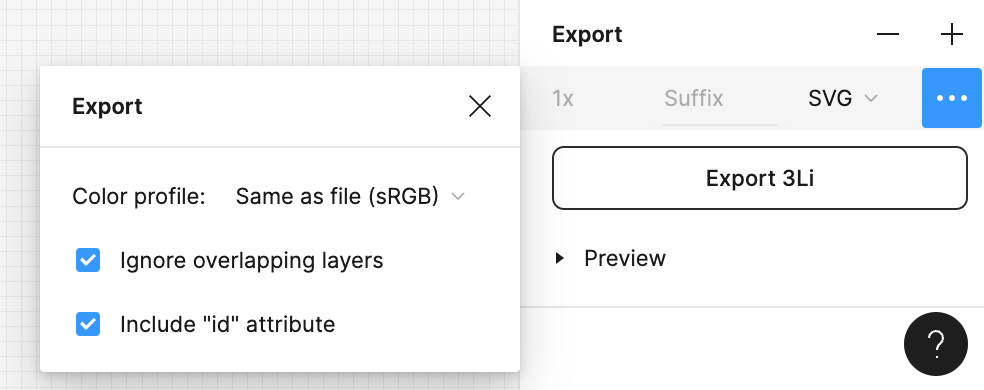
  1. Use the “…” menu when exporting the SVG.
  2. Select the “Include “id” attribute”.

If there are names in the file that are the same it appends “_2”, “_3” etc.
This is better than scrambled layer names which is what was happening before.

Ideally I would want the layers names to persist but will accept having to open them in inkscape to rename them again with the partially preserved names.

I found this solution only because of this other person’s question:


Randall_Li
  • Author
  • May 13, 2024

I am using this for exports that I plan on importing into Rive.

Looks like Rive docs have found the same fix that I just discovered.

rive.app

checking the box will preserve (some) of the names when you paste them into Rive.