

halkiona
June 30, 2023
Question

Drag direction up and down using variables and conditionals

  • June 30, 2023
  • 19 replies
  • 4929 views

Hi,

I’m trying to create a temperature picker and recent variables launch hugely simplified the process. I previously has to create a variant for each temperature. I just created a conditional to increase and decrease the temperature. However, I can still only drag the value in one direction only, in this case increase only.
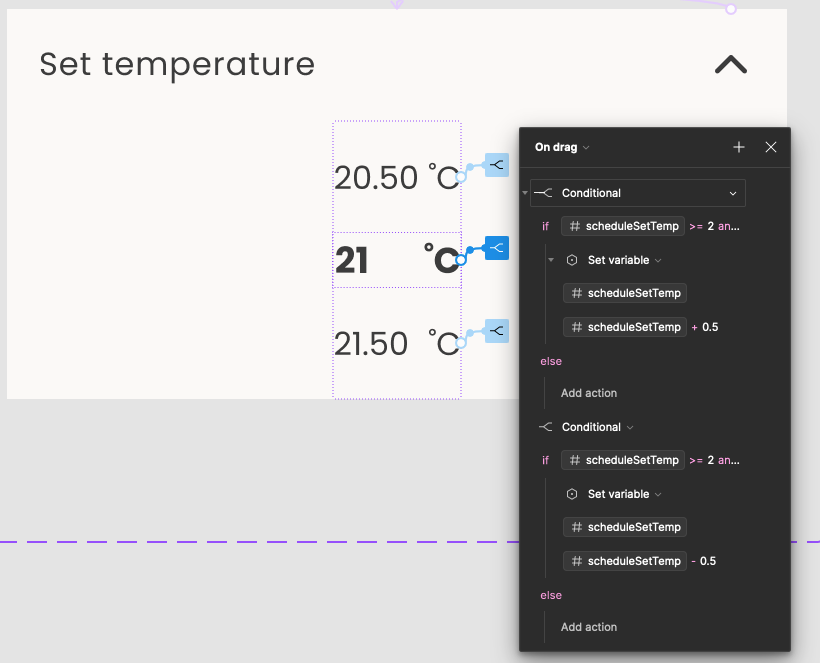
I added two drag interactions one for toggling the temperature up and one for toggling it down but the second one doesn’t work. Is there a way to set drag direction when using conditionals? If anyone has an idea, please let me know.

Thanks

This topic has been closed for replies.

19 replies

December 7, 2023

Man your prototypes were awesome. I was wondering if there is a away, even if it’s by using a gross workaround, to have decimals in a number variable?

tank666
December 7, 2023

Yes, you can create a number variable with a decimal value. Just enter a period or comma (for example, .25; ,5; 1.4; 2,8).

You can also enter a fraction (for example, 1/10, etc.) and Figma will convert it to a decimal value.

UX/UI designer. Figma expert. Creator and developer of plugins and widgets for Figma and FigJam. Check out my resources in Figma Community: figma.com/@tank
Amalia2
April 2, 2024

I’m trying to use this but for a clock, and changing hours when it gets to 12, for it to change from AM to PM.

So what if I want a range, I want 7 AM-7 PM, on drag. Minutes don’t matter for this. I followed a tutorial for it to all change after a delay but not on drag and tried to combine it with this and got lost. Happy to share my Figma file with you.

tank666
April 3, 2024

In this case, you need to create a couple more variables and add additional conditionals.

For example:
Additional variables:

  • amPM string type;
  • toggle boolean type.

Conditionals:

/*
  minHr = 1,
  maxHr = 12
*/

// minus variant
if (currentTime == maxHr - minHr && amPM == "AM") {
  Set toggle to True
}
if (currentTime == maxHr - minHr && amPM == "PM") {
  Set toggle to False
}

// plus variant
if (currentTime == maxHr && amPM == "AM") {
  Set toggle to True
}
if (currentTime == maxHr && amPM == "PM") {
  Set toggle to False
}

// default variant
// After delay 1ms
if (toggle) {
  Set amPM to "PM"
}
else {
  Set amPM to "AM"
}

As a result, you should end up with something like this:

UX/UI designer. Figma expert. Creator and developer of plugins and widgets for Figma and FigJam. Check out my resources in Figma Community: figma.com/@tank
Amalia2
April 3, 2024

Do you have a link to the file? I also want from 7 AM to 7 PM.

tank666
April 4, 2024

I’ve added a page with this example to the source file (post №4).

Direct link to the design file page:

Figma – 3 Jul 23

The wheel picker component example can be dragged in both directions with an infinite loop of values ​​1-12, and the starting value does not matter here. In any case, you can edit the variable values ​​yourself so that the prototype starts with the value you need.

UX/UI designer. Figma expert. Creator and developer of plugins and widgets for Figma and FigJam. Check out my resources in Figma Community: figma.com/@tank
Amalia2
April 4, 2024

Thank you! How do I make it so it doesn’t go around in a circle? Like I want it to stop at 7 when i scroll up and stop at 7 when i scroll down?

I want the numbers to be
7
8
9
10
11
12
1
2
3
4
5
6
7,

but not be continuous scroll in a endless circle. Like scroll up in one direction and scroll down in one direction, when it passes 12, it changes from AM to PM

When right now if I set the min time to 7 and max to 12, the scroll is
7
8
9
10
11
12
7
8
9…
etc, is there also a way to fix that?

tank666
April 5, 2024
UX/UI designer. Figma expert. Creator and developer of plugins and widgets for Figma and FigJam. Check out my resources in Figma Community: figma.com/@tank
May 9, 2024

Hey, So I am trying to create a similar but a bit different interaction. I am trying to make a weight scale such that if I drag the scale the number above changes with it. I have attached an image for reference. I tried giving number variable and increasing it as I drag the scale but the scale and number increases unevenly. How can I make it move together like with each line it increases 0.1