carlos.castrillo
March 14, 2024
Solved

Desktop app doesn´t work with the latest update 😢

  • March 14, 2024
  • 23 replies
  • 4334 views

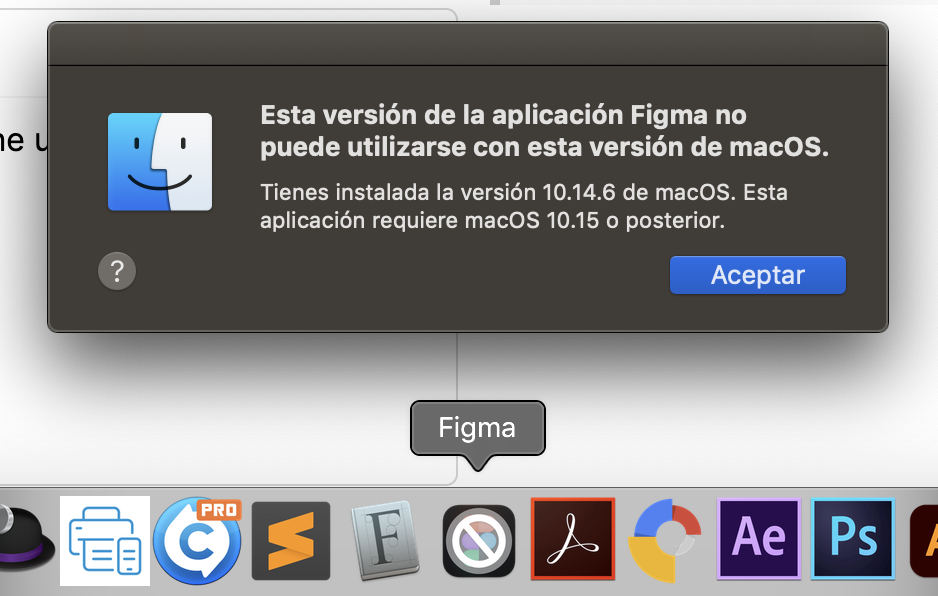
I’m sending you this ticket because since the last update of Figma, I can’t use the desktop application on my macOS with Mojave operating system, and I don’t want to update it to the next version.

Since I’ve been paying my subscription for years, I believe I have the right to have a desktop version of Figma that I can use from my work computer.

Please, I’m looking forward to your response to provide me with a solution.

Thanks a lot

This topic has been closed for replies.
Best answer by Celine_

Hey everyone, thanks for your feedback and apologies for any confusion with the notification!

We understand we could have communicated the end of support for your macOS version better and appreciate your feedback.

For reference, Figma only supports the latest version of the Figma app. A semi-automated process disables older versions of the app on a regular basis.

To clarify, the issue arises because our latest version, 124.7, requires macOS 11 or later. Since 12/18, all users on version 124.1 have been required to upgrade due to compatibility and support reasons.

For more details on the desktop app and the browser requirements, please check out our Help Center articles:
Guide to the Figma desktop app
What are the system requirements for Figma?

Minimum System Requirements:
On desktop app,

  • macOS: Must be running macOS 11 or later
  • Windows: Must be running Windows 10 or later in a 64-bit environment

On browser,

  • Chrome 99 or later
  • Firefox 101 or later
  • Safari 16 or later
  • Microsoft Edge 121 or later

We hope this clarifies the situation, and we appreciate your understanding!

23 replies

djv
Figmate
Community Support
August 1, 2024

Hey @kangrui_bee, sorry to hear this!

Which Windows OS version are you using and are you able to provide the version of the Figma app you have installed as well?

On Windows, to the left of the window controls, select the ⌄ icon. In that dropdown menu, select About Figma for the version number or Check for Updates… to see if there is a newer version.

Rocio_Landaveri
December 16, 2024

i also just lost the desktop app because of an old macOS 😦

i’m starting to dislike Figma i guess

Kristina_Hergottova
December 20, 2024

The same here. It’s very disappointing. One click that made me miserable.

apple_0408
December 20, 2024

Paid user~ Updated to the latest version and it stated " You can’t use this version of the application “Figma” with this version of macOS.

Having no alert or hint before the installation. This sounds ridiculous

Poggs
December 20, 2024

Same. For reasons, I can’t update the OS on my main MBP… had I known that was a requirement I of course wouldn’t have installed the Figma update.

I managed to get it working by completely uninstalling, then fresh-installing a previous version I found through Wayback:
https:// desktop [dot] Figma [dot] com / mac-universal / Figma-124.2.9 [dot] pkg

I don’t get why they wouldn’t warn that a newer OS is required for the update. I’ve just wasted 2 hours of my day trying to sort this out, in order to get the urgent work done today before the xmas break. Terrible timing!!

Mike101
December 20, 2024

If you can say this after someone’s updated your software, why not before? Come on! Do you think your customers like this type of stuff?

Mike101
December 20, 2024

This is totally unkind of Figma. Why not warn the users that the upgrade is coming, and tell them what requirements their systems will need to use it?

Domanique
December 20, 2024

Agreed! I’m no longer able to use the Figma desktop app because of this.

kasun1
December 20, 2024

Celine_
Figmate
Celine_Answer
Community Support
December 20, 2024

Hey everyone, thanks for your feedback and apologies for any confusion with the notification!

We understand we could have communicated the end of support for your macOS version better and appreciate your feedback.

For reference, Figma only supports the latest version of the Figma app. A semi-automated process disables older versions of the app on a regular basis.

To clarify, the issue arises because our latest version, 124.7, requires macOS 11 or later. Since 12/18, all users on version 124.1 have been required to upgrade due to compatibility and support reasons.

For more details on the desktop app and the browser requirements, please check out our Help Center articles:
Guide to the Figma desktop app
What are the system requirements for Figma?

Minimum System Requirements:
On desktop app,

  • macOS: Must be running macOS 11 or later
  • Windows: Must be running Windows 10 or later in a 64-bit environment

On browser,

  • Chrome 99 or later
  • Firefox 101 or later
  • Safari 16 or later
  • Microsoft Edge 121 or later

We hope this clarifies the situation, and we appreciate your understanding!