Asher2
New Member
May 4, 2024
Solved

Delete the contents inside the curated libraries

  • May 4, 2024
  • 23 replies
  • 1052 views

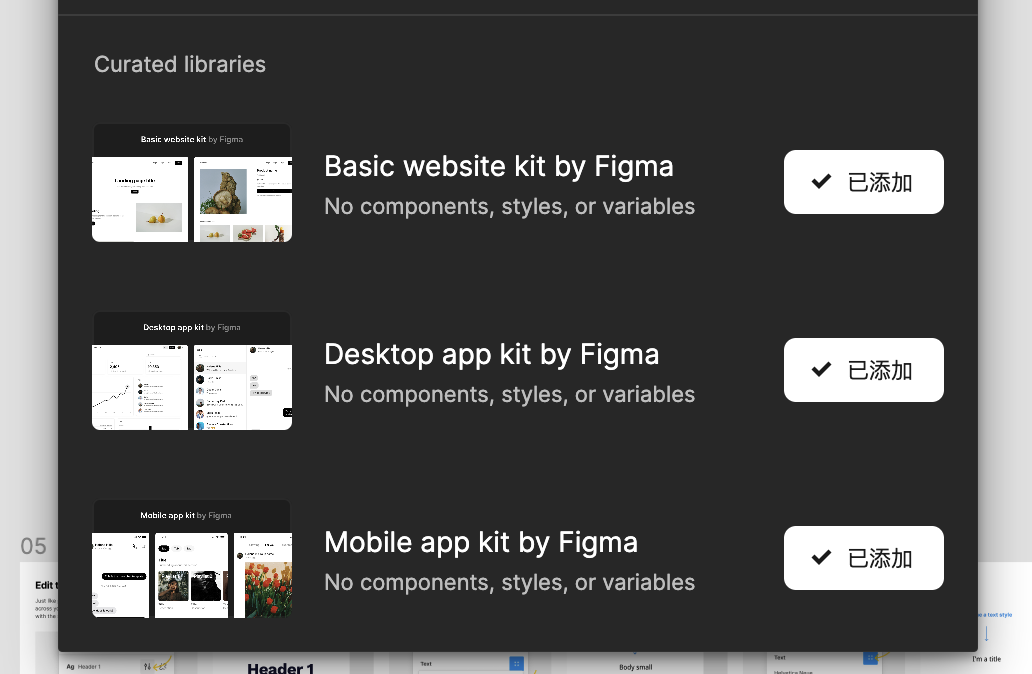
In all the design files, there are three default libraries in curated libraries. I don’t need them, but I can’t find anywhere to completely delete them. Does anyone know?

This topic has been closed for replies.
Best answer by ksn

Hi everyone - sending an update to address your questions/comments/concerns:

First: What are these libraries, and why are they showing up?

Curated Libraries are libraries made by Figma that contain basic building blocks and layouts. We’ve made these available by default in design files so that everyone has resources that enable them to get started faster.

And, just like other libraries, they can be removed or added back to files or at the team level if you’d like! You can even use these as a starting point to create your own custom library for your team.

You can remove these libraries on an individual file level by going into the libraries modal and clicking the button next to each library. For more information, please see this Help Center article.

If you are on a Pro plan, you can remove these libraries in your team’s settings, the same way you enable or disable libraries for your team. For more information, please see this Help Center article.

This is a new feature we’re testing and have only rolled out to a portion of people, so we really appreciate your feedback – feel free to drop additional comments here.

I hope this helps clarify – also want to take a moment to say thank you for your patience with me while I worked to get the correct info gathered.

23 replies

ksn
Figmate
Community Support
May 21, 2024

Also @Asher2 – haven’t forgotten about you. I’m working to get your case figured out. I’ll DM you once I know more on my end.

Asher2
Asher2Author
New Member
May 21, 2024

Okay, I will wait for your message.

Matt_Brett
May 21, 2024

Throwing my hat in the ring. These curated libraries just showed up for me and have been added to every file in my organization. I want to disable them immediately across the board to avoid confusion. How do I do this? Updating dozens of files manually isn’t a viable option.

Colin_Olphand
May 23, 2024

The audacity from Figma to add these to EVERY file, and especially under Org and Enterprise plans. You really think we’ll “kickstart our next design” with these cute mobile app mockups?

Lehel_Babos1
New Member
May 27, 2024

Facing the same issue – these libraries just showed up. No way to remove them across my team. It’s cluttering up the UI and causing confusion.

ksn
Figmate
ksnSolution
Community Support
May 28, 2024

Hi everyone - sending an update to address your questions/comments/concerns:

First: What are these libraries, and why are they showing up?

Curated Libraries are libraries made by Figma that contain basic building blocks and layouts. We’ve made these available by default in design files so that everyone has resources that enable them to get started faster.

And, just like other libraries, they can be removed or added back to files or at the team level if you’d like! You can even use these as a starting point to create your own custom library for your team.

You can remove these libraries on an individual file level by going into the libraries modal and clicking the button next to each library. For more information, please see this Help Center article.

If you are on a Pro plan, you can remove these libraries in your team’s settings, the same way you enable or disable libraries for your team. For more information, please see this Help Center article.

This is a new feature we’re testing and have only rolled out to a portion of people, so we really appreciate your feedback – feel free to drop additional comments here.

I hope this helps clarify – also want to take a moment to say thank you for your patience with me while I worked to get the correct info gathered.

Pattaya_Upara
May 29, 2024

Not allowing us to check it off from Setting > Libraries. you’d just grayed out the choice to take it off.

I, too, think I shouldn’t adopted this from Figma, this is so annoying.

June 5, 2024

I have no problem with the addition of new template files or libraries or what have you. I do take issue with having the curated libraries attached to every file I make. I logged this as a bug because I sincerely hope they didn’t intend this as a feature.

June 5, 2024

It should be possible to turn these off in the Settings panel no matter your plan level.

June 13, 2024

This is so unnecessary and confusing. We do have Figma community to use the resources like this. Please never do things like this in the future.
