
Alex_Stoian
New Participant
June 22, 2023
Solved

Create gradients from color library

  • June 22, 2023
  • 20 replies
  • 3458 views

After the new update we lost the ability to create gradients out of colors from a library. The only option available for gradients is the document colors picker:
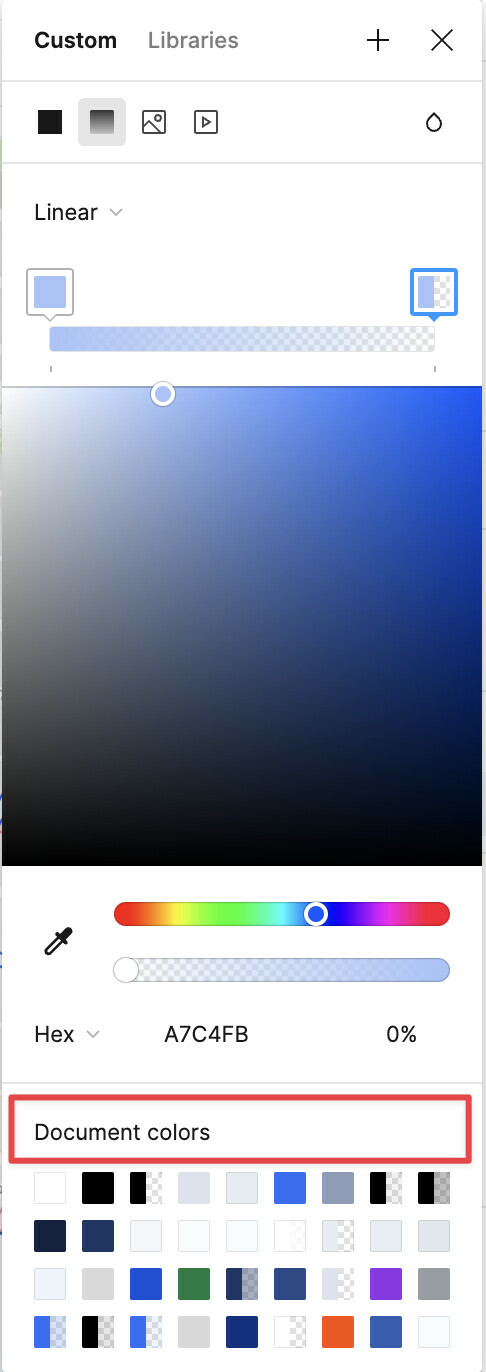
Am I missing something?

This topic has been closed for replies.
Best answer by efrat_kovach

Figma engineering team fixed this issue 🎉 Try refreshing Figma.

20 replies

Celine_
Figmate
Community Support
March 4, 2024

Hey @Jerod_Guillen ,
As efrat_kovach said, a fix has been deployed last year. Can you try to clear out your cache and force-quit to see if that helps?

Still, if you are still encountering the issue, please reach out directly to the support team with a quick video recording and your laptop specs: here
Our support team can investigate it further. Thank you!

July 18, 2024

@Celine_Figma I understand that a fix was deployed, I’m still running into the issue. I have done a hard reload yet the gradient color selector still does not show the colors saved in my library. Please see the screenshots and let me know if the team requires additional information for investigation.


VS

Celine_
Figmate
Community Support
July 18, 2024

Hey @Sara_Anees ,
Thanks for flagging this! Not sure where the issue may come from here 🤔
It would be great to investigate it further with a copy of your file. I’ve forwarded your issue to our support team, you should have received my message via your email linked to your Figma account (sdxxxxx15@gxxxl.com, your ticket is #1069746). Please also share to the support team any screenshot, include a link to the file, and share it with support-share@figma.com as an Editor so they can take a closer look. Thank you!

July 18, 2024

@Celine_Figma VS gradient color selector library

This is my first time commenting on a Figma forum - the system did not allow me to embed two images in a single post. And now I have to wait 8 minutes to post the follow up… 😕 not ideal.

Anthony19
New Participant
September 15, 2024

+1 Also have this issue. None of my colour styles are available in the gradient colour selection.

Stasiya_Bulavkina
November 8, 2024

same issue here as Anthony19.

Alex_Stoian
New Participant
November 8, 2024

Same issue as Anthony19 as well.

The library is only visible under “custom” which is frustrating for the Engineers who have to match the hex code to the color token

thrilly
November 20, 2024

@Celine_Figma – Seeing the same issue. This seems like a regression and I know what the issue is. Gradient panel will only show the color variable if it is scoped for all fills. Once I switched my scope to include all fills (even text), the variables appeared.

Hope this helps everyone!

Celine_
Figmate
Community Support
November 22, 2024

Hey all,
Thanks for the additional details! I’ve reported this details to our internal team.

We confirm this is expected, styles can’t be applied to gradient stops.

I’ve also passed along your feedback as a feature request to our team for future consideration. Thank you everyone for flagging it, and sorry again for the confusion!

thrilly
December 20, 2024

Thanks for the update! As a point of clarity, we’re not trying to apply styles to gradient stops—but rather trying to apply variables. Applying styles certainly wouldn’t make sense as it would lead to recursion (gradients styles applied within a gradient style). But variables can be added if the scopes are adjusted as I mentioned.