

Question

Code Connect not showing preview?

  • January 23, 2026
  • 8 replies
  • 117 views

Adam_Gordon

Hey all, I am finally getting round to trialing out Code Connect, Figma MCP and the like to see how it all works and if there are any noticeable benefits to these features for my wider team.

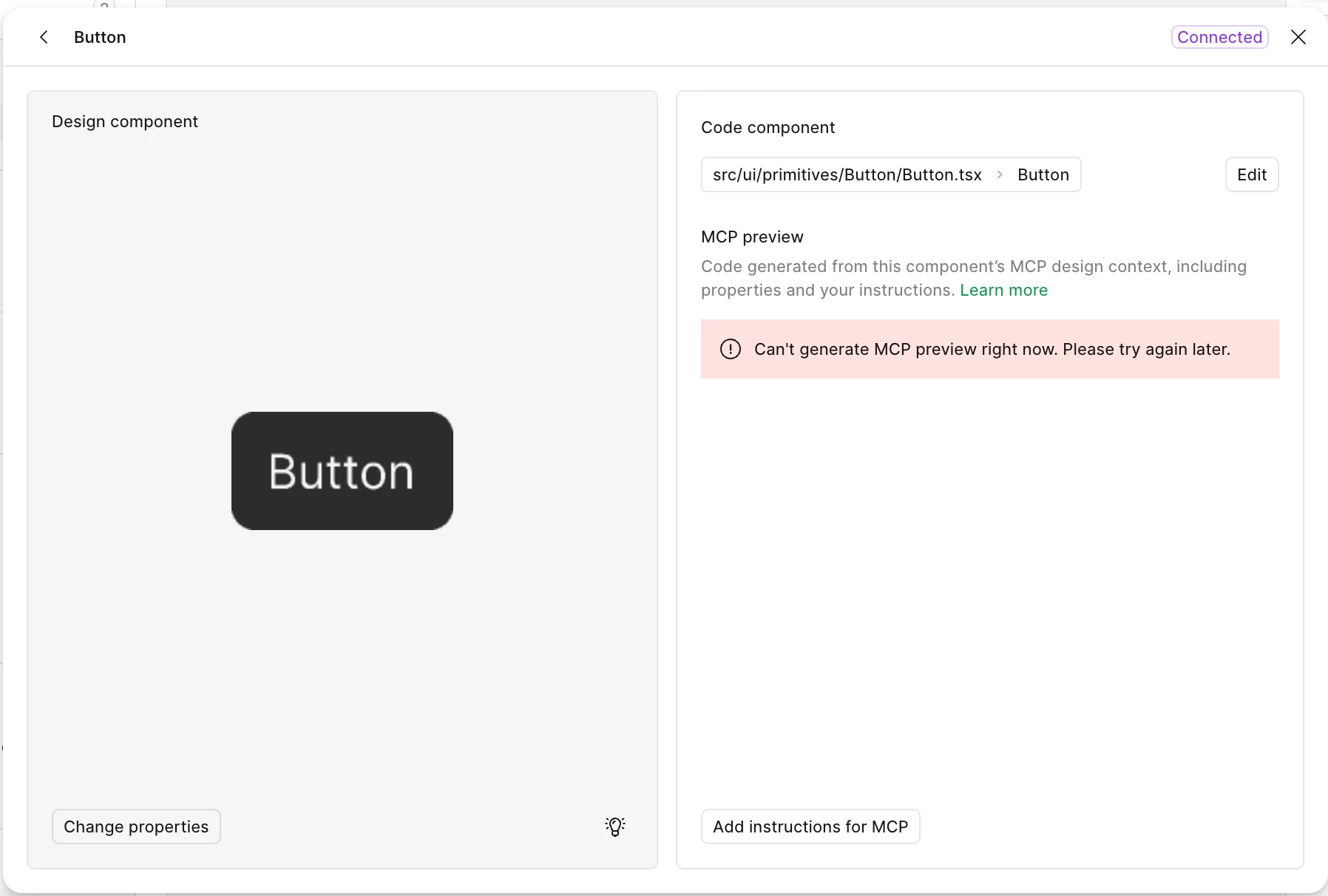
I had some issues initially setting up, but have finally gotten to the point where I can connect them to GitHub, for testing  purposes I am using the Figma Design System and corresponding coded components. However when connected, I get this error, and I am unsure how to fix it. Has anyone come across this before, and any advice on how to resolve? Thanks!


8 replies

vitdolb
  • New Member
  • January 28, 2026

Hi, I have the same issue - I’ve connected a simple badge component to a file in github. When I ask figma through the MCP in claude code via the selection, it can detect the connection successfully and says where the file is located


jeana.clark
  • New Member
  • January 30, 2026

I’m also experiencing the same thing


Nhan Do Thanh

I faced the same problem? anyone here can help us?


djv
Figmate
  • Community Support
  • February 11, 2026

Hey All, thanks for flagging this issue! 

I appreciate the detailed descriptions and the screenshots you’ve provided. With a few more details, I can try to pin point the issue and get you connected with our Technical quality team.

Can any of you confirm if the issue is happening only in the one file you’ve shared or for all of your files?


Lindsey_Drennan

I am having this same issue. I’m seeing any new components I try to connect it doesn’t show MCP preview. I paste the exact github component URL and nothing generates code wise. I noticed the components I originally connected using the manual code connect method in the codebase are coming through via MCP and showing the code preview.


djv
Figmate
  • Community Support
  • February 11, 2026

Thanks for chiming in here, ​@Lindsey_Drennan

As I mentioned above, with a few more details, I can help get you connected with our Technical quality team. Are you using the desktop or the remote MCP server? Is this issue happening in only this file or for all of your files?

If it’s only this file, are you able to share a URL link here and add support-share@figma.com as a Viewer to the file?


Lindsey_Drennan

@djv I just added them to my file! Yes it’s our component file, and you can take a look at content section components, tried connecting a good bit of them and nothing works except a few that I already initially connected before the structure change of how you can do code connect. https://www.figma.com/design/SLlE2j1LV7fGSiJF02JpEO/FDS-Website---Brand-Components?node-id=237-457&t=4voduupwjLIO6zXh-1


djv
Figmate
  • Community Support
  • February 12, 2026

Thanks, ​@Lindsey_Drennan

I’ve created ticket #1744234 on your behalf to connect you with our technical quality team. They’ll take a closer look at your file and follow up directly with you via email. 

If you have any further questions, please reply directly to support via email.