Clement_Bettini
June 5, 2021
Solved

Change Properties Variant Order

  • June 5, 2021
  • 22 replies
  • 12844 views

It would be great if we could put the properties in the order we want in the variants.

With drag and drop like layers.

Have a good day 🙂

This topic has been closed for replies.
Best answer by Marc30

OMG I am sooo glad to have found this out! It’s been driving my OCD nuts 🙂 It wasn’t easy to find.


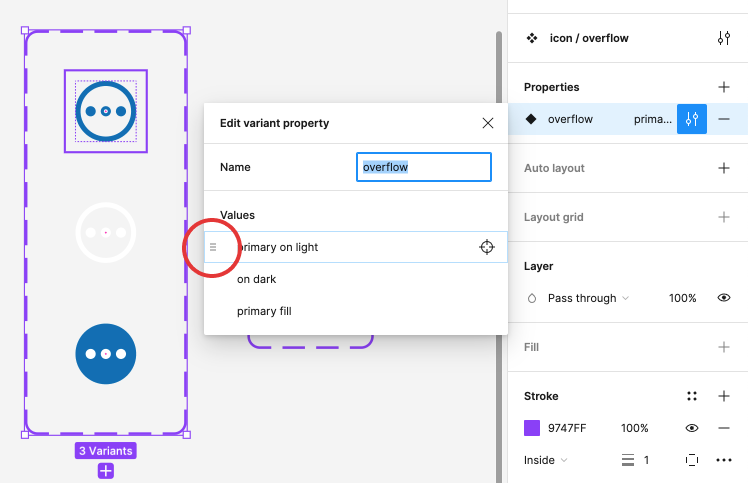
You have to hover your mouse over that little area on the left to get the hand icon to show up but then you can drag. It might be handy if the UI had the little “grips” visible all the time.

22 replies

y_toku
Figmate
Community Support
October 16, 2024

If I understand correctly, do you want to change the order like this one?

If you select the top layer of the component, I think you can reorder the properties.

Please let me know if I’m misunderstanding!

Thanks,
Toku

Giant_Du
November 13, 2024

Totally agree with you. 🙌

Dirk_Schiller1
New Member
December 5, 2024

Those “three” lines should be visible on each hover of the variants!

SomethingFishy
Active Member
December 5, 2024

For real! The number of hidden UI elements in Figma is ridiculous. How ironic that the UI on a UI-builder isn’t so great…

Figma is lipstick on a broken box layout where component interactions dissolve on contact with other pages.
MB_Tm
December 18, 2024

This has be driving me nuts!!!

It used to be there and easy to do…just the typical two line icon- “this thing is draggable/reorderable”

Now??? WHERE did it go?!

C’mon Figma designers…do better.

Vivien Schirk
New Member
February 3, 2025

Where did the functionality go? I really need to sort my properties :( 

Joey Madds
New Member
February 4, 2025

Where did the functionality go? I really need to sort my properties :( 

I found this thread for the same reason lol

Here’s the solution:

The drag icon for moving properties around only appears when you hover your cursor over it. Hover your cursor in the tiny margin between the property itself and the left hand edge of the toolbar. Your cursor will turn into a hand when you hover over it. From there you can click and drag to your heart’s content :D


To the devs/designers at Figma: This is not a good design, as its not obvious to newer users that properties can even be rearranged in the first place. Also, with the drag icon being so small, the mouse cursor is big enough to obscure it. The only reason I found it is because I noticed the .05 seconds that my mouse cursor changed into hand when I accidentally hovered over it.

Vivien Schirk
New Member
February 5, 2025

Where did the functionality go? I really need to sort my properties :( 

I found this thread for the same reason lol

Here’s the solution:

The drag icon for moving properties around only appears when you hover your cursor over it. Hover your cursor in the tiny margin between the property itself and the left hand edge of the toolbar. Your cursor will turn into a hand when you hover over it. From there you can click and drag to your heart’s content :D


To the devs/designers at Figma: This is not a good design, as its not obvious to newer users that properties can even be rearranged in the first place. Also, with the drag icon being so small, the mouse cursor is big enough to obscure it. The only reason I found it is because I noticed the .05 seconds that my mouse cursor changed into hand when I accidentally hovered over it.

This is totally insane! I've really tried everything, but how can you see the handle if the cursor completely covers it? 😅 Unfortunately, this really is a very poor user experience.

Thank you so much, that helps me so much! I would never have found this myself, even though I've tried everything and have been using Figma every day for many years.

nicnac147
New Member
March 4, 2025

Where did the functionality go? I really need to sort my properties :( 

I found this thread for the same reason lol

Here’s the solution:

The drag icon for moving properties around only appears when you hover your cursor over it. Hover your cursor in the tiny margin between the property itself and the left hand edge of the toolbar. Your cursor will turn into a hand when you hover over it. From there you can click and drag to your heart’s content :D


To the devs/designers at Figma: This is not a good design, as its not obvious to newer users that properties can even be rearranged in the first place. Also, with the drag icon being so small, the mouse cursor is big enough to obscure it. The only reason I found it is because I noticed the .05 seconds that my mouse cursor changed into hand when I accidentally hovered over it.

This is totally insane! I've really tried everything, but how can you see the handle if the cursor completely covers it? 😅 Unfortunately, this really is a very poor user experience.

Thank you so much, that helps me so much! I would never have found this myself, even though I've tried everything and have been using Figma every day for many years.

Thank you !!! Took me AGES to even find your answer because a lot of people talks about moving properties VALUES, but not the properties themselves. BTW it should remain 2 different threads, because I came here 3 times before finally scrolling all the way down to see this post.

As you so precisely mention, this is DEVILISH UI : let’s make a hidden element that appears when you hover over it BUT at the same time is smaller than the mouse cursor itself. hin hin 👹  Com’on Figma, we know you focus on design & development, but a little UX & Gestalt principles could help you here.

Eli_Fares
New Member
April 24, 2025

Is there a way to automatically order them A to Z?

If there are a lot of variants and you add more, it gets really annoying to click and drag the newest variant into the right order each time.