
April 10, 2021
Solved

Borders are not included in the size of frames

  • April 10, 2021
  • 22 replies
  • 14472 views

Adding, for example, 1px borders does not increase the size of the frame.
It makes designing websites where “box-sizing: border-box” just not accurate with how browser compute the width and height.
How do you go around this behavior ?
for me, I add extra 1px padding around the frame (I also have to be using auto-layout).

This topic has been closed for replies.
Best answer by Daniel_Cullinan

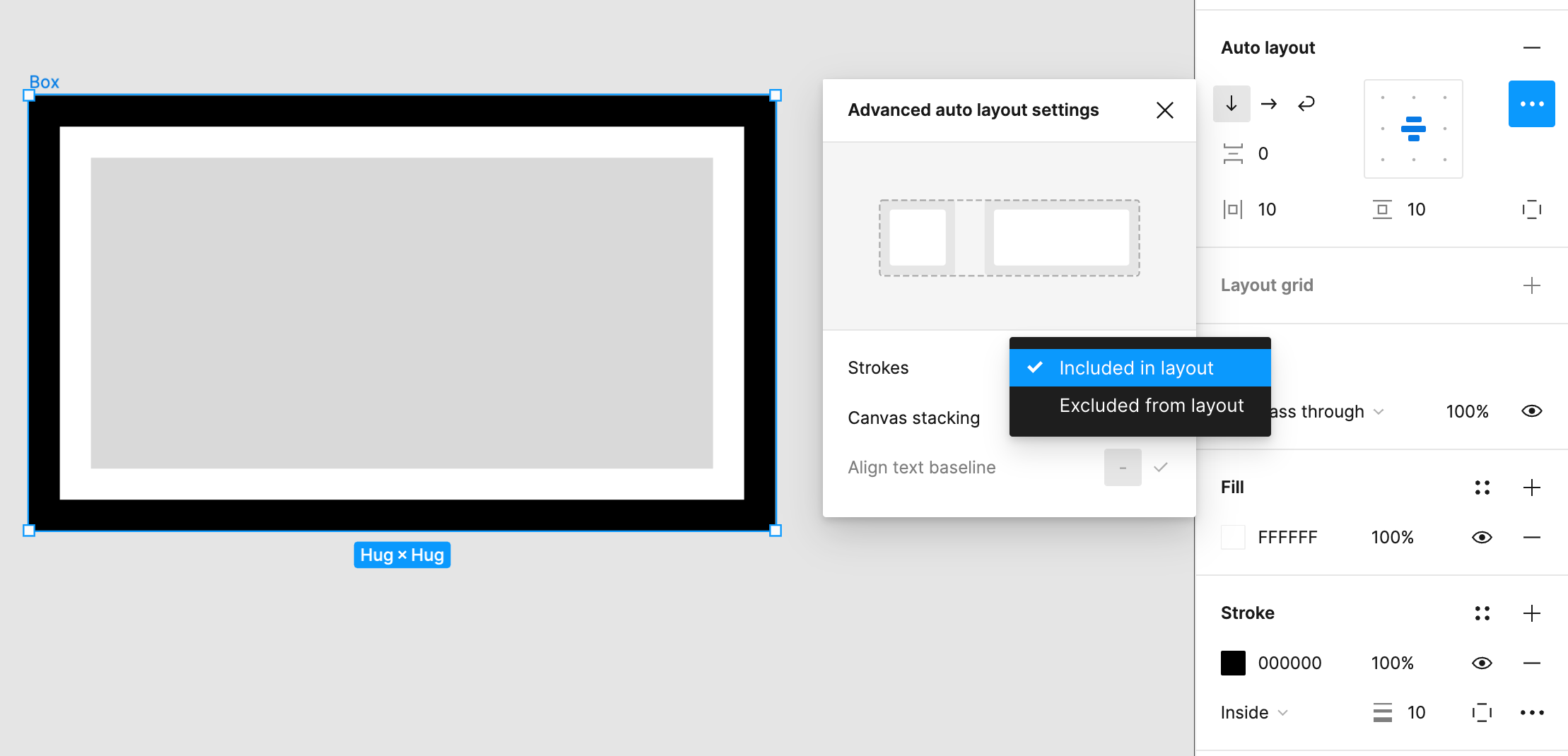
It works in Figma, you just need to choose 'Strokes: Included in layout" from the Auto layout options:

22 replies

MEEfO
May 4, 2022

It is truly bizarre that a browser-based design tool with a mission as Figma defines it does not give users the choice to calculate the size of elements based on content-box or border-box, at least in the inspect panel. This creates so many discrepancies between design and dev implementation, and gets flagged by QA.

Stranger still is that in some cases Figma seems to include the border when calculating distance, while other cases, no. It is arbitrary. For example, when viewing redlines in inspect, if you select a button and hover over the padding area of the button it will show 12px padding between the text object and the border. But if you hold CMD on Mac it will show 13px, thus calculating the border. This shows the application is capable of calculating border as part of a total value including padding. So why can they not do that with the height and width calculations?

Different developers work in different ways and depending on if they use hover, CMD + hover, or simply view the code snippet in the Inspect panel they may get different values for spacing. It’s indefensible.

Daniel_Cullinan
Active Member
May 10, 2022

Looks like this has finally been addressed in the new update with the ‘Strokes: Included in layout’ option 🙂

Michael_Hametner
New Participant
November 15, 2022

Is has to be set to inside for it wo work.
Not sure If I’m getting this option.

Marcio3
New Member
September 29, 2023

Where in Figma is this “Strokes: Included in layout” Option?

Marcio3
New Member
September 29, 2023

ps: Just found it (It’s in the auto layout options… I was looking in the Strokes options)

KHL
October 10, 2023

It would be great if Figma could incorporate this feature in the future. However, as of now, I guess the recommended approach for aligning the design between the designer and developer would be to utilize box-shadow instead of a border. This choice stems from the fact that using borders in Figma does not precisely match how CSS is rendered in web browsers. Of course, there are advantages and disadvantages to consider when opting for box-shadow over borders. Additionally, I’ve noticed that some developers use the box-sizing property as a workaround to ensure that their designs in Figma align properly.

Box-sizing

developer.mozilla.org
Daniel_Cullinan
Active Member
October 12, 2023

It works in Figma, you just need to choose 'Strokes: Included in layout" from the Auto layout options:

KHL
October 12, 2023

I appreciate the heads up, @Daniel_Cullinan. 🙏 I also noticed the “border-box” in the inspector window, so my mistake for not paying attention for that detail. It’s great to be on the same page with both the designer and developer. 🙌

Screenshot 2023-10-12 at 13.22.07

Boom_PT
October 24, 2023

Is there a way to turn it on by default?

May 14, 2024

Any update for this?