

Barnes_Alison_M
New Member
January 3, 2024
Question

Absolute Position with Horizontal Fill

  • January 3, 2024
  • 11 replies
  • 3663 views

The topic I am after was closed Absolute Positioning: Fill Horizontally. Starting a new thread in hopes something has changed.

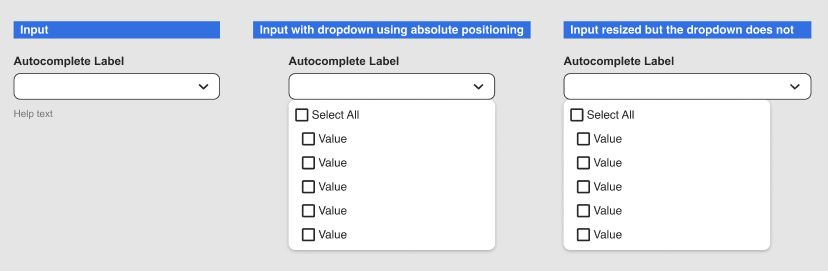
I have an input field component that I have a dropdown on, it’s placed with absolute position. The component needs to be responsive; the input itself resizes but the dropdown does not. The “fill container” option is removed from the dropdown when absolute positioning is applied to it.
Image below.
This topic has been closed for replies.

11 replies

Nate_G
Power Member
January 3, 2024

@Barnes_Alison_M When you set the dropdown to absolute positioning you should be able to adjust the width using constraints: “left and right”.

But you could also achieve the same responsiveness for the dropdown by just using auto-layout (fill-container) vs having it set to absolute positioning (see example file below).

Get Example File

Nate G
Barnes_Alison_M
New Member
January 18, 2024

@Nate_G
Mate!
You are a lifesaver! This is a HUGE help. The team of designers using the design system I try to help out on will be blown away.
(sorry I hit edit file by mistake lol)
Thank you so much 😃

May 19, 2024

Hi @Nate_G, Im late to the party I know! 🙂 but if you use auto complete and then use the component in an auto complete layout, lets say a form, when expanded the dropdown appearing moves the other elements down. That make sense? Not sure what the best way around this is? thanks

Nate_G
Power Member
May 20, 2024

@Kevin_Mitchell Set the master dropdown component’s height to the height of the dropdown field, then when you expand the dropdown’s options in an auto layout it will not push other elements down. But you’ll want to make sure that canvas stacking is set to “first on top”, that way the dropdown options will appear above the other elements in the auto-layout versus below (see video example).

Hope that helps!

Nate G
Ignat_Remizov
New Member
May 28, 2024

@Nate_G you are a super design wizard!! They need to put this tip right onto the Figma frontpage with credit :))))

Nate_G
Power Member
May 28, 2024

Glad it helped!

Nate G
June 2, 2024

Hi Nate thanks for this, did you set the list to absolute here? Thanks Kevin

Nate_G
Power Member
June 4, 2024

@Kevin_Mitchell I used the Auto-layout dropdown example from my previously shared figma file in the above video demo. But I could have also used the absolute position dropdown example in that file, the concept is the same.

Nate G
June 11, 2024

Yep nice one, i change mine to be auto complete. thanks again!

Chris_Seymour
August 5, 2024

OMG! This was doing my head in for ages. I didn’t think of changing the frame height to prevent the components below pushing down.