

andrey28tim
March 23, 2024
Solved

The mouse control has been changed

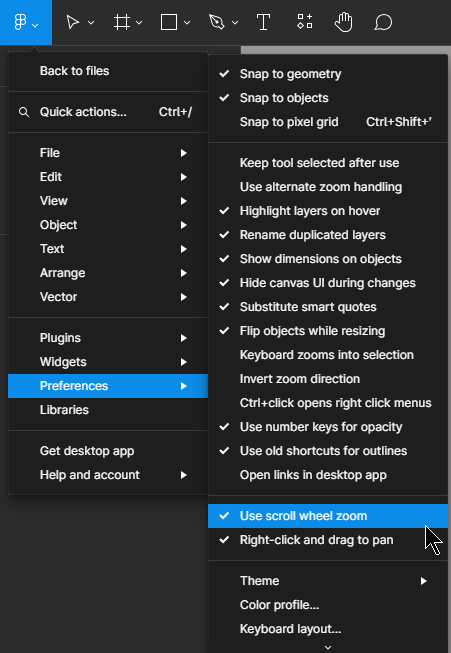
Recently, when I went into my Figma project, some kind of window appeared like “try a new mouse control”, where controlling the mouse wheel changes the scale (previously ctrl + mouse wheel). And now it gets in the way a little, I want to use the old option to change the scale (ctrl + mouse wheel), since now for a horizontal view (shift + mouse wheel) I often have to use a zoom change to consider any subject in the project. Guys how fix it? 🙂

This topic has been closed for replies.
tank666
tank666Solution
March 23, 2024


Main menu › Preferences › Use scroll wheel zoom.

Or use Quick actions.

UX/UI designer. Figma expert. Creator and developer of plugins and widgets for Figma and FigJam. Check out my resources in Figma Community: figma.com/@tank

1 reply

tank666
tank666Solution
March 23, 2024


Main menu › Preferences › Use scroll wheel zoom.

Or use Quick actions.

UX/UI designer. Figma expert. Creator and developer of plugins and widgets for Figma and FigJam. Check out my resources in Figma Community: figma.com/@tank