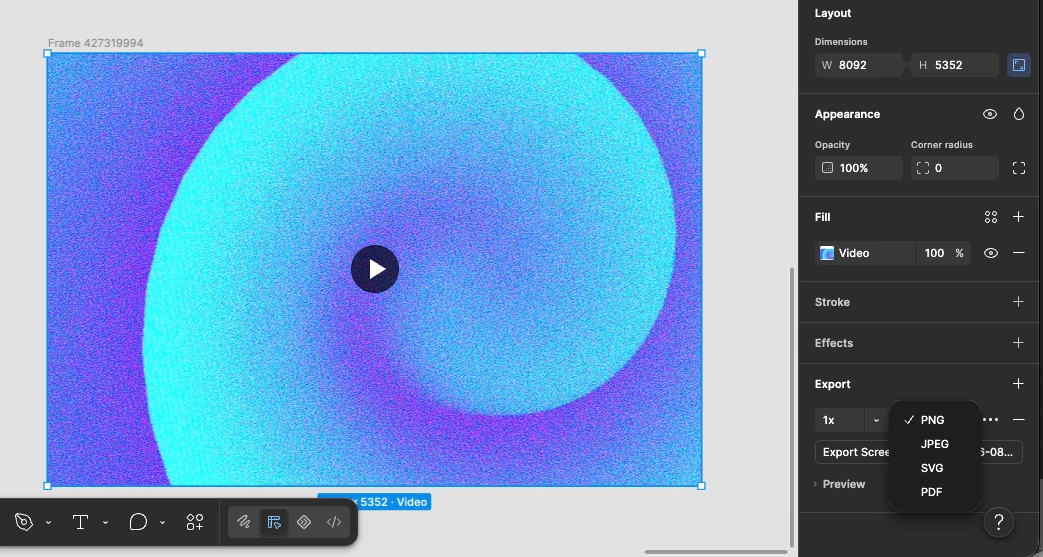
Video/GIF Export for Animated Frames
Problem:
When a Figma frame contains a video, GIF, or prototype animation, exporting it as PNG/JPG loses the motion. Currently, designers often need to use external tools or screen-record the prototype.
Suggested feature:
When a frame contains video, GIF, or animated interactions, add MP4 and GIF as export formats.
Export options:
- PNG
- JPG
- SVG
- MP4 🎬
- GIF 🔄
Suggested UX
When clicking Export, Figma could automatically detect whether the frame contains animated content.
Export as:
○ PNG
○ JPG
○ SVG
○ MP4
○ GIF
For MP4/GIF, provide:
- Duration: Entire prototype / Custom
- Resolution: 1× / 2× / 3×
- Frame rate: 24 / 30 / 60 FPS
- GIF: Loop / Play once
- MP4: Include audio / mute
⭐ Extra opportunity
A particularly useful option would be:
“Export prototype flow as video”
Instead of exporting just one frame, designers could select a prototype starting point and Figma would record the entire interaction flow as an MP4/GIF.
That would be extremely useful for portfolio case studies, presentations, social media, design reviews, and developer handoffs.