

Neil7
New Participant
August 24, 2023

Variables menu to support display long variable names

  • August 24, 2023
  • 13 replies
  • 1400 views

We are transferring design token names to variables in Figma.

Token names are by necessity quite long (they cannot be shortened without losing meaning).

Examples:

dimension-action-padding-vertical-with-label-l
dimension-action-padding-horizontal-with-label-l
dimension-action-padding-gap-with-label-l

When I click into an input field eg. auto-layout/vertical spacing I cannot differentiate the variable names in the list because the window is not rescalable. See image.
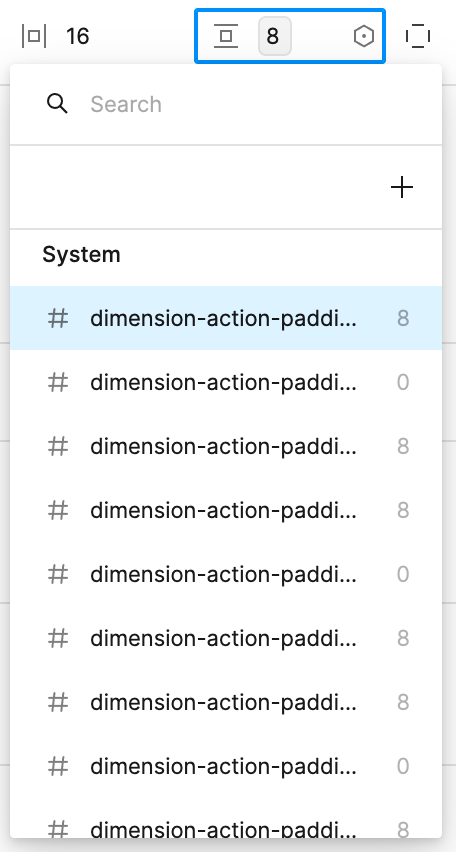
I need to be able to see the full names. Preferably immediately without needing to hover over each item in the list.

Thanks keep up the exciting work on variables guys and girls!

13 replies

Katrina2
New Participant
August 29, 2024

With the latest Figma update, the right side panel can now be adjusted in its width. Which is nice 🙂 It would still be great, if the width could be increased even further. Long component token names are still being cropped.

But worse: The window for searching variables (screenshot left side) is by far too small. The part of the token name, which differentiates the tokens from another, is being cropped. It’s a guessing game which component token to pick.

Please Figma, improve the search for long variable names. 🙏

Bobby_Davis
New Participant
August 15, 2025

Can’t believe this one hasn’t been remedied yet. Still waiting and hoping…

(truncated in the panel below: sds/semantic/color/interactive/background/primary/)


That was done just for illustrative purposes. In our actual design system’s variables/styles/tokens library, what we’ve done as a workaround is to truncate the first few levels of all tokens. In this case, for semantic colors we’ve decided to truncate “sds/semantic/color”… leaving only “interactive/background/primary” visible for end-users.

Not ideal, as our devs have to create and maintain transforms to sync Figma and code.

Can we somehow make the flyout panels resizable? Or, have them wider when long variable names are present, maybe up to a max-width, but then wrap the long variable string? I don’t love wrapping, but it’s better than truncation.

And yes, I know there is a tooltip now on hover…


… but we’ve learned though user testing that this is not a good solution for our end-users either. It’s cumbersome and prevents quick scanning. We learned that people aren’t using the search function much at all, and most rely on visual scanning of the list.

Luciano Picozzi
New Member
March 4, 2026

Dear Figma,

Great that the side panel can be made more wide. However the popover for the variable list is still too narrow. This has been an issue for years. Are there any plans to do something about it in the near future? 

Regards,

Luciano (Air France–KLM)