
Catherine_Desrochers
New Participant
September 27, 2023

There should be an option to prevent interaction overlap between layers above and behind

  • September 27, 2023
  • 11 replies
  • 2245 views

The gif below should be self-explanatory about the issue
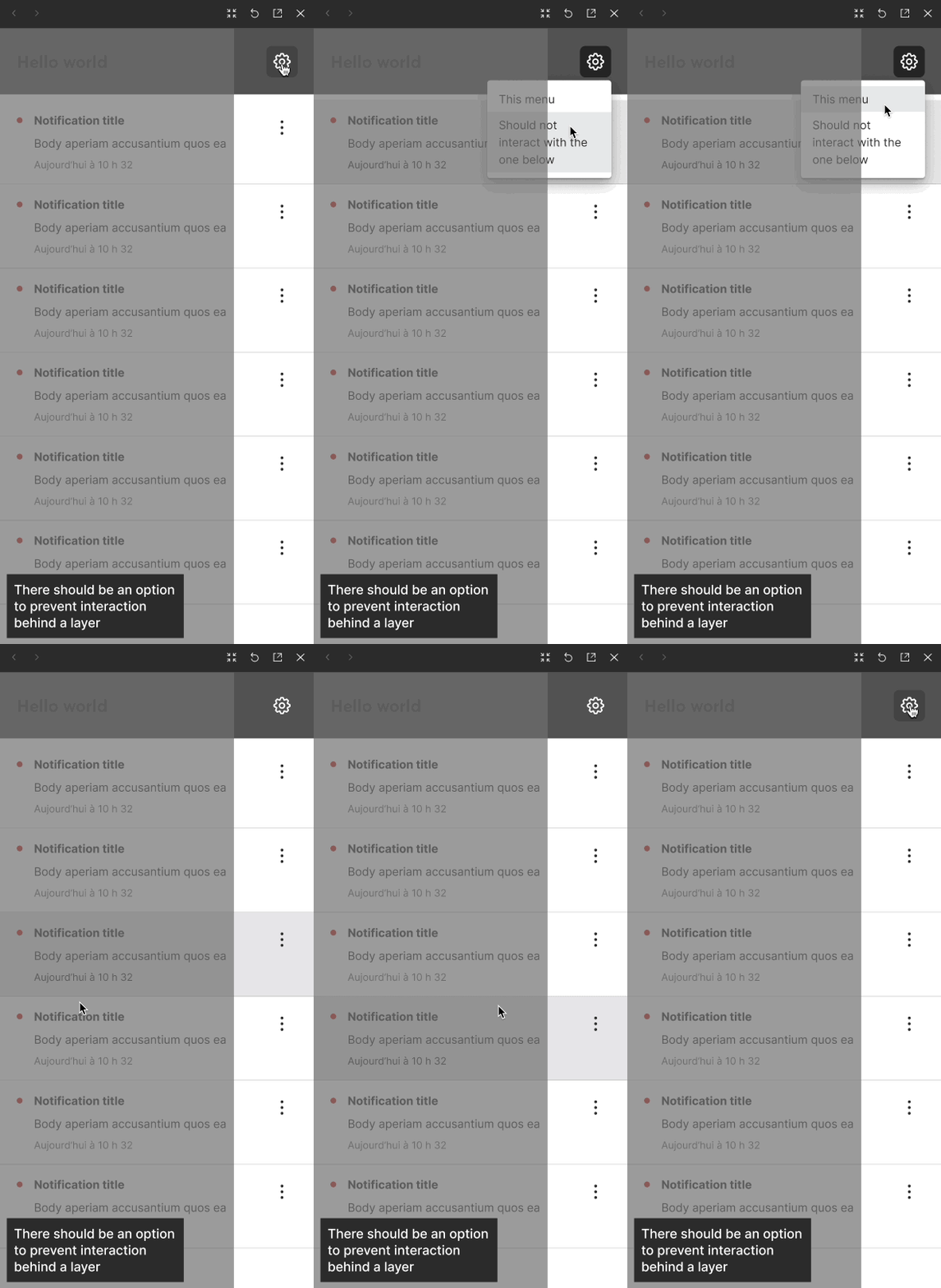
Enregistrement d’écran, le 2023-09-27 à 13.33.04.2023-09-27 13_35_47

11 replies

Valtrip
October 20, 2023

I’m facing the exact same issue right now and can’t find a solution to it.

Must-have!

Bauke_Schildt
Active Member
October 20, 2023

In your example, you could use the “open overlay” interaction.


(Sorry for the crude mockup)

Screenshot 2023-10-20 at 10.55.13

Mine opens On Click, but you can also have it open after a delay of 1ms on the frame.

The overlay option prevents any interaction with the original frame.

Catherine_Desrochers
New Participant
October 20, 2023

Indeed, it is a great solution for some use cases. But it remain an unwanted behaviour. I have multiple cases that comes in my mind to illustrate it ; for my screen capture, clicking on the three dots also open a menu that interact with the layers below.

I wonder if an overlay for absolutely everything is a great idea, especially since overlay positioning can be a little of a mess. I see these dropdown menus as variants than a link to an overlay.

Adding a simple checkbox to specify that we don’t want below interaction to interfere with a layer would be a good idea.

Bauke_Schildt
Active Member
October 20, 2023

Oh, agreed, it’s an issue I’ve come across as well. There’s a bug in Presentation/Prototype mode where, if you follow someone going through the prototype and they open an overlay, sometimes you won’t see them opening the overlay. So we sometimes build our prototypes without Overlays to avoid that issue.

Catherine_Desrochers
New Participant
October 20, 2023

Regarding this issue, @Bauke_Schildt , submitting a bug to Figma may be not that intuitive, but once you are in the loop with them, they are quite proactive!n 🙂

Bauke_Schildt
Active Member
October 20, 2023

You’re right, I should submit that as a bug. 🙂

robwrch
October 30, 2024

I have the exact same issue

Erik_van_der_Neut
New Member
April 21, 2025

This bug is seriously SO ANNOYING! Pulling my hair out on this one. How to work around this now in a complicated prototype. Just infuriating that this does not work properly.

Xavier_Godbout
New Member
December 8, 2025

2 years in and nothing has changed….

Hatim Dossaji
New Member
December 9, 2025

We need a “on mouse enter” disable interactions below. So on any dropdown, layers below would not interact all the while the drop down itself has all the required interactions (hover, click, etc)
